

dublove
Legend
June 15, 2026
Question

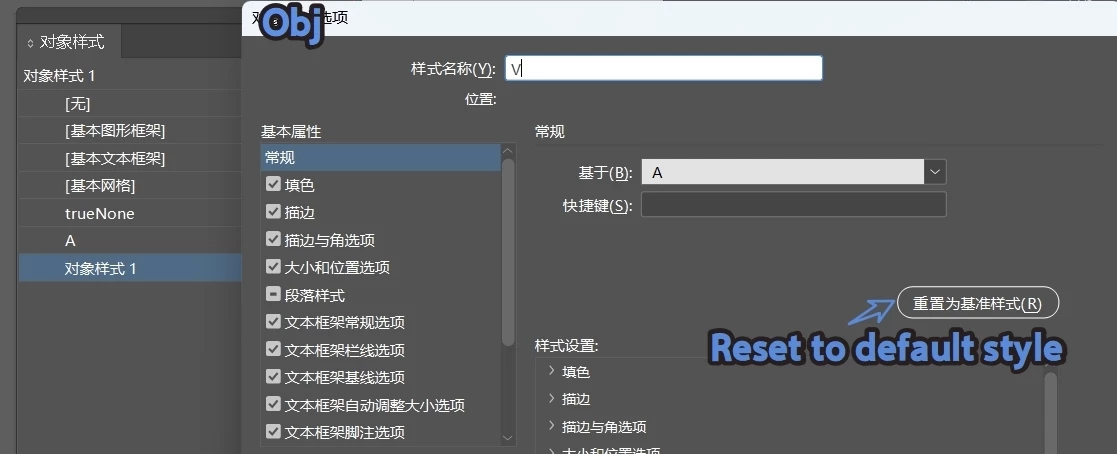
How do I write the code for “reset to base style” in object styles?

  • June 15, 2026
  • 2 replies
  • 21 views


Style B was created based on Style A (using `baseOn`), but sometimes it doesn’t inherit Style A’s original options. I need to reset Style B’s base options and then set Style B’s other options.

How do I write the code for “reset to base style”?
It seems I couldn’t find a way to do this before, so I ended up using `duplicate();` as a workaround.
 

    2 replies

    dublove
    dubloveAuthor
    Legend
    June 16, 2026

    I actually asked about this before… I didn’t pay attention at the time, so I might have missed it.
    I just found it—it’s fixed in ​@m1b .
    I was wondering why the script didn’t have this feature.

    https://community.adobe.com/questions-671/the-basedon-property-of-the-object-style-has-been-read-but-why-isn-t-it-actually-working-8977

    rob day
    Community Expert
    Community Expert
    June 15, 2026

    Try getting the A and B styles then reset the B style’s properties to the based on A style


    //get the A object style
    var A = app.documents[0].objectStyles.itemByName("A");
    //get the B object style that is based on A
    var B = app.documents[0].objectStyles.itemByName("B");
    //reset the B object style’s properties to A’s properties
    B.properties = A.properties


    The A and B style


    The B style after running the script


    dublove
    dubloveAuthor
    Legend
    June 16, 2026

    Hi ​@rob day 

    Isn't there any code to reset the styles to the default ones?
    Is the only option to use `B.properties = A.properties`?


    It has to be set up this way for it to work, but I can’t help feeling something’s off.

    B.properties = A.properties;
    B.basedOn = A;

    For example, when based on another style, it doesn’t update the “new settings” (e.g., B based on A); it only updates the “old options.”
    Later, when A gains new settings, B’s style doesn’t update automatically—this is different from paragraph styles.

    dublove
    dubloveAuthor
    Legend
    June 16, 2026

    Hi ​@rob day  ​@m1b 

    This code will cause an error when style A is in a group.
    style.properties = baseStyle.properties;
    This will cause the name of “A” to be changed to “trueNone”.

    It works normally when the style is not in a group.

    (Attachments included)

    /** Reset Object Style.js
    * Equivalent of clicking the "Reset To Base" button in the Object Style Options dialog box.
    *reset the style to its base style
    * @author m1b
    * @version 2025-10-09
    * @discussion https://community.adobe.com/t5/indesign-discussions/how-to-create-new-object-styles-based-on-really-quot-none-quot-object-using-scripts/m-p/15412503
    **/

    function main() {
    var doc = app.activeDocument;
    co = app.documents[0].objectStyleGroups.itemByName("myGroup").objectStyles.itemByName("A");
    resetObjectStyle(co);
    };

    //app.doScript(main, ScriptLanguage.JAVASCRIPT, undefined, UndoModes.ENTIRE_SCRIPT, 'Reset Object Style');
    main();

    /** Resets the object style to its base style.
    * @param {ObjectStyle} style - the style to reset.
    */
    function resetObjectStyle(style) {
    var baseStyle = style.basedOn;
    if (!baseStyle.isValid)
    return alert('Object style cannot be reset due to missing base style.');
    style.properties = baseStyle.properties;
    style.contentEffectsEnablingSettings.properties = baseStyle.contentEffectsEnablingSettings.properties;
    style.objectEffectsEnablingSettings.properties = baseStyle.objectEffectsEnablingSettings.properties;
    style.basedOn = baseStyle;
    }