Inspiring
June 25, 2025
Question

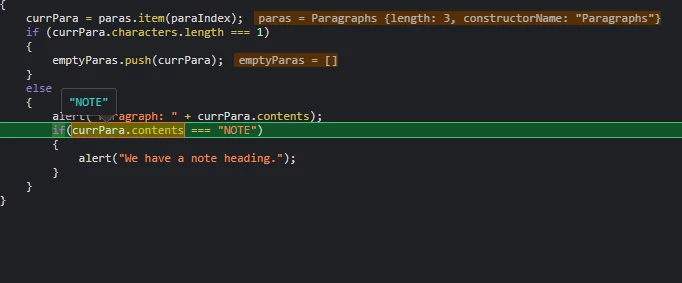
How do you compare a paragraph's contents to a string?

  • June 25, 2025
  • 3 replies
  • 654 views

Seems simple, right? And yet this doesn't work (you can see the debugger showing that the contents are "NOTE"), even when I use the more-permissive "==" comparison:

 

3 replies

Peter Kahrel
Community Expert
Community Expert
June 25, 2025

Try == instead of ===

Kasyan Servetsky
Legend
June 25, 2025

@Peter Kahrel He tried this and it didn't work: see the OP.

Peter Kahrel
Community Expert
Community Expert
June 25, 2025

Oops

Kasyan Servetsky
Legend
June 25, 2025

It's not as simple as it seems! 🙂

InDesign text may contain and, in most cases, does contain special (hidden) characters like anchored objects, indexes, xrefs, etc.

To handle them effectively by script, I wrote a couple of functions and posted them here.

Inspiring
June 25, 2025

Thanks! Can't access that site, though. It times out.


Also, you'd think an API to a word-processing application would anticipate the need to compare strings. Especially if I ask for a word.

brian_p_dts
Community Expert
Community Expert
June 25, 2025

You can test a regular expression against the contents:


/note/gi.test(myPara.contents)

brian_p_dts
Community Expert
Community Expert
June 25, 2025

Your paragraph also likely will have a return character \r in it too. Debug by inspecting currPara.contents with an extra quote around it. Be curious as to why behavior you would expect doesn't turn out to be true.

Inspiring
June 25, 2025

Thanks for the reply. Yes, I suspected that it included the return character, and proved that was true by printing the character count (5). But then I tried comparing the first word to the string, and that also failed. So it's not clear what entity will match a string in quotes.


A Web search on the issue turns up nothing but wrong examples.