
Inspiring
May 5, 2025
Question

How do you create a section name (or any variable that changes by section)?

  • May 5, 2025
  • 2 replies
  • 3208 views

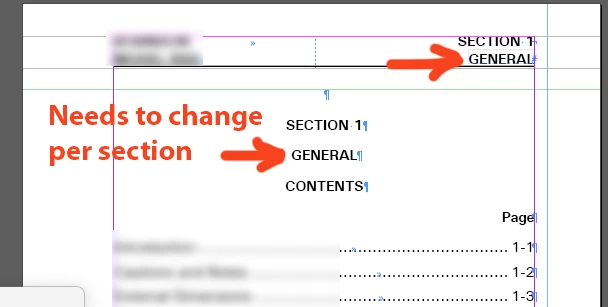
It seems pretty common to have a name for each section of a document, but I can't find any way to specify a variable whose value can change by section. How does one do this?
 

2 replies

Robert at ID-Tasker
Legend
May 5, 2025

@Thomas_Calvin


Running Header with contents of the Paragraph / Character Style?


Inspiring
May 5, 2025

Thanks, but I don't know what Adobe means by "running header" in this application. The documentation doesn't mention a specific header or footer; but rather it depicts setting up those areas on a master page (which makes sense). Then, of course, they're "running" because they're on a master page.

Robert at ID-Tasker
Legend
May 5, 2025

@Thomas_Calvin


You need to create a new Text Variable -> Running Header.


jmlevy
Community Expert
Community Expert
May 5, 2025

First, you need to create a “section mark”:

Then, in a text frame, right click:

Inspiring
May 5, 2025

Thanks! But I already have a "section mark," which is the number "1" that you see in the screen shot after the word "section." There doesn't seem to be any "section number" marker built in. Or am I overlooking it?

jmlevy
Community Expert
Community Expert
May 5, 2025

I didn't realize that you have already setup a section mark. So, I think that the only solution would be to use a custom text variable.