

dublove
Legend
July 31, 2025
Answered

How do you determine the initial reference when controlling a chart using visibleBounds?

  • July 31, 2025
  • 2 replies
  • 259 views

I used:

var sel = app.documents[0].selection;
sel[j].visibleBounds = [sb[0], lcb, sb[2], rcb];

to control two charts.


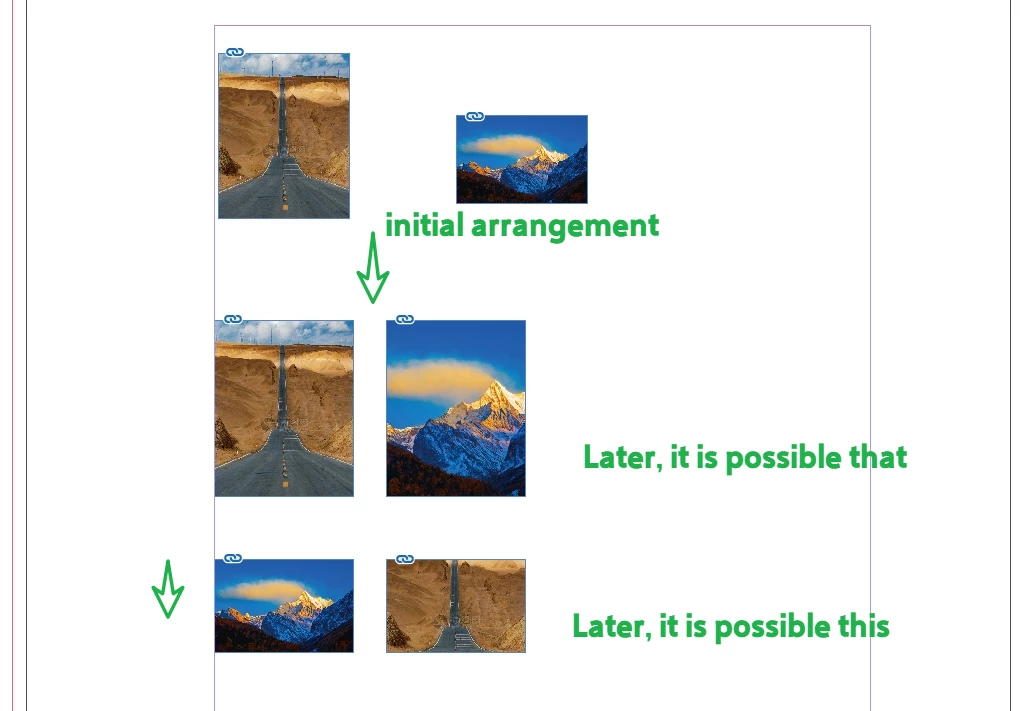
I noticed that sometimes 00001 is placed at the front, and its height is used as the standard for changes.


But sometimes 00002 is placed at the front, and its height is used as the reference.

These are not based on which one was originally at the front, but seem to be based on the order of the filenames 00001 and 00002.


Is this random? It doesn't seem so.

How to ensure that the initial top-ranked item remains the standard reference and continues to rank first.

 That is, make it sb[0].
 

Correct answer m1b

Hi @dublove the selection is an Array, which you can sort.

/**
* Example of sorting frames by position on the page.
*
* @author m1b
* @version 2025-07-31
* @discussion https://community.adobe.com/t5/indesign-discussions/how-do-you-determine-the-initial-reference-when-controlling-a-chart-using-visiblebounds/m-p/15437423
*/
(function () {

    var doc = app.activeDocument;

    // now we have an Array of selected page items
    var frames = doc.selection;

    // we have an array
    alert('frames constructor name is "' + frames.constructor.name + '".');

    if (0 === frames.length)
        return alert('Please select some frames and try again.');

    // sort the frame by left-right/top-bottom on the page
    frames.sort(function (a, b) {

        var aBounds = a.visibleBounds;
        var bBounds = b.visibleBounds;

        // compare the left edges
        if (aBounds[1] < bBounds[1])
            // a is left of b
            return -1;

        else if (aBounds[1] > bBounds[1])
            // a is right of b
            return 1;

        else
            // at the same horizontal position, so compare top edges
            return aBounds[0] - bBounds[0];

    });

    // so now we know that frames[0] is above frames[1]

    // just for demonstration!
    frames[0].remove();

})();

2 replies

m1b
Community Expert
Community Expert
July 31, 2025

Hi @dublove I think you need to sort the array of graphics (or frames) based on their position on the page. Here is an example showing the Array.sort method at work:

/**
* Example of sorting graphics by position on the page.
*
* @author m1b
* @version 2025-07-31
* @discussion https://community.adobe.com/t5/indesign-discussions/how-do-you-determine-the-initial-reference-when-controlling-a-chart-using-visiblebounds/m-p/15437423
*/
(function () {

    var doc = app.activeDocument;
    var graphics = [doc.allGraphics[0], doc.allGraphics[1]];

    // sort the graphics by their frame's position on the page
    graphics.sort(function (a, b) {

        // we want the graphic's parent frame's bounds
        var aBounds = a.parent.visibleBounds;
        var bBounds = b.parent.visibleBounds;

        // compare the left edges
        if (aBounds[1] < bBounds[1])
            // a is left of b
            return -1;

        else if (aBounds[1] > bBounds[1])
            // a is right of b
            return 1;

        else
            // at the same horizontal position, so compare top edges
            return aBounds[0] - bBounds[0];

    });

    // so now we know that graphics[0] is to the left of graphics[1]
    
    // just for demonstration!
    graphics[0].remove();

})();


After sorting, the graphics[0] will have the left-most frame.

- Mark

dublove
dubloveAuthor
Legend
July 31, 2025

Hi m1b.

Thank you very much.


My operation object is
var sel = app.documents[0].selection;
How can I send sel[j] to the function () function for sorting?

Like this?

var graphics = [sel[j], sel[j+1]];
.....
Push sel[j] again?
var newSel;
newSel.push(sel[j])
m1b
Community Expert
m1bCommunity ExpertCorrect answer
Community Expert
July 31, 2025

Hi @dublove the selection is an Array, which you can sort.

/**
* Example of sorting frames by position on the page.
*
* @author m1b
* @version 2025-07-31
* @discussion https://community.adobe.com/t5/indesign-discussions/how-do-you-determine-the-initial-reference-when-controlling-a-chart-using-visiblebounds/m-p/15437423
*/
(function () {

    var doc = app.activeDocument;

    // now we have an Array of selected page items
    var frames = doc.selection;

    // we have an array
    alert('frames constructor name is "' + frames.constructor.name + '".');

    if (0 === frames.length)
        return alert('Please select some frames and try again.');

    // sort the frame by left-right/top-bottom on the page
    frames.sort(function (a, b) {

        var aBounds = a.visibleBounds;
        var bBounds = b.visibleBounds;

        // compare the left edges
        if (aBounds[1] < bBounds[1])
            // a is left of b
            return -1;

        else if (aBounds[1] > bBounds[1])
            // a is right of b
            return 1;

        else
            // at the same horizontal position, so compare top edges
            return aBounds[0] - bBounds[0];

    });

    // so now we know that frames[0] is above frames[1]

    // just for demonstration!
    frames[0].remove();

})();
brian_p_dts
Community Expert
Community Expert
July 31, 2025

Again you are sharing incomplete code with undefined variables (ie. sel[j], sb[0], sb[2]). We can't help you if you don't show us exactly what you are trying to achieve. 

dublove
dubloveAuthor
Legend
July 31, 2025

Sorry,  there's a bit too much code here.
I'll look into it some more. The question is, if multiple options are selected, which one is the first?