dublove
Legend
May 4, 2025 10:43 AM UTC
Answered

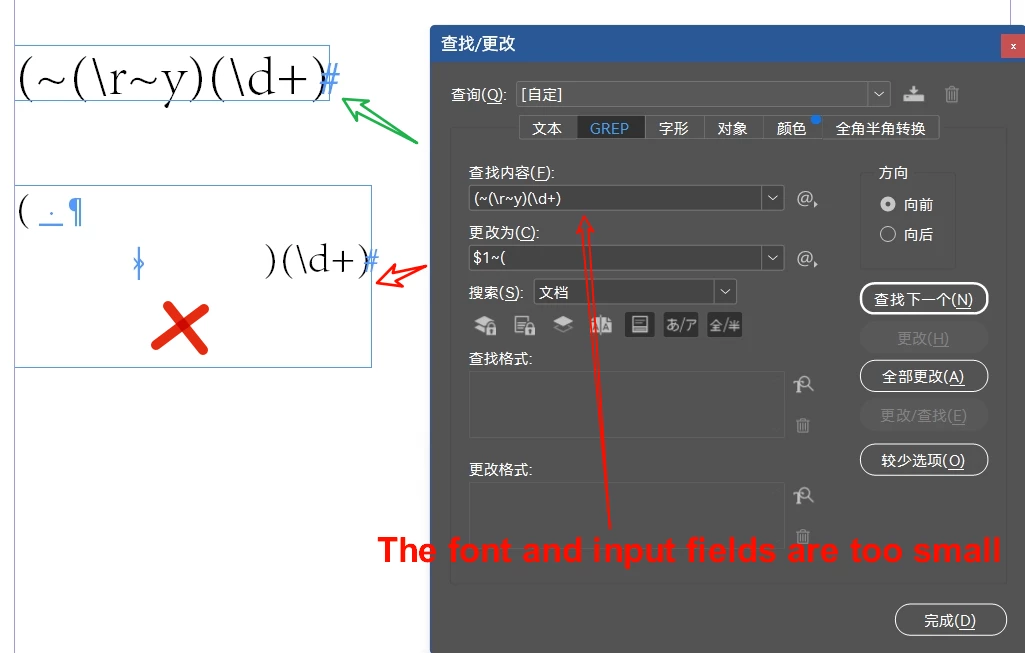
How do you keep ~( \r ~y from being lost? When I pasting the Grep into ID typearea.

How do you keep ~( \r ~y from being lost? When pasting the contents of the Grep lookup window into the ID window.
Do I only have to go open the XML file to copy the full grep?
Or write it all over again?

Also, the Grep lookup box is too small, it would be nice if the font was a little bigger.
Mike Witherell
Mike WitherellCorrect answer
Community Expert
May 4, 2025 4:07 PM UTC

20 replies

Mike Witherell
Community Expert
Mike WitherellCommunity ExpertCorrect answer
Community Expert
May 4, 2025 4:07 PM UTC
dublove
dubloveAuthor
Legend
May 4, 2025 4:34 PM UTC

@Mike Witherell 

I have to say, it's a great script.
It would be great if he could convert the regular in the ID lookup window to plain text.

Thank you for sharing


Its this Send to Grep Style, which is pretty similar to a question I've asked before.

A paragraph style, directly inherits a regular expression from B paragraph style.

Translate
Robert at ID-Tasker
Legend
May 4, 2025 6:28 PM UTC

@dublove


But if you Base one ParaStyle on another - it automatically inherits all GREP Styles.


Translate
Robert at ID-Tasker
Legend
May 4, 2025 10:53 AM UTC

If you type it in the Notepad first - then it will paste without "interpretation" - but if you type it in the F&C GREP Find What field - or paste it there from Notepad - and then copy - it will get "interpreted" even when you paste it back to Notepad:


Even Paste Without Formatting - Ctrl+Shift+V - doesn't help.


For the too small Find What field - you need to increase font size in the system - or UI Scalling in the InDesign:


Translate
dublove
dubloveAuthor
Legend
May 4, 2025 3:54 PM UTC

To be improved.

Translate