
Answered
How does InDesign Grep represent groups greater than 9?
For example:
Search: (A) (B) (C) (D) (E) (F) (G) (H) (I) (J) (K) (L) (M) (N)
Replace with: $1 ${12}
That is: AL
The actual result is as follows:
A${12}
It seems that ${12} is invalid
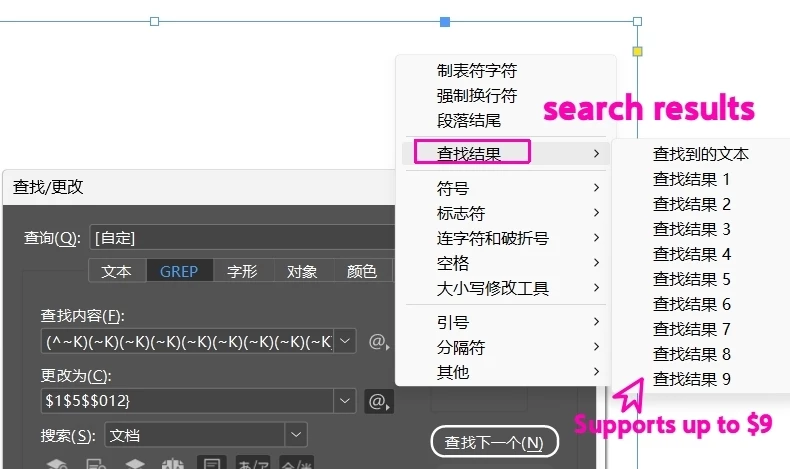

For example:
Search: (A) (B) (C) (D) (E) (F) (G) (H) (I) (J) (K) (L) (M) (N)
Replace with: $1 ${12}
That is: AL
The actual result is as follows:
A${12}
It seems that ${12} is invalid
In InDesign GREP replacements, the captured found text only works from $1 to $9.
So $12 is not treated as “capture group 12”. In many cases it is read as $1 plus the literal number 2, or ${12} is treated as plain text.
So yes, this is basically a limitation.
The workaround is to only capture the parts you actually need, and make the rest non-capturing groups.
For example, instead of this:
(A) (B) (C) (D) (E) (F) (G) (H) (I) (J) (K) (L) (M) (N)
Use this:
(A) (?:B) (?:C) (?:D) (?:E) (?:F) (?:G) (?:H) (?:I) (?:J) (?:K) (L) (?:M) (?:N)
Then replace with:
$1$2
This gives:
AL
The important part is that only A and L are captured, so they become $1 and $2.
Already have an account? Login
Enter your E-mail address. We'll send you an e-mail with instructions to reset your password.


 AdChoices