Inspiring
April 25, 2020
Answered

How find Missing Fonts in image

  • April 25, 2020
  • 5 replies
  • 2847 views

Hi,

I could not collect the missing fonts images Name. Could you help me?
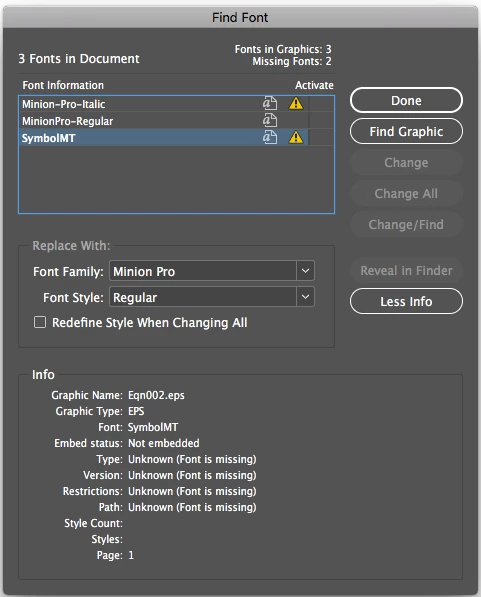
This topic has been closed for replies.
Correct answer $rikanth

Hi, Thanks to all for your guidence.

Finaly i found the soluton for this one.

1. I have created preflight profile.

2. Save the Report as .txt format.

3. Match the all image names in Report. if true the image have missing fonts.


5 replies

$rikanthAuthorCorrect answer
Inspiring
April 27, 2020

Hi, Thanks to all for your guidence.

Finaly i found the soluton for this one.

1. I have created preflight profile.

2. Save the Report as .txt format.

3. Match the all image names in Report. if true the image have missing fonts.


Community Expert
April 26, 2020

Hi together,

as long as MathType is not able to embed fonts working cross-platform or cross-computer is a real drag.


There is no way to assign substitutions for missing fonts with placed EPS in InDesign's Find Font panel.

You must install the missing fonts and make them available to InDesign through the system, a Document fonts folder or the Fonts folder in the spplication folder of InDesign.


And even then:

Could be problematic if you have a different font version with the same name or if you work cross-platform.


Your best, perhaps only chance, to solve the issue:
[ 1 ] Stay on the operating system where the InDesign document was created.

[ 2 ] Try to get the font files that were actually used ( could be problematic for licensing reasons! )

[ 3 ] Install them so that InDesign is not issuing a "Missing Font" error.


Regards,
Uwe Laubender

( ACP )

Participant
April 28, 2020

Hello!
I also have such a problem:
The image in ChemDraw was saved, Indesign prints a similar problem. I made it on my own machine, so it's the same font, yet it doesn't recognize it!

JR Boulay
Community Expert
Community Expert
April 26, 2020

Don't use EPS !!!

It's an obsolete, outdated format, unsuitable for modern software and which creates problems that do not exist with modern formats.

Acrobate du PDF, InDesigner et Photoshopographe
$rikanthAuthor
Inspiring
April 26, 2020

yes but it was equation, created in MathType, is there any other way to generate the log with missing fonts and image name

Brad @ Roaring Mouse
Community Expert
Community Expert
April 25, 2020

Can you open the .eps file that contains them? If you can, you can likely resolve the missing fonts there, and either resave the file as is, or even convert the text to outlines if it's simple enough. I suspect it's an older file or one from a different system and it may be just a matter of differences in naming conventions (as both fonts are pretty common and readily available anyway). If you try make a PDF of that file now, what happens?

Community Expert
April 26, 2020

Hi roaringmousegraphics,

theoretically that could be a solution, but this would cut InDesign from interacting with MathType.

One could even edit the PostScript code with placed and embedded EPS files and do that automatically by scripting, but then it is a problem to update formulas done with MathType.


Regards,
Uwe Laubender

( ACP )

Brad @ Roaring Mouse
Community Expert
Community Expert
April 26, 2020

Ah, I missed the MathType part of this.


Another way to handle this is to PDF the EPS. If the OP has full Acrobat, they could try open the EPS in Acrobat (which will launch Distiller and generate a PDF), then place that in InDesign. If there are truly fonts missing, there will be an error, of course, but it's possible to create a font substitution rule in Distiller to, say, swap the "missing" Minion reference to one you actually have, and same with Symbol.

Scott Falkner
Community Expert
Community Expert
April 25, 2020

It’s retty simple. This document was created using fonts that aren’t installed on your system. I see that you have some version of Minion Pro, but the name of the one installed it slightly different than the one used. In the document there is “Minion-Pro-Italic” but the font you have installed (and is not missing at the top of the window) is “MinionPro-Regular”. This might mean the font is different or just that it has been named differently but is identical. If you use the bottom of the window and replace Minion-Pro-Italic with MinionPro-Italic (assuming it is installed) then you will probably be fine. You might also have a Symbol font installed iwth a name slightly different from teh one used in the document.


The first thing I would do is check the folder the document in is to see if there is a Fonts folder with the missing fonts available, then install them on my system. I would also contact the supplier of the file and ask for a package to be saved. This copies the file, all links, and all fonts to a folder.

$rikanthAuthor
Inspiring
April 26, 2020

HI,

Thanks for your guide, actualy my process, i need to generate all images as .jpg, while exporting images if have font missing in images need to generate report log.
