dublove
Legend
Oct 29, 2026 11:21 AM UTC
Answered

How is the effective minimum cell height for a row calculated?

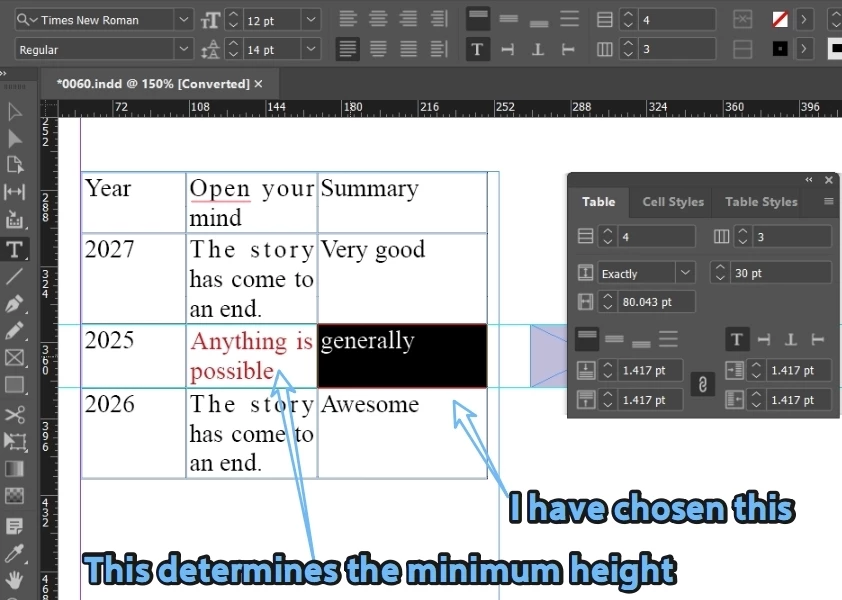
I selected a cell in a row, but I found that its minimum height is not determined by itself, but by the cell with the most text lines in the row.
How can I use a script to find the cell with the most text lines in this line?
The minimum height of the red cell in the sample file below is 30pt. It seems that there is still an error in the calculation as follows:

CellH=14+14+2*1.417=30.834>30pt。

Another question, how to calculate the total height of the table columns in the current text box


    Eugene TysonCorrect answer
    Community Expert
    Oct 31, 2026 2:16 PM UTC

    There are a couple of things worth discussing here.

    First, your screenshot shows the row height set to Exactly 30 pt. This is a fixed height, rather than InDesign's calculated minimum height.

    Your formula of `4 + 14 + (2 × 1.417) doesn't quite reflect how InDesign composes text. Two lines with 14 pt leading have a 14 pt distance between their baselines. The remaining height depends on font metrics, the first baseline offset, the cell insets and potentially other formatting.

    Also, the cell containing the most lines isn't necessarily the cell that determines the required row height. A cell with fewer lines but larger text, different leading or larger insets could require more height.

    For scripting, you can use

    cell.lines.length

    to count the composed lines in each cell


    and


    row.height

     to obtain the actual row height


    On your other question

    InDesign provides

    table.height

    which gives the total height of the table.


    You can also use

    table.columns[0].height

     or sum the heights of the individual rows


    However, if you're asking for the height of only the portion of a table displayed in the current text frame, that is a different calculation. You would need to identify the rows composed in that frame and sum their heights. If the frame contains multiple text columns, you would also need to distinguish between those columns.

    Here’s a quick example that reports the cell or cells containing the most composed lines, the actual row height and the table height.

    Let us know where we go from here :)


    (function () {
    if (!app.documents.length || !app.selection.length ||
    app.selection[0].constructor.name !== "Cell") {
    alert("Please select a single table cell.");
    return;
    }

    var cell = app.selection[0];
    var row = cell.parentRow;
    var table = row.parent;

    var maxLines = -1;
    var longestCells = [];

    // Find cells with the most composed lines
    for (var i = 0; i < row.cells.length; i++) {
    var count = row.cells[i].lines.length;

    if (count > maxLines) {
    maxLines = count;
    longestCells = [i + 1];
    } else if (count === maxLines) {
    longestCells.push(i + 1);
    }
    }

    var report =
    "Most lines: " + maxLines +
    "\nCell number(s): " + longestCells.join(", ") +
    "\nActual row height: " + row.height +
    "\nWhole table height: " + table.height;

    // Sum rows belonging to the selected cell's text frame
    var frames = cell.insertionPoints[0].parentTextFrames;

    if (frames.length > 0) {
    var frame = frames[0];
    var frameHeight = 0;
    var rowsFound = 0;

    for (var r = 0; r < table.rows.length; r++) {
    var firstCell = table.rows[r].cells[0];
    var rowFrames =
    firstCell.insertionPoints[0].parentTextFrames;

    if (rowFrames.length > 0 &&
    rowFrames[0].id === frame.id) {
    frameHeight += table.rows[r].height;
    rowsFound++;
    }
    }

    report +=
    "\nRows detected in current frame: " + rowsFound +
    "\nTheir combined height: " + frameHeight;
    }

    alert(report);
    })();

     

    3 replies

    CORCTON34033231
    Community Expert
    Community Expert
    Nov 3, 2026 3:04 AM UTC

    Eugene Tyson's point is spot on — with the row height set to Exactly 30 pt, that is a fixed height, not InDesign's calculated minimum, so the 30 pt value is what holds even when the text would need a little more. One small addition: his script needs a single table cell selected first (it will prompt you otherwise), and it then reports the actual row height via row.height alongside the cell with the most composed lines. Has this resolved it for you, or is the height still not matching in your file?

    Translate
    Eugene TysonCommunity ExpertCorrect answer
    Community Expert
    Oct 31, 2026 2:16 PM UTC

    There are a couple of things worth discussing here.

    First, your screenshot shows the row height set to Exactly 30 pt. This is a fixed height, rather than InDesign's calculated minimum height.

    Your formula of `4 + 14 + (2 × 1.417) doesn't quite reflect how InDesign composes text. Two lines with 14 pt leading have a 14 pt distance between their baselines. The remaining height depends on font metrics, the first baseline offset, the cell insets and potentially other formatting.

    Also, the cell containing the most lines isn't necessarily the cell that determines the required row height. A cell with fewer lines but larger text, different leading or larger insets could require more height.

    For scripting, you can use

    cell.lines.length

    to count the composed lines in each cell


    and


    row.height

     to obtain the actual row height


    On your other question

    InDesign provides

    table.height

    which gives the total height of the table.


    You can also use

    table.columns[0].height

     or sum the heights of the individual rows


    However, if you're asking for the height of only the portion of a table displayed in the current text frame, that is a different calculation. You would need to identify the rows composed in that frame and sum their heights. If the frame contains multiple text columns, you would also need to distinguish between those columns.

    Here’s a quick example that reports the cell or cells containing the most composed lines, the actual row height and the table height.

    Let us know where we go from here :)


    (function () {
    if (!app.documents.length || !app.selection.length ||
    app.selection[0].constructor.name !== "Cell") {
    alert("Please select a single table cell.");
    return;
    }

    var cell = app.selection[0];
    var row = cell.parentRow;
    var table = row.parent;

    var maxLines = -1;
    var longestCells = [];

    // Find cells with the most composed lines
    for (var i = 0; i < row.cells.length; i++) {
    var count = row.cells[i].lines.length;

    if (count > maxLines) {
    maxLines = count;
    longestCells = [i + 1];
    } else if (count === maxLines) {
    longestCells.push(i + 1);
    }
    }

    var report =
    "Most lines: " + maxLines +
    "\nCell number(s): " + longestCells.join(", ") +
    "\nActual row height: " + row.height +
    "\nWhole table height: " + table.height;

    // Sum rows belonging to the selected cell's text frame
    var frames = cell.insertionPoints[0].parentTextFrames;

    if (frames.length > 0) {
    var frame = frames[0];
    var frameHeight = 0;
    var rowsFound = 0;

    for (var r = 0; r < table.rows.length; r++) {
    var firstCell = table.rows[r].cells[0];
    var rowFrames =
    firstCell.insertionPoints[0].parentTextFrames;

    if (rowFrames.length > 0 &&
    rowFrames[0].id === frame.id) {
    frameHeight += table.rows[r].height;
    rowsFound++;
    }
    }

    report +=
    "\nRows detected in current frame: " + rowsFound +
    "\nTheir combined height: " + frameHeight;
    }

    alert(report);
    })();

     

    Translate
    dublove
    dubloveAuthor
    Legend
    Nov 3, 2026 3:20 AM UTC

    HI Eugene Tyson.

    Thank you very much.
    This is very detailed and valuable, and I will study it in depth.

    Translate