



dublove
Legend
Nov 1, 2026 5:10 PM UTC
Answered

How is the width "W" value of the image on the control bar calculated?

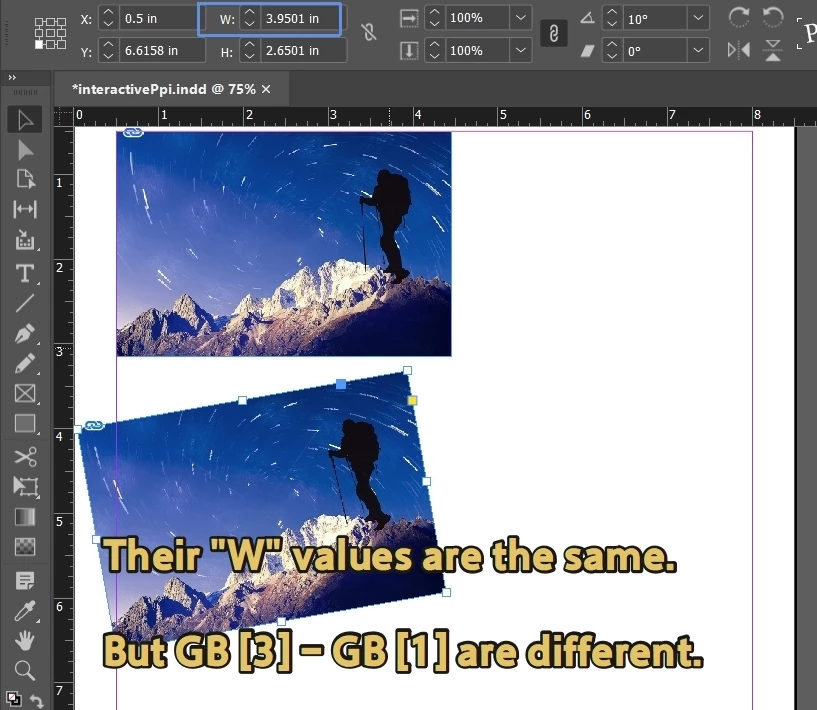
After copying the same image and rotating it by 10 degrees, the "W" value on the control bar does not change, and the rotated W is not obtained using gb [3] - gb [1].
I found a script that should be correct in principle, but it will mention 'undified':

var d = app.activeDocument;
var item = app.selection[0];
//No rotation, obtain directly from the boundary
var gb = item.geometricBounds;
var width = gb[3] - gb[1];

// If the object has rotation, use transformValues to obtain the actual size
var tv = item.transformValuesOf(CoordinateSpaces.INNER_COORDINATES);
var w = tv.horizontalScale;
var h = tv.verticalScale;
alert(w);
 

    dublove
    dubloveCorrect answer
    Legend
    Nov 3, 2026 2:50 AM UTC

    Hi @rob day 

    You'll understand by looking at this.

    Sad, without expert guidance.
    We went around a big circle.

    Don't worry about the effectiveness Ppi, it is determined by the horizontalScale.


    Core formula:
    When the resolution unit is pixels/inch:
    Image width (cm)=(pixel width ÷ resolution) × 2.54
    Image height (cm)=(pixel height ÷ resolution) × 2.54


    When the resolution unit is pixels/centimeter:
    Image width (cm)=pixel width ÷ resolution
    Image height (cm)=pixel height ÷ resolution


    For example, the pixel size of an image is 720px (width) x 960px (height).


    Calculate by substituting the formula
    Example 1 (Resolution 72 pixels/inch):
    Width (cm)=(720 ÷ 72) × 2.54=10 × 2.54=25.4 cm
    Height (cm)=(960 ÷ 72) × 2.54 ≈ 13.33 × 2.54 ≈ 33.86 cm


    Example 2 (Resolution 300 pixels/cm):
    Width (cm)=720 ÷ 300=2.4 cm
    Height (cm)=960 ÷ 300=3.2 cm

    16 replies

    dublove
    dubloveAuthor
    Legend
    Nov 2, 2026 2:00 PM UTC

    Hi ​@rob day 

    I actually really want to know the method of using InDesign software itself.
    It is definitely not using the method of copying a copy.


    I have sporadically reviewed some materials, and it seems that  need to calculate the resolution of the monitor?
    Convert using the relationship between dimensions, actual Ppi, effective Ppi, and horizontal scale.

    Translate
    rob day
    Community Expert
    Community Expert
    Nov 1, 2026 8:26 PM UTC

    In case you missed my explanation of the geometricBounds property in the other post:

    You are misinterpreting the geometricBounds property—it’s the geometric bounds of the selection including any rotation or other transforms. As you rotate a rectangle, its geometric bounds change, but its width and height remain the same. In this example the width of the geometric bounds is 3.2889, not the rectangle’s 3.00 width


    var sel = app.selection[0];
    var gb = sel.geometricBounds
    alert(gb)


    Translate
    dublove
    dubloveAuthor
    Legend
    Nov 2, 2026 2:42 AM UTC

    Hi ​@rob day 

    I know what you mean.


    What I have always wanted to know is how to obtain the width of a shape after rotation.
    How is the current value of "W" calculated.
    You see my screenshot, this is clearly not gb [3] - gb [0] (I don't need this value, it's unreliable), it should be related to horizontalScale.


    When a picture has no deformation or rotation, its W=gb [3] - gb [1]
    But how to calculate the value of W when the graph has a rotation angle?


    Translate
    dublove
    dubloveAuthor
    Legend
    Nov 1, 2026 6:02 PM UTC

    I searched online.
    But I don't know how to find it in indesignjs.de

    TransformationMatrix is a read-only object in the InDesign scripting API that describes object transformation matrices, including horizontal/vertical scaling, rotation, cutting, translation, and other components, as well as raw matrix values and unit triangle mappings. ‌‌

    📐  Core Attributes
    MatrixValues: Matrix values of type Array of 2 Arrays of 2 Reals, which is a 2x2 matrix that records the core transformation components of scaling, rotation, and shearing.

    HorizontalScaleFactor: Horizontal scaling factor, of type Number.

    VerticalScaleFactor: Vertical scaling factor, of type Number.

    CounterclockwiseRotationAngle: counterclockwise rotation angle, of type Number.

    ClockwiseShearAngle: Clockwise Shear Angle, of type Number.

    HorizontalTranslation: Horizontal translation distance, of type Number.

    VerticalTranslation: Vertical translation distance, of type Number.

    MatrixMapping: The mapping of a matrix to a unit triangle, which returns the Array of 2 Arrays of 2 Reals, which are the mapping coordinates of three vertices.

    Name: Matrix name, of type String. ‌‌

    Translate