



dublove
Legend
May 29, 2026
Question

How to accurately increase or decrease line spacing while maintaining the bottom margin height?

  • May 29, 2026
  • 3 replies
  • 25 views

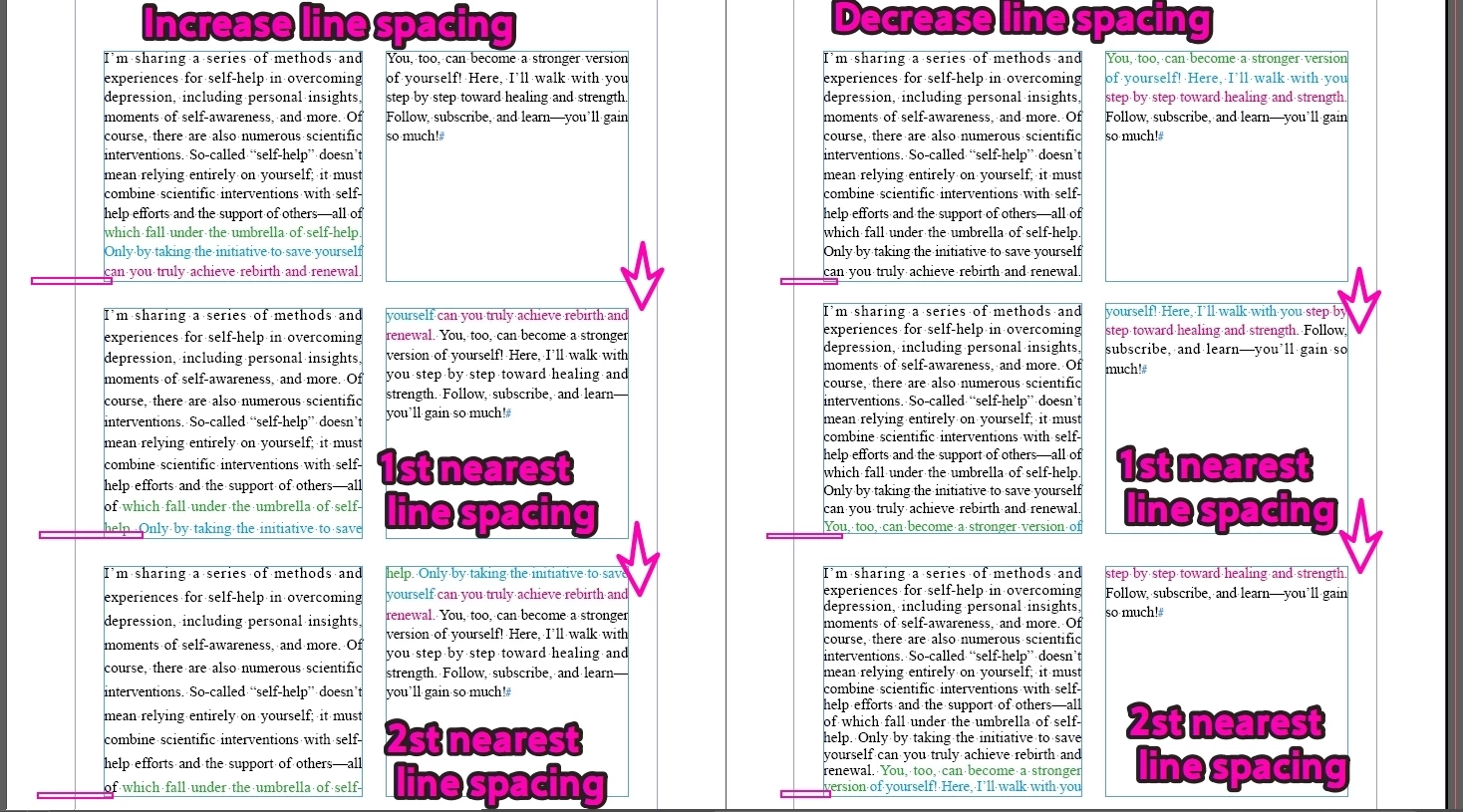
Prerequisite: Maintain the spacing between the text content and the text box (keeping the same bottom margin as before the adjustment).

For example, in the text below, the normal, appropriate line spacing is 16.
However, due to layout adjustments, I sometimes need to adjust the line spacing—either pushing it down by 1–2 lines or pulling it up by 1–2 lines.

I want to run the script once to increase the line spacing by 1 line, and then run it again to increase it by another 1 line.
Another script does the opposite:
Run it once to decrease the line spacing by 1 line, and then run it again to decrease it by another 1 line.
 

    3 replies

    rob day
    Community Expert
    Community Expert
    May 29, 2026

    Hi ​@dublove , Why are you using 2 linked single column text frames? Why not set a single text frame to 2 columns?


    Also, the text frames’ First Baseline Offset setting would affect where the text starts and ends, so a scrpt would have to set the first base line:


    Also a text frame’s Vertical Justification can be set in Text Frame Options. First Baseline set to Cap height with Vertical Justification set to Justify, and equal number of lines in each column:


    dublove
    dubloveAuthor
    Legend
    May 29, 2026

    @rob day 

    Why are you using 2 linked single column text frames? Why not set a single text frame to 2 columns?


    It’s not because of the “baseline alignment” of the first line or the “justified” alignment of the text box.

    It’s because sometimes the “heading” happens to be at the bottom, so you have to push the “heading” to the next column (or the next text box).
    Yes, “justified” alignment can be useful at times, but I don’t think that’s the reason.


    This refers to a fixed text box height.
    The issue of quickly adding or removing a line.
    For example, if there were originally 10 lines and you now want to add an 11th line, or reduce it to 9 lines.
    (After adding or removing lines, it is crucial to ensure that the bottom is aligned, or that there is a tolerance of 0.3 mm.)

    rob day
    Community Expert
    Community Expert
    May 29, 2026

    Is this what you mean


    Your text frames are set as linked single column frames, why not set one frame with 2 columns?


    dublove
    dubloveAuthor
    Legend
    May 29, 2026

    Sorry, I phrased that incorrectly. Perhaps this explanation is more accurate:
    How can I align the selected line to the bottom of the text box?


    There are two scenarios:
    The last line is in the current column (or text box).
    The last line is in the next column (or text box).


    I've updated the attachment.


    Community Expert
    May 29, 2026

    Insert a Column Break where you want it to break over columns. 


    dublove
    dubloveAuthor
    Legend
    May 29, 2026

    This isn't easy to control.
    You'll also need to set the top and bottom margins.

    It's quicker to just adjust the line spacing.

    Community Expert
    May 29, 2026

    Before discussing the script itself, could you explain the workflow and the specific problem you are trying to solve?

    I'm having trouble understanding why the requirement is to move the text by exactly one line at a time by adjusting leading. Knowing the production scenario would help determine whether this is the best approach or whether there may be a simpler solution already available in InDesign.

    For example:

    • What type of document are you producing (book, magazine, newspaper, etc.)?

    • Why do you need the text to gain or lose exactly one line?

    • Is this being done to make content fit a fixed page count?

    • Is it being used to balance facing pages or columns?

    • Is it intended to eliminate overset text?

    • How often do you need to perform this adjustment?

    • Are you adjusting a single text frame, a threaded story, or multiple linked frames?

    • Why must the bottom spacing between the last line and the text frame remain unchanged?

    The reason I ask is that there may be a simpler workflow or a different typographic adjustment that achieves the same result without repeatedly searching for a leading value that causes a one-line reflow.

    Once I understand the actual layout problem you're trying to solve, it will be much easier to determine whether the script is on the right track or whether a different approach would be more reliable.

    dublove
    dubloveAuthor
    Legend
    May 29, 2026

    Hi ​@Eugene Tyson 

    You didn't understand what I meant.
    It has so many uses, like aligning two columns.

    To prevent the title from appearing at the bottom while ensuring bottom alignment

    Community Expert
    May 29, 2026

    Clearly not. I have no idea what you’re trying to do or why, and the arrows and direction and colours are not helping.