
Participating Frequently
July 13, 2020
Resuelto

How to add a Table border to the style (as opposed to a Cell border)

  • July 13, 2020
  • 3 respuestas
  • 729 visualizaciones

Hi all,

I've setup custom cell styles with various strokes and fills without a problem. I thought through Table Styles - Table Style Options - Table Setup - Table Border", it will create a border circling the entire table (i.e. at a heavier weight). But it doesn't, doesn't change anything to the table. Am I missing something? Or do I have to change each cell at the perimeters to look as table borders?
Este tema ha sido cerrado para respuestas.
Mejor respuesta de Laubender

Hi bwnich,

table border is just doing this. But a cell style with borders will trump the table border.

Also if you did local overrides.


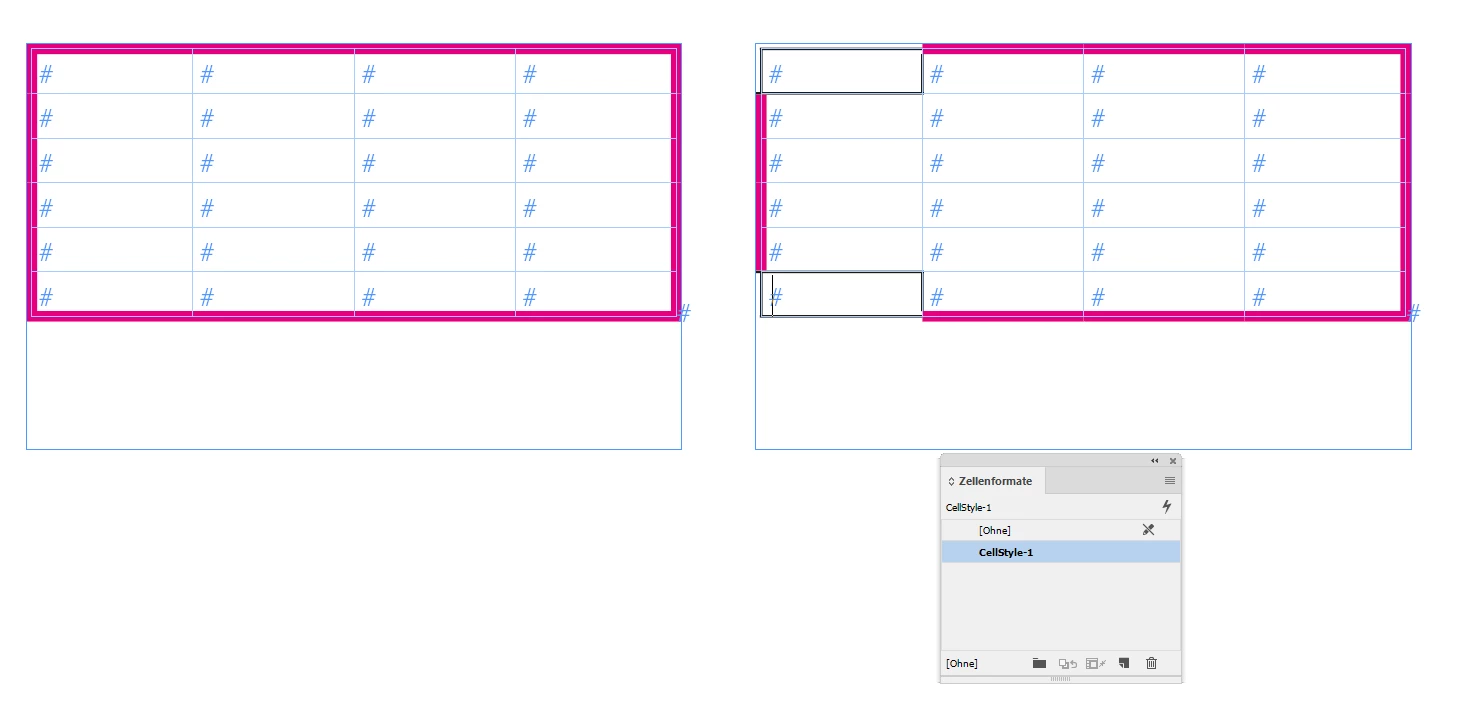
The screenshot below is showing two tables with the same table border.

In the right table I applied a cell style with a different border to two of the corner cells:


Regards,
Uwe Laubender

( ACP )

3 respuestas

Mike Witherell
Community Expert
Community Expert
November 23, 2021

Thanks, David, I had forgotten that!

So it would seem that some settings require Ignore while other settings require backspacing out the old value until the field is empty because they don't have an Ignore. A bit inconsistent!

Mike Witherell
Mike Witherell
Community Expert
Community Expert
November 22, 2021

I have been meaning to ask this too. I start with a clean table; not imported.

I made a set of two cell styles. 1 for header; 1 for body. In both, the cell stroke is set to 0 to not show.

Next, in the Table Style that uses the two cell styles, I set table border to, say, 2pt black ink.

It does not show (and the styles are cleanly applied with no + sign overrides anywhere.

I realize that cell strokes would trump the table border, but in this case there are no cell borders.

Why does it not show?

Further, if I directly apply a table border from the Table Setup from Table menu, it does NOT show. 

But if I have the table selected and apply the Table Border from the Control Panel, it DOES show.

I'm confused.


Mike Witherell
Dave Creamer of IDEAS
Community Expert
Community Expert
November 22, 2021

Zero (0) is not the same as blank--an empty cell stroke style will let the table setting show though; zero will override any table setting depending on how applied. 

The "pecking order" is:

  1. Manual formatting (Control panel or Table panel)
  2. Cell Styles
  3. Table Styles.


I treat my cell styles the same as character styles--put in the least amount of formatting needed to get the job done.

David Creamer: Community Expert (ACI and ACE 1995-2023)
LaubenderCommunity ExpertRespuesta
Community Expert
July 13, 2020

Hi bwnich,

table border is just doing this. But a cell style with borders will trump the table border.

Also if you did local overrides.


The screenshot below is showing two tables with the same table border.

In the right table I applied a cell style with a different border to two of the corner cells:


Regards,
Uwe Laubender

( ACP )

bwnichAutor
Participating Frequently
July 14, 2020

Thank you Laubender, I understand doing manual changes. So basically cell styles superior over table styles. I think this needs improvement.