
Known Participant
December 23, 2021
Answered

How to add Chinese Pinyin in the script?

  • December 23, 2021
  • 2 replies
  • 1668 views

I spent a day to search the way to add Chinese Pinyin in scripting. But found nothing.


I have a lot of words to set to topics. So I have to select the words, then make the words setting to topics. Topics are sorted by Chinese Pinyin. When I do it manually, the Chinese Pinyin of target words come out automatically. See the picture below.
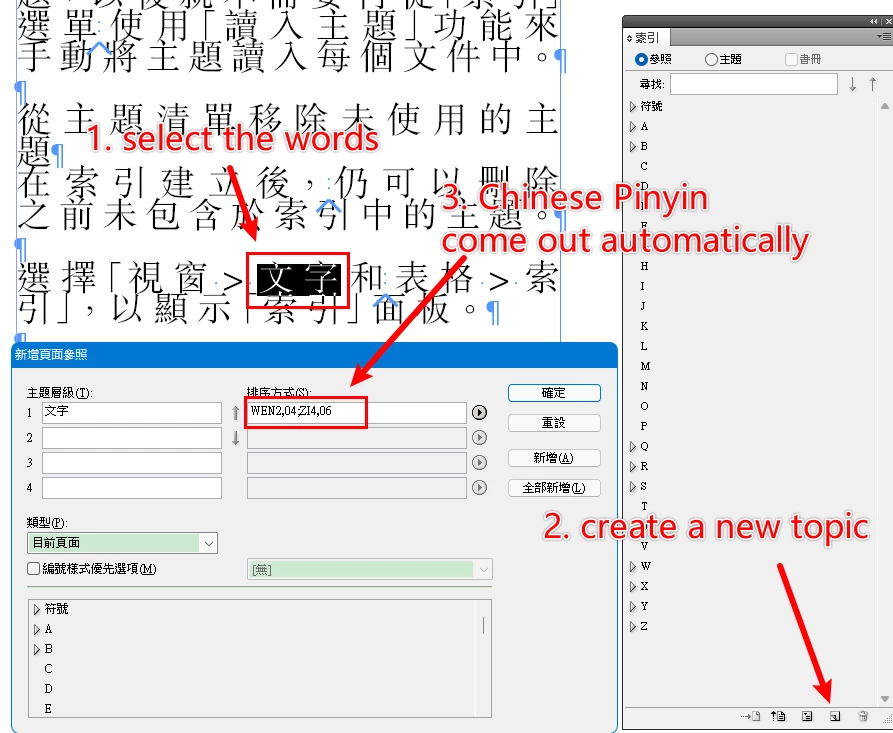
There are too many words to set topics. So I write a Javascript.


Here is the code:

for(c1 = 0; c1 < myTargetWordsToInsertIndex.length; c1++){
app.select(myTargetWordsToInsertIndex[c1]);

app.activeDocument.indexes[0].topics.add(app.selection[0].contents, app.selection[0].contents's Chinese Pinyin);
}

It's just the app.selection[0].contents's Chinese Pinyin, I can't find any information about it in the Object Model Viewer. 


Is there anyone knows some info about this?


Thanks for your attention.

This topic has been closed for replies.
Correct answer Mike Bro

Hello @Dargon Kong,


Try the snippet below and report back on what happens...

You'll have to add it to the rest of your code.


app.scriptPreferences.userInteractionLevel = UserInteractionLevels.NEVER_INTERACT;

for(c1 = 0; c1 < myTargetWordsToInsertIndex.length; c1++){
    app.select(myTargetWordsToInsertIndex[c1]);
    app.menuActions.itemByID(78142).invoke()

}

app.scriptPreferences.userInteractionLevel = UserInteractionLevels.INTERACT_WITH_ALL;


Regards,

Mike

2 replies

Legend
December 23, 2021

When I search an own OMV for Pinyin, the only reference is an enumeration HeaderTypes.CHINESE_PINYIN that would be assigned to app/doc.indexingSortOptions.headerType .

Do you already set that value?


At the plug-in side, there is a similar GroupOrder, but beyond that I only see some Pinyin related dialog - is a concept called "Tone" relevant here?


Anyway, short from looking what actually happens under the hood - even with an example document that would take hours - a feature to transliterate to Pinyin is likely only implemented in the UI. I'd either have a look at UI scripting using AutoHotkey, or alternatively perform the task via an outside service - e.g. export the topic name, process it in node.js with Pinyin support via ICU transforms (I'd guess InDesign uses the same), then supply the sort order entries from the result. Maybe CEP has a matching ICU subsystem so you can stay within InDesign? As I don't use CEP, someone else would have to answer that.

Known Participant
December 24, 2021

I have tried "Tone" or "diacritics" and so on before.

It seems like I have to solve this problem outside Indesign Javascript.

I will try using Autohotkey. Much more easier.

Thanks.

Mike BroCorrect answer
Legend
December 24, 2021

Hello @Dargon Kong,


Try the snippet below and report back on what happens...

You'll have to add it to the rest of your code.


app.scriptPreferences.userInteractionLevel = UserInteractionLevels.NEVER_INTERACT;

for(c1 = 0; c1 < myTargetWordsToInsertIndex.length; c1++){
    app.select(myTargetWordsToInsertIndex[c1]);
    app.menuActions.itemByID(78142).invoke()

}

app.scriptPreferences.userInteractionLevel = UserInteractionLevels.INTERACT_WITH_ALL;


Regards,

Mike

Legend
December 23, 2021

Hello @Dargon Kong,


It's not real clear what you are trying to do but you can try changing the last line in your code to this.

 app.activeDocument.indexes.add().topics.add({name: app.selection[0].contents});


https://www.indesignjs.de/extendscriptAPI/indesign-latest/index.html#Topics.html


Regards,

Mike

Known Participant
December 23, 2021

Topics.add (name: string , sortBy: string , withProperties: Object )

The Parameter “sortBy: string“, is there a way to call its corresponding string through a property or a variable?


Cause I input the words "文字" manually in Indesign, the Chinese Pinyin "WEN2,04;ZI4,06" will be created by Indesign Program itself.


So as for the Javascript, I think there is maybe a property or a variable corresponding to the sortBy: string of app.selection[0].contents.


Thanks.

Legend
December 23, 2021

Hello @Dargon Kong,


Take a look here pages 154 - 157 might give you some direction, also look at https://www.indesignjs.de/extendscriptAPI/indesign-latest/index.html#IndexingSortOption.html


Regards,

Mike