Known Participant
March 6, 2025
Answered

How to add colours to the list of text alternatively (GREP)?

  • March 6, 2025
  • 1 reply
  • 1784 views

Hi,

I would like to add colours to alternative numbers so that it is easy to read like this:

12 (13, 14, 15, 16, 17, 18)


Brackets needs to be where it is placed.

Does anyone one know how I can use GREP so that it is applied to the document? I find GREP so hard to understand!


Many thanks for your help.

Correct answer FRIdNGE

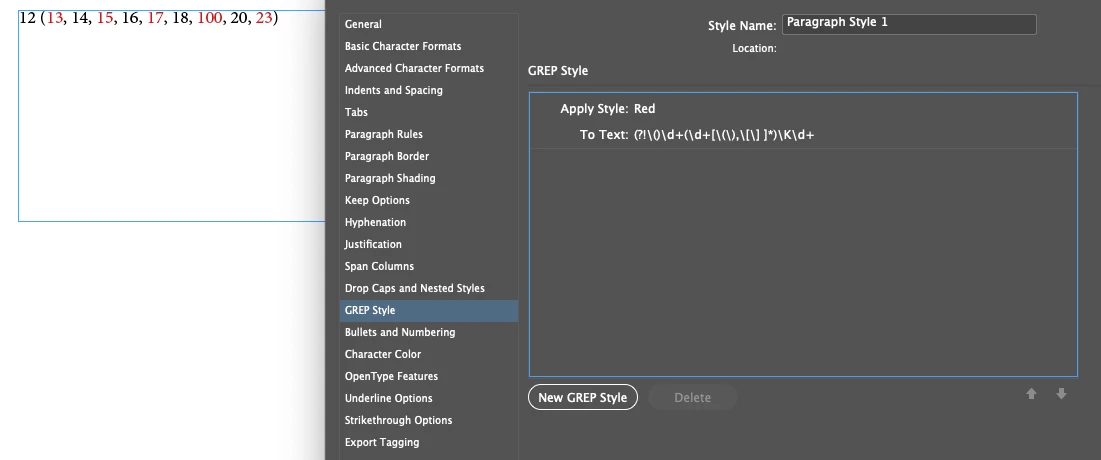
copy this GREP

(?!\()\d+(\d+[\(\),\[\] ]*)\K\d+


Create a character style for the Red Text


In the Paragraph Styles go to the GREP Style section


Insert the code

and select your Red character style.  


Just For Comment:


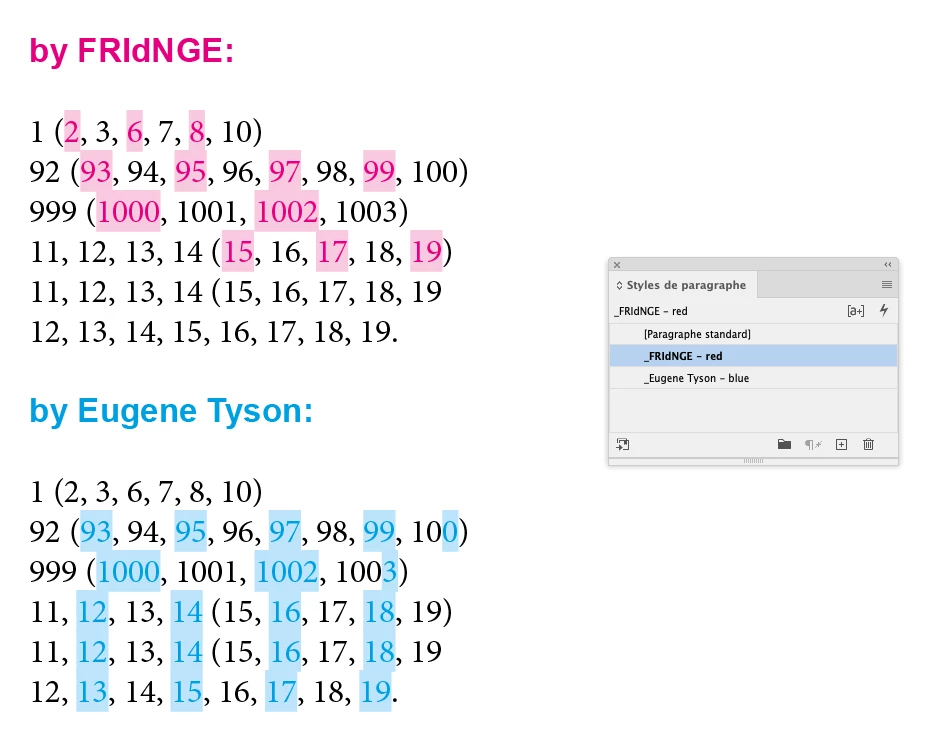
Supposing someone only wants to colorize numbers between parenthesis! … [first, third, fifth, seventh, …]

In this case, alas, Eugene's Grep code gives us an error on each text line!


Personally, I've never thought trying to write an "magical" unique Grep code is the fastest and best way to play!!


But write a simple Grep code we can duplicate is a way I often use, faster and simpler to play, with more control too!  😉


Here:


Grep Style 1:  \((\d+,\h){0}\K\d+(?=.*\))

Grep Style 2:  \((\d+,\h){2}\K\d+(?=.*\))

Grep Style 3:  \((\d+,\h){4}\K\d+(?=.*\))

Grep Style 4:  \((\d+,\h){6}\K\d+(?=.*\))

Grep Style 5:  \((\d+,\h){8}\K\d+(?=.*\))


The numbers in pink gives us the number place between parenthesis.

To get the second, fourth, sixth, eighth, tenth number, just change:

0 => 1,  2 => 3,  4 => 5,  6 => 7,  8 => 9.


(^/)  The Jedi

1 reply

Robert at ID-Tasker
Legend
March 6, 2025

@Kyoko5CD0


Do you want to run global GREP Find&Change - or use GREP Styles?


Kyoko5CD0Author
Known Participant
March 7, 2025

Hi!

Please could you teach me how to do both?

Global means to add GREP in the character style right? Yes I would like to know that as well as Find&Change. Are the code the same?

Thank you so much!


Community Expert
March 7, 2025

copy this GREP

(?!\()\d+(\d+[\(\),\[\] ]*)\K\d+


Create a character style for the Red Text


In the Paragraph Styles go to the GREP Style section


Insert the code

and select your Red character style.