

ACpub
Participating Frequently
June 14, 2023
Answered

How to add left parent page to a "right" single parent page?

  • June 14, 2023
  • 2 replies
  • 1301 views

Hello. Is there a way to add a left parent page to a existing right/single parent page?

I know I can create a new facing/double parent page and copy/paste the content, or right-click the right/single parent page in the pages pannel, go to "Parent Options for..." but it adds a new parent to the right.
This topic has been closed for replies.
Correct answer Bill Silbert

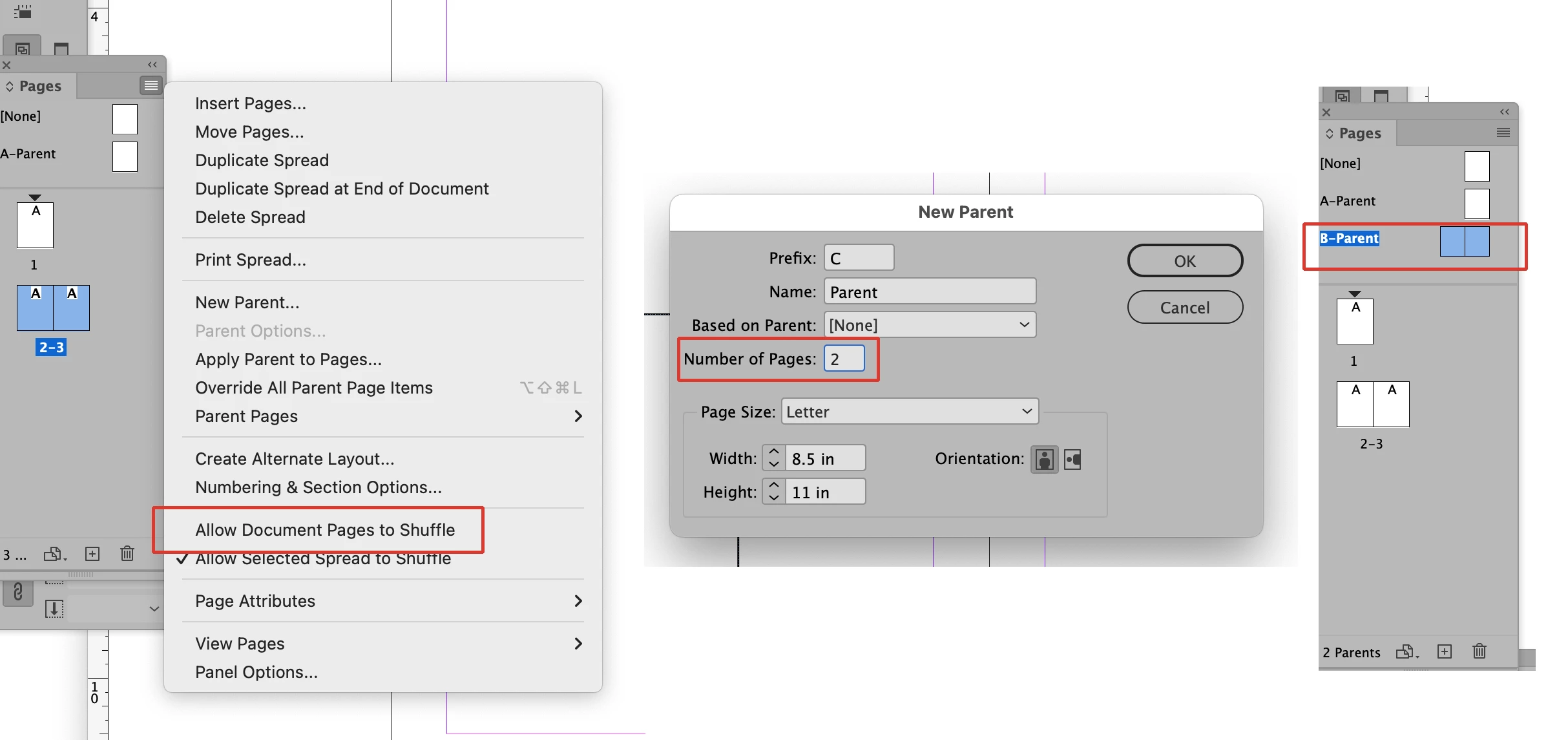
You can set your document up in spreads using single pages (rather than facing) and apply different parent pages to the left and right document pages. You can also set up the parent pages for the document as spreads. To allow single pages to be made into spreads you must first make sure that Allow Document Pages to Shuffle is unchecked in the Pages Panel pull-down menu. Then you can pull the single pages into spreads as seen in the first picture below. It is a manual process, however. To make the parent pages in a single page document into spreads enter the number of pages you want in the appropriate area of the New Parent dialog as seen in the second picture. Once you have the parent pages as spreads you can pull either the left parent or right parent down onto the appropriate document pages. You cannot pull the parent pages down as a spread, however. If you try that only the left parent will get applied. 

2 replies

Bill Silbert
Community Expert
Bill SilbertCommunity ExpertCorrect answer
Community Expert
June 15, 2023

You can set your document up in spreads using single pages (rather than facing) and apply different parent pages to the left and right document pages. You can also set up the parent pages for the document as spreads. To allow single pages to be made into spreads you must first make sure that Allow Document Pages to Shuffle is unchecked in the Pages Panel pull-down menu. Then you can pull the single pages into spreads as seen in the first picture below. It is a manual process, however. To make the parent pages in a single page document into spreads enter the number of pages you want in the appropriate area of the New Parent dialog as seen in the second picture. Once you have the parent pages as spreads you can pull either the left parent or right parent down onto the appropriate document pages. You cannot pull the parent pages down as a spread, however. If you try that only the left parent will get applied. 

ACpub
ACpubAuthor
Participating Frequently
June 15, 2023

Thank you, Bill.

I was wondering if there was an easier way to add a new left-parent to a single-parent (red arrow).

If I right-clik to open Parent Options For... an add a new page, Indesign adds the new page on the right, pulling the existing one to the left (blue arrow).

Thank you both for your time.


    .

Steve Werner
Community Expert
Community Expert
June 15, 2023

You can set up single page documents (which have single parent pages) and you can create facing page documents (which have left-right parent pairs).


It sounds like you're trying to mix the two which is not possible.

ACpub
ACpubAuthor
Participating Frequently
June 15, 2023

Thank you Steve.

As I said, there are at least two workarounds. I was only looking for a easier way to do, like an option to add a parent page before the right-single one.