
likeafox2k
Participant
June 11, 2018
Question

How to align TOC text after section number

  • June 11, 2018
  • 2 replies
  • 1798 views

Hello Friends,

I'm trying to spruce up my TOC and I can't figure out how to line up the align the text after the section numbers.

For Example:
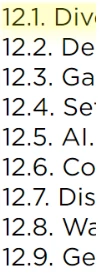
Notice that the letters are not aligned. There must be a way to do this. Anyone know how?

Thanks for your help.

    This topic has been closed for replies.

    2 replies

    Scott Citron
    Legend
    June 12, 2018

    As was noted in Scott Falkner's reply (5.) you MUST use tabular figures instead of proportional figures. Tabular figures all occupy the same width, which allows them to align in a way that's not possible when using proportional figures.

    Mike Witherell
    Community Expert
    Community Expert
    June 11, 2018

    There should be a Tab character after the number and before the text. Are you using Layout > Table of Contents generator?

    Mike Witherell
    likeafox2k
    Participant
    June 11, 2018

    Yes, I'm using Layout > Table of Contents.

    I've added the 2 paragraph styles I wish to include in the TOC. The section numbers are generated by the paragraph styles, not the TOC though.

    Here is the table of contents settings panel.

    Should I be using different paragraph styles without section numbering for the TOC, then have the TOC settings regenerate the section numbers somehow?

    vinny38
    Legend
    June 12, 2018

    This changes the space between the text on each line and the page number that comes after it. This s not what I am trying to modify.

    I would like to modify the space between the section numbers that come before the text and the test so that the text is aligned.

    Here is an example:

    Notice that the pages number on the far right are properly aligned, the section numbers on the left are properly aligned, but the text itself is not.

    I have a feeling I may need to change the paragraph style used for each line to achieve this.


    Hi

    If you have selected "Include Full paragraph" in the TOC options (see figure below), Indesign should carry the separator that you used in your document paragraph style's "Bullets and numbering options" into the TOC.

    So, you should first check your "Section heading" and "Subsection heading" paragraph styles > Bullets and numbering, and replace the space by a tab (Note: if you don't want to do that, alternative solutions exist. E.g. see Scott's last answer):

    Do not forget to set up the indents and the tab marker position in order to have a nice spacing between the numbering and the header.

    Be careful to set it in a way you'll have a consistent spacing in order to avoid this kind of horror: (remember, we are "in" the document text, not in the TOC)

    Now, let's go back to TOC.

    One last (but important) thing: after updating your TOC, you should see that the paragraph numbering is now followed by a tab.

    Unless your TOC para style is based on your Header para style, it will not carry the indents and tab position settings. Indd will use the default settings instead.

    So again, don't forget to set tabs and indents for a nice spacing.

    Hope that helps

    Vinny