
Participating Frequently
May 17, 2022
Answered

How to apply character style to whole paragraph

  • May 17, 2022
  • 7 replies
  • 1619 views

Hi,

How to apply a character style to the whole paragraphs, like the attached screnshot below.


Regards

Srinath


This topic has been closed for replies.
Correct answer Laubender

LearnerS said: "I want to select entire <ANNO> paragraph to apply character style throughout in one shot. "


Hi LearnerS,

thank you for this. Now it's a bit more clear what you like to do.

Rob has shown a screenshot sample on a possible page with frame edges turned on and hidden characters visible.

You should post a screenshot of your situation exactly like that.


We also must or should know if the numbering of the paragraph is set to auto-numbering and if another auto-numbered paragraph is following the text in your screenshot.


Strategies:

If <Anno> sits in its own paragraph away from the numbered one you simply could search for <Anno> in Text or GREP Find and apply a different paragraph style. Very easy.


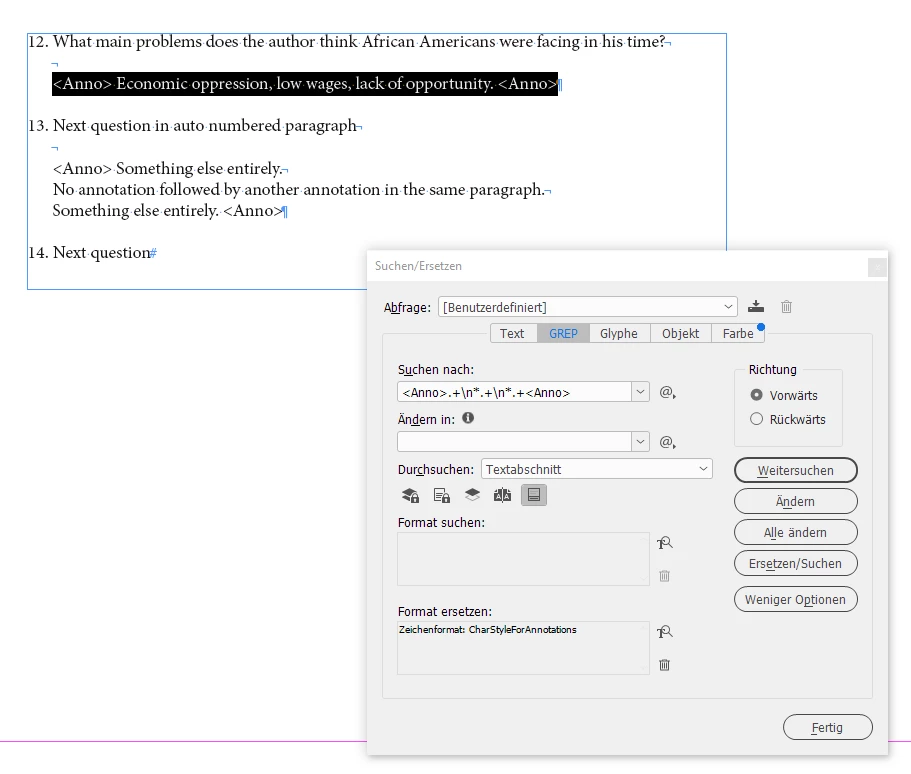
If you only want to format the text from one <Anno> to the next <Anno> and between is no end-of-line special character you could use this simple GREP expression to find the text:

<Anno>.+<Anno>

Apply a character style to the found instances.


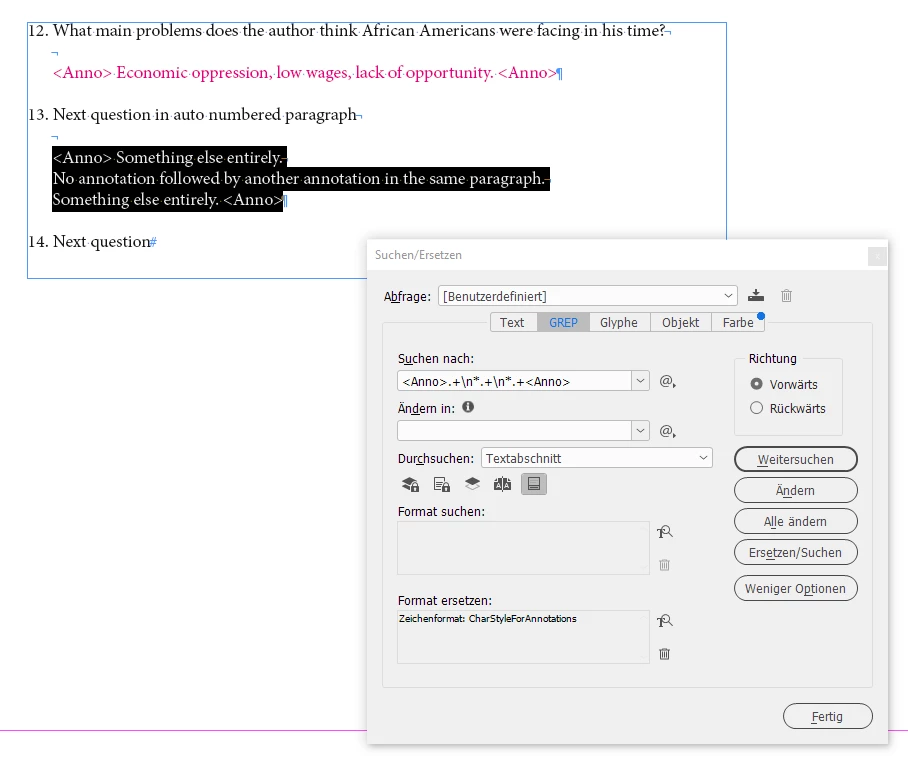
If you do have end-of-line special characters inside the pairs of <Anno> (how many do you maximal have?) you could work with the Find GREP pattern below that cares for a maximum of two interruptions with end-of-line special characters between the two <Anno>:

<Anno>.+\n*.+\n*.+<Anno>

Apply a character style to the found instances.


Sample from my test document:


Regards,
Uwe Laubender
( Adobe Community Professional )

7 replies

LaubenderCommunity ExpertCorrect answer
Community Expert
May 17, 2022

LearnerS said: "I want to select entire <ANNO> paragraph to apply character style throughout in one shot. "


Hi LearnerS,

thank you for this. Now it's a bit more clear what you like to do.

Rob has shown a screenshot sample on a possible page with frame edges turned on and hidden characters visible.

You should post a screenshot of your situation exactly like that.


We also must or should know if the numbering of the paragraph is set to auto-numbering and if another auto-numbered paragraph is following the text in your screenshot.


Strategies:

If <Anno> sits in its own paragraph away from the numbered one you simply could search for <Anno> in Text or GREP Find and apply a different paragraph style. Very easy.


If you only want to format the text from one <Anno> to the next <Anno> and between is no end-of-line special character you could use this simple GREP expression to find the text:

<Anno>.+<Anno>

Apply a character style to the found instances.


If you do have end-of-line special characters inside the pairs of <Anno> (how many do you maximal have?) you could work with the Find GREP pattern below that cares for a maximum of two interruptions with end-of-line special characters between the two <Anno>:

<Anno>.+\n*.+\n*.+<Anno>

Apply a character style to the found instances.


Sample from my test document:


Regards,
Uwe Laubender
( Adobe Community Professional )

LearnerSAuthor
Participating Frequently
May 18, 2022

Hi Uwe Laubender,


Happy Morning.


I have checked above GREP, it was working fine. I got what I was expected 

rob day
Community Expert
Community Expert
May 17, 2022

Hi @LearnerS , Are you using soft returns to separate the question and answers? A soft return separates the lines, but they are all part of the same paragraph, which would force you to format the second line with a Character Style.


If you use a regular return there would be two paragraphs, which could be syled differently—the space could be created with the Paragraph Style’s Space After property rather than an extra return:


Here there is a regular paragraph return separating the lines with Space After creating the needed space after the first line:


Now I can format the answer with a Paragraph Style

Willi Adelberger
Community Expert
Community Expert
May 17, 2022

If a whole paragraph has the same character properties it should not be done via character style. The paragraph style has all what you need to define the character properties. 

A character style should only be used, if there is a difference to the hosting charaacterproperties, like language, color, underline, etc.

Maybe, that you are used to Quark Xpress. There it was common to set up a Character Style on every text. InDesign has a different method to work, which makes it more efficient.

Randy Hagan
Community Expert
Community Expert
May 17, 2022

For those rare times you want to apply a character style to an entire paragraph, use the following process:


  • Place your cursor into the paragraph where you want to apply the character style variation and quadruple-click — one-two-three-four — quickly with the left mouse button.
  • Open your Character Styles panel and select the character styling you want to apply.
  • Click your cursor away from the paragraph you just styled and admire your handiwork.


This'll get you where you want to be.


Randy

Randy Hagan
Community Expert
Community Expert
May 17, 2022

I respectfully differ with the folks here responding that if you have one or two paragraphs where you want to apply a pre-existing character style overlay for an existing paragraph style it's the wrong course of action, and that it's necessary to create a new paragraph style instead.


Applying character style exceptions work just as well for a word as they do for a paragraph. Especially if the user is formatting for digital publishing. It reserves precious and limited style tagging instances for other areas where more elaborate styling may need to be applied, which is no small issue when dealing with heavily-formatted documentation. Additionally, it poses no complication for users wanting/tagging a simple bold, italic and/or bold italic styling while maintaining previous existing paragraph styling for a given thread of text.


In short, I feel there's no good reason for telling the original poster not to do what he or she wants to do, and in several good instances, real reasons why he or she might not want to follow the suggested alternative course of action. Besides, chastising the user into a different workflow does not respond to the question originally asked.


Randy

BobLevine
Community Expert
Community Expert
May 17, 2022

There are very good reasons, Randy. A well-created character style only contains the overriding attributes. If the OP is looking to have all attributes applied, he/she is going to have all kinds of problems.


It is a foolish thing to attempt and there is no way I would even guide anyone toward doing it. Only a complete newbie would ask for that and it's far better to guide that person to the appropriate workflow.

Community Expert
May 17, 2022

Hi Srinath,

from your screenshot I do not get what you like to do with the text:


To apply any character style you simple select all the characters you want to format first, then apply the style from the Character Styles panel. Enable the view on invisible characters in Normal View mode to see what's the situation you're in with your text.


Regards,
Uwe Laubender
( Adobe Community Professional )


LearnerSAuthor
Participating Frequently
May 17, 2022

Hi Uwe Laubender,


Perhaps my last e-mail did not adequately communicate my questions. Please accept my apologies.


From the screenshot, I want to select entire <ANNO> paragraph to apply character style throughout in one shot. 

To using Find/Replace option. 

Peter Spier
Community Expert
Community Expert
May 17, 2022

Paragraph styles are used to define the basic format for any text. You can have multiple different paragraph styles for different types of text, headings, sub headings, body text, pull quotes, lists, and so forth.

Character styles are used to change the basic formatting of selected text in a paragraph that must be differnt from the basic paragraph, such as applying bold or italic to a word.

One fast way to create a new style is to select the text involved, change the formatting manually, then go to the appropriate style panel and click the New Style button...

Geоrge
Legend
May 17, 2022

For apply formatting to the whole paragraph you are need to use paragraph style.


Therefore, you can select all the words in the paragpraph and apply character style. Why do you need this?


Remember, never say you can't do something in InDesign, it's always just a question of finding the right workaround to get the job done. © David Blatner