



Inspiring
August 27, 2024
Answered

How to Arrange Image to the Front in InDesign

  • August 27, 2024
  • 1 reply
  • 2586 views

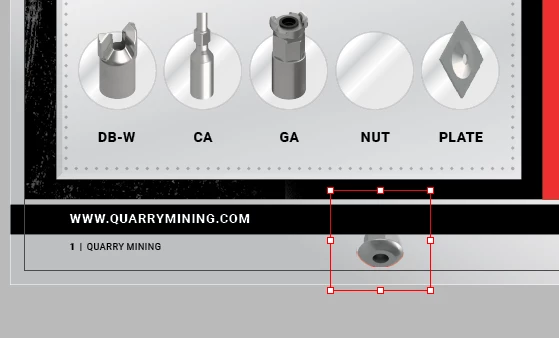
hi there, desperate, for some reason i'm having trouble sending a picture of a nut (bolt) to the front of the circle icon, see pic. i had no issues placing the other items on top of the circles but this one will not work, i've looked at layers etc but can't work it out. tearing my hair out ready to put my fist through the screen!!!

oh and there is NO option to arrange to front upon right clicking the image.

help please!


<Title renamed by MOD>


This topic has been closed for replies.
Correct answer Nick Passmore

Is the image in question on a different layer from the objects that are overlying it?


Bring to Front will not be active if it is at the top of the stacking order on its own layer but that layer can still be below others.


The order of the layers themselves can be altered from the Layers palette — or you could just move the image to the same layer as the other images.


1 reply

Nick PassmoreCorrect answer
Participating Frequently
August 27, 2024

Is the image in question on a different layer from the objects that are overlying it?


Bring to Front will not be active if it is at the top of the stacking order on its own layer but that layer can still be below others.


The order of the layers themselves can be altered from the Layers palette — or you could just move the image to the same layer as the other images.


Bec MacAuthor
Inspiring
August 29, 2024

thanks Nick!

i have another element, in the pic above you'll see a red vertical line, i can't grab  it, and its not appearing in my layers

Participating Frequently
August 29, 2024

It may be that the vertical red line is something on a Master (Parent) page. If it is you will only see it listed in the Layers palette when you switch to that Master page.


If you want to delete or edit the line on this specific page:


. . . . press the Command+Shift keys (macOS) or Ctrl+Shift keys (Windows) and click on a master page item on the document page. This selects the master page item on the document page, so it can be deleted, moved, or modified.


From https://creativecloud.adobe.com/cc/learn/indesign/web/override-master-pages