
Participating Frequently
August 3, 2025
Question

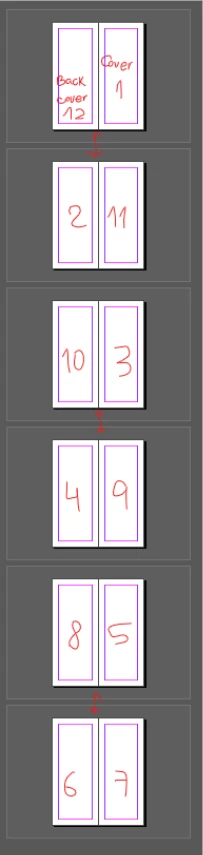
how to auto number pages for saddle stitching
  • August 3, 2025
  • 2 replies
  • 117 views

As you can see the spreads can't be numbered in a sequence. The arrows that I drew between spreads indicate they're printed on the other side. So; 12, 1, 2 and 11 are a single spread. 10, 3, 4 and 9 another and so on. As far as I can tell, there's no settings to make this automated. If that's the case, I'd like to know a better way to do it than manually


2 replies

Willi Adelberger
Community Expert
Community Expert
August 3, 2025

Start with page 1 and succeed with the following pages. Autonumber those. Let the imposing do the printer. It is not the task of the designer.

rob day
Community Expert
Community Expert
August 3, 2025

Hi @cream__soda , Imposition is always handled by the printer after the layout is complete. If you are trying to impose for a laser or inkjet printer InDesign has Print Booklet. Acrobat also has a booklet function in its Print dialog.