Well, InDesign doesn't have a built-in tool like, say Photoshop's Batch Automation tool. It does have a scripting engine, so you can automate pretty much whatever you want, if you know Javascript, or Applescript, or VBscript. There is one fairly advanced script that comes packaged with InDesign called FindChangeByList, which is a way to (you guessed it) store a list of find-change operations, and then process that list automatically without user intervention. It sounds kinda like what you're looking for.
However, when I have a single edit to make to 100 footers, I don't script it. (Partially because I write scripts at a glacially slow pace.) I generally use the Find/Change dialog. When I handle files like this, the footers tend to be in master pages, but this will change 'em even if they're on the live page.
1) I would open all 100 docs.
2) I would open the Find/Change dialog.
3) I would set the Search scope to All Documents, and I would make sure that ID was searching master pages. Like so:
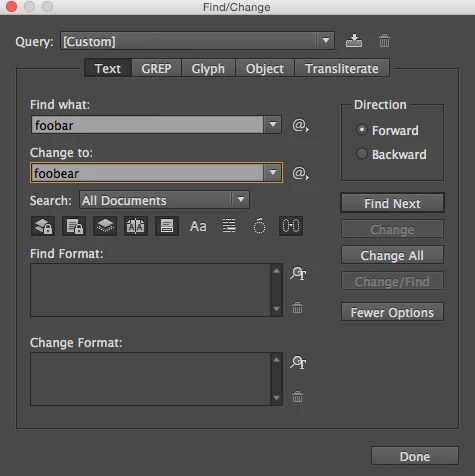
4) Then I whack "Change All."
This will not work, of course, if "foobar" is part of your live text, and must remain unchanged.
Your other case - where you have to update control numbers - is a more complicated case. In my own situation, I knew I was going to be updating my own revision numbers every year or two for as long as I had the job. So i knew that a spot of prep work was going to be to my advantage in the future. (And lo, fifteen years later, I am still updating these forms in twelve languages as a freelancer, and i thank my lucky stars that I saw fit to make it easy in InDesign CS so many years ago.)
What I did was I typeset the rev numbers in their very own character style. I called it "RevDateStylee":
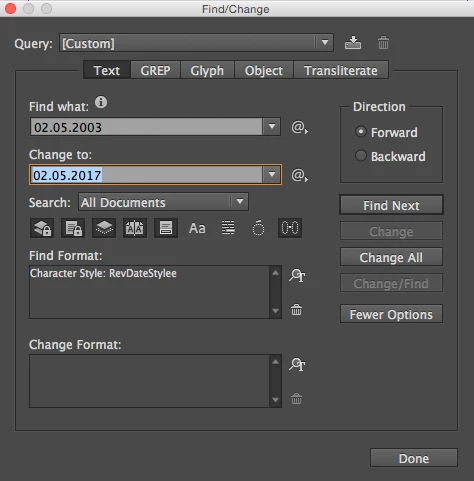
That way, I knew that my rev date (and only my rev date) was going to be updated in all 100 files.
But this is just one method. Depending on how much time you can save down the line, you may want to invest more time in setting it up to be easy. Sandee's suggestion to store 'em all in a book file so that they can share master pages is pretty slick. I have faked up a similar workflow where InDesign files (or in some cases Illustrator files) were placed as footers/backers on the bottom layer of other InDesign files, so that I could edit one file once and have that change propagate automagically into hundreds of other files that used the same footer and watermark and et cetera. I have also used Javascript to do things like load text variables from one source document into hundreds of other documents. There are many ways to automate this stuff in InDesign. If none of these suggestions work for you, please do post some more details about your project, or maybe take your details over to the InDesign scripting forum, where I suspect you could hire a script developer who could whip up a custom job for you.


 AdChoices