How to automatically add extra pages when text is overset?
I'm a beginner with InDesign and I've used some great youtube tutorials to get me through the basics. I've created a simple book with paragraph styles and a series of chapters and ToC. I'm now placing in the content to the chapters themselves but am stuck.
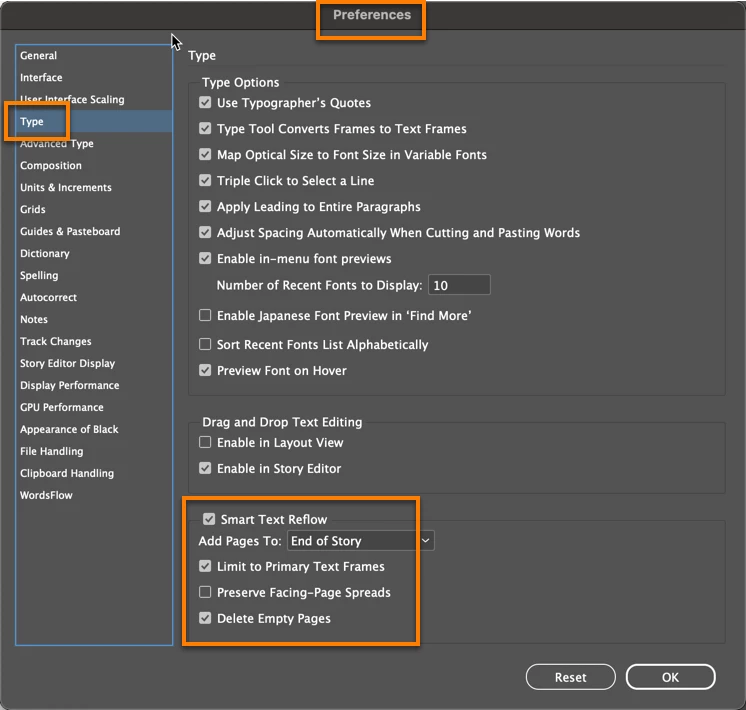
When I place some text content into a chapter document within my book, I then apply a Paragraph Style + next style which works perfectly. However, it always causes overset text. Is there a way of that process automatically creating and threading the text into a new page where its needed? I know that I used settings to ensure the extra pages would be added at the point I place in the text, but have I missed a setting somewhere to enable that for when I apply the styling?
(My master page has a full page text box included, so new pages should hopefully create the text box ready to accept text - hope I've explained and understood that clearly enough.)
I can go in to each chapter document and manually add a new page and then deal with the overset text myself, but for 20+ chapters, I am hoping there's a quicker fix!
Many thanks.
 AdChoices