

Inspiring
August 5, 2024
Question

How to Automatically Add Space Between Words in a Large InDesign Document

  • August 5, 2024
  • 2 replies
  • 387 views

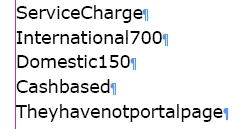
There is no space between words. How do I add space between words automatically? It is a large document.
 

<Title renamed by moderator>

 

This topic has been closed for replies.

2 replies

Robert at ID-Tasker
Legend
August 5, 2024

@hibru305572725zfd


Numbers - doable with GREP. 


"ServiceCharge" - also doable with GREP - space before Upper cases.


The rest - you could start with all the short words - "if", "the", "but", etc. then fix the rest manually.


Or as @Peter Spier suggested - try some AI tool.


Peter Spier
Community Expert
Community Expert
August 5, 2024

Yeah, some might be fixable with GREP, but there could be a TON of false matches for short words that are really part of larger ones. I think, depending on the length, it would be just as fast to manually add the spaces as to go back through after the automation to find and correct any errors.

A LOT, of course, depends on the actual text.

Robert at ID-Tasker
Legend
August 5, 2024

I think using a tool that will show words in context - concordance - would help to quickly cleanup the document... 


Peter Spier
Community Expert
Community Expert
August 5, 2024

To the best of my knowledge there is no way to do that in InDesign.

My guess is you will need to feed this to some sort of Artificial Intelligence, then bring it back.