

dublove
Legend
Nov 6, 2026 10:50 AM UTC
Answered

How to automatically copy the content in the input box above after clicking the "Copy" button?

Hello everyone.

I want to click 'Copy' to automatically copy the content in the input box and prompt 'Copy successful'.

After the prompt pops up, click OK and the first two dialog boxes will automatically close at the same time.

Can you help me take a look?

Thank you.
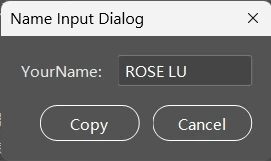

// Create a new window
var win = new Window("dialog", "Name Input Dialog");
// Group for Name input
var inputGroup = win.add("group");
inputGroup.add("statictext", undefined, "YourName:");
var keyInput = inputGroup.add("edittext", undefined, "ROSE LU");
keyInput.characters = 10;
// Buttons group
var btnGroup = win.add("group");
btnGroup.alignment = "right";
var okBtn = btnGroup.add("button", undefined, "Copy"); // OK
var cancelBtn = btnGroup.add("button", undefined, "Cancel"); // Cancel

// Show the dialog
win.center();
win.show();


    Eugene TysonCorrect answer
    Community Expert
    Nov 6, 2026 1:09 PM UTC


    Some answer here. 

    So I’d try something like this


    #targetengine "session"

    // Create a palette instead of a modal dialog
    var win = new Window("palette", "Name Input Dialog");

    var inputGroup = win.add("group");
    inputGroup.add("statictext", undefined, "YourName:");

    var keyInput = inputGroup.add("edittext", undefined, "ROSE LU");
    keyInput.characters = 10;

    var btnGroup = win.add("group");
    btnGroup.alignment = "right";

    var copyBtn = btnGroup.add("button", undefined, "Copy");
    var cancelBtn = btnGroup.add("button", undefined, "Cancel");

    // Copy plain text using InDesign
    function copyToClipboard(str) {
    if (app.documents.length === 0) {
    throw new Error("Please open an InDesign document.");
    }

    var tf = null;

    try {
    tf = app.activeDocument.pages[0].textFrames.add();
    tf.geometricBounds = [0, 0, 100, 200];
    tf.contents = str;

    // Select the text, not the text frame
    tf.parentStory.texts[0].select();
    app.copy();

    } finally {
    if (tf && tf.isValid) {
    tf.remove();
    }
    }
    }

    // Copy button
    copyBtn.onClick = function () {
    try {
    copyToClipboard(keyInput.text);

    // Alert waits until OK is clicked
    alert("Copy successful");

    // Close palette after OK
    win.close();

    } catch (e) {
    alert("Copy failed: " + e.message);
    }
    };

    cancelBtn.onClick = function () {
    win.close();
    };

    win.center();
    win.show();


    16 replies

    Eugene TysonCommunity ExpertCorrect answer
    Community Expert
    Nov 6, 2026 1:09 PM UTC


    Some answer here. 

    So I’d try something like this


    #targetengine "session"

    // Create a palette instead of a modal dialog
    var win = new Window("palette", "Name Input Dialog");

    var inputGroup = win.add("group");
    inputGroup.add("statictext", undefined, "YourName:");

    var keyInput = inputGroup.add("edittext", undefined, "ROSE LU");
    keyInput.characters = 10;

    var btnGroup = win.add("group");
    btnGroup.alignment = "right";

    var copyBtn = btnGroup.add("button", undefined, "Copy");
    var cancelBtn = btnGroup.add("button", undefined, "Cancel");

    // Copy plain text using InDesign
    function copyToClipboard(str) {
    if (app.documents.length === 0) {
    throw new Error("Please open an InDesign document.");
    }

    var tf = null;

    try {
    tf = app.activeDocument.pages[0].textFrames.add();
    tf.geometricBounds = [0, 0, 100, 200];
    tf.contents = str;

    // Select the text, not the text frame
    tf.parentStory.texts[0].select();
    app.copy();

    } finally {
    if (tf && tf.isValid) {
    tf.remove();
    }
    }
    }

    // Copy button
    copyBtn.onClick = function () {
    try {
    copyToClipboard(keyInput.text);

    // Alert waits until OK is clicked
    alert("Copy successful");

    // Close palette after OK
    win.close();

    } catch (e) {
    alert("Copy failed: " + e.message);
    }
    };

    cancelBtn.onClick = function () {
    win.close();
    };

    win.center();
    win.show();


    Translate
    dublove
    dubloveAuthor
    Legend
    Nov 6, 2026 2:19 PM UTC

    Hi ​@Eugene Tyson 

    Thank you very much.
    What if I want to directly copy variables to the clipboard?
    Is there a direct command like this in ExtendeScript for Js?

    I don't understand where I went wrong:

    function copyToClipboard(str) {
    str = (typeof str === 'string') ? str : str.toString();
    var isWindows = $.os.indexOf('Windows') !== -1;
    var cmd;
    if (isWindows) {
    // Windows uses the clip command,
    cmd = 'cmd.exe /c "echo ' + str + '| clip"';
    } else {
    // Using pbcopy for macOS
    cmd = 'echo "' + str + '" | pbcopy';
    }
    system.callSystem(cmd);
    }
    // Usage example
    var myVar = "Hello World";
    copyToClipboard(myVar);


    Translate
    Community Expert
    Nov 6, 2026 3:05 PM UTC

    The problem is the

    system.callSystem(cmd) line.

    is not InDesign ExtendScript. (Is that After Effects scripting - where did you get it from??? searching for it suggests it is) 

    There isn't a direct command to copy a JavaScript string to the clipboard in ExtendScript.

    But I did find this
    https://community.adobe.com/questions-671/is-it-possible-to-load-the-clipboard-with-text-from-a-script-878445?

    The workaround is to temporarily create a text frame, insert your variable's value, select the text, copy it to the clipboard, and remove the temporary frame.

    You can pass any string variable into the function below, including the contents of your original input box.

    This does require an InDesign document to be open.


    There is a method in UXP scripting, but that won't work in a traditional .jsx script.
    https://developer.adobe.com/indesign/uxp/resources/recipes/clipboard/?

    So I think something like this


    function copyToClipboard(str) {
    if (app.documents.length === 0) {
    throw new Error("Please open an InDesign document.");
    }

    var tf = app.activeDocument.pages[0].textFrames.add();

    try {
    tf.contents = String(str);
    tf.parentStory.texts[0].select();
    app.copy();
    } finally {
    if (tf.isValid) tf.remove();
    }
    }

    // Usage example
    var myVar = "Hello World";
    copyToClipboard(myVar);

    alert("Copy successful");


    Translate
    CORCTON34033231
    Community Expert
    Community Expert
    Nov 6, 2026 12:09 PM UTC

    Hi dublove — ExtendScript has no built-in way to copy a string straight to the system clipboard, so the Copy button needs a small helper function. The approach marked as the correct answer in this community thread hands the text to the operating system’s clipboard tool (pbcopy on macOS, clip on Windows) using system.callSystem: https://community.adobe.com/questions-529/how-can-i-copy-string-in-a-variable-to-clipboard-in-extendscript-24801

    Add that copyToClipboard helper to your script — copy it from the code block in the linked thread, where the code is exact. Then give your Copy button an onClick handler that does three things in order: copy the contents of the input box, show the Copy successful message, and close the dialog. The alert waits for OK, so the close runs right after it.


    That gives you the flow you described: click Copy, the text is copied, the Copy successful prompt appears, and clicking OK closes the dialog.

    Two things to watch: on Windows, leave no space before the pipe to clip, or a trailing space gets copied with the text; and echo adds a trailing newline, so this is best for plain text where that trailing newline does not matter.


    Translate