
Participating Frequently
November 26, 2024
Answered

How to automatically create a specified space after a nested style?

  • November 26, 2024
  • 1 reply
  • 217 views

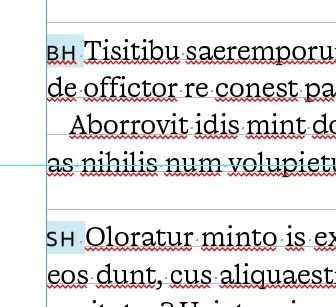
Hello everyone! I'd like to know it is possible to add automatically an em space after a nested style of a paragraph style (e.g. after the initials of a person interviewed, like here). Thanks!

 

This topic has been closed for replies.
Correct answer Willi Adelberger
  1. Create a character style with extended horizontal scaling
  2. Add another nested style after the first (until the space) one for only 1 space.

1 reply

Willi Adelberger
Community Expert
Willi AdelbergerCommunity ExpertCorrect answer
Community Expert
November 26, 2024
  1. Create a character style with extended horizontal scaling
  2. Add another nested style after the first (until the space) one for only 1 space.
gregollaAuthor
Participating Frequently
November 26, 2024

Thanks for your answer Willi, but there's no "space" options in the nested style panel, and the new character style is applied to the first character after the nested style 😕😕

Willi Adelberger
Community Expert
Community Expert
November 26, 2024

Type a space " " into the field as you can do with any other character.