

How to calculate the number of lines occupied by the "space before and space after" in the current selection area?
Hello everyone.
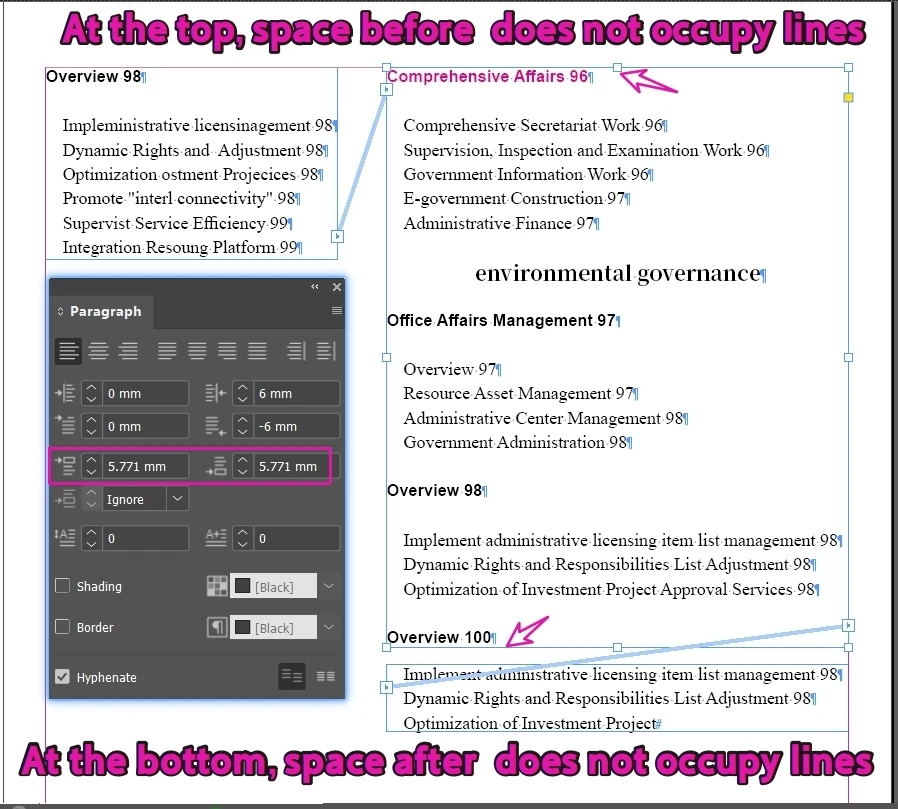
As shown in the figure below, suppose I have selected the text in the largest text box on the right.
Assuming the value of “space before” is SpBValue, the value of “space after” is SpAValue, and the leading is “myLeading”
According to the following logic, how to calculate how many lines are occupied by the “space before and space after” in the selected area?
if(SpBValue<=myLeading||SpAValue<=myLeading){
//Consider occupying a row
}
if((SpBValue>1.2*myLeading&&SpBValue<2*myLeading)||(SpAValue>1.2*myLeading&&SpAValue<2*myLeading)){
//Consider occupying 2 rows
}
There are still 3 lines occupied, and my logic needs to be reorganized (i.e. if it is greater than 1.2, it is considered to occupy one line)
It should be noted that:
When a line with a “space before” at the top of the text box, the “space before” does not occupy a line.
Similarly, line with a “space after” do not occupy lines when it at the bottom of the text box.
Thank you very much.
 AdChoices