

dublove
Legend
March 26, 2026
Answered

How to calculate the page layout, column width, and column spacing with scripting

  • March 26, 2026
  • 2 replies
  • 62 views

I feel like the method I’m using now isn’t quite right.
Is the approach different for single-column layouts versus layouts with two or more columns?

Assuming the column widths are equal.

Also, how to know what is the number of columns?

var doc = app.activeDocument;
var item = doc.selection[0];
var items = doc.selection;
var pp = item.parentPage;
var cp = pp.marginPreferences.columnsPositions;
var csp,law,cw;
    //Calculate column spacing
    if (cp.length == 2) {
        csp = 0;
    }

    else if (cp.length > 2) {
        var csp = cp[2] - cp[1];
    }
//typearea(?Layout)
var law=cp[cp.length-1]-cp[0]

//Column width
cw=cp[1]-cp[0]
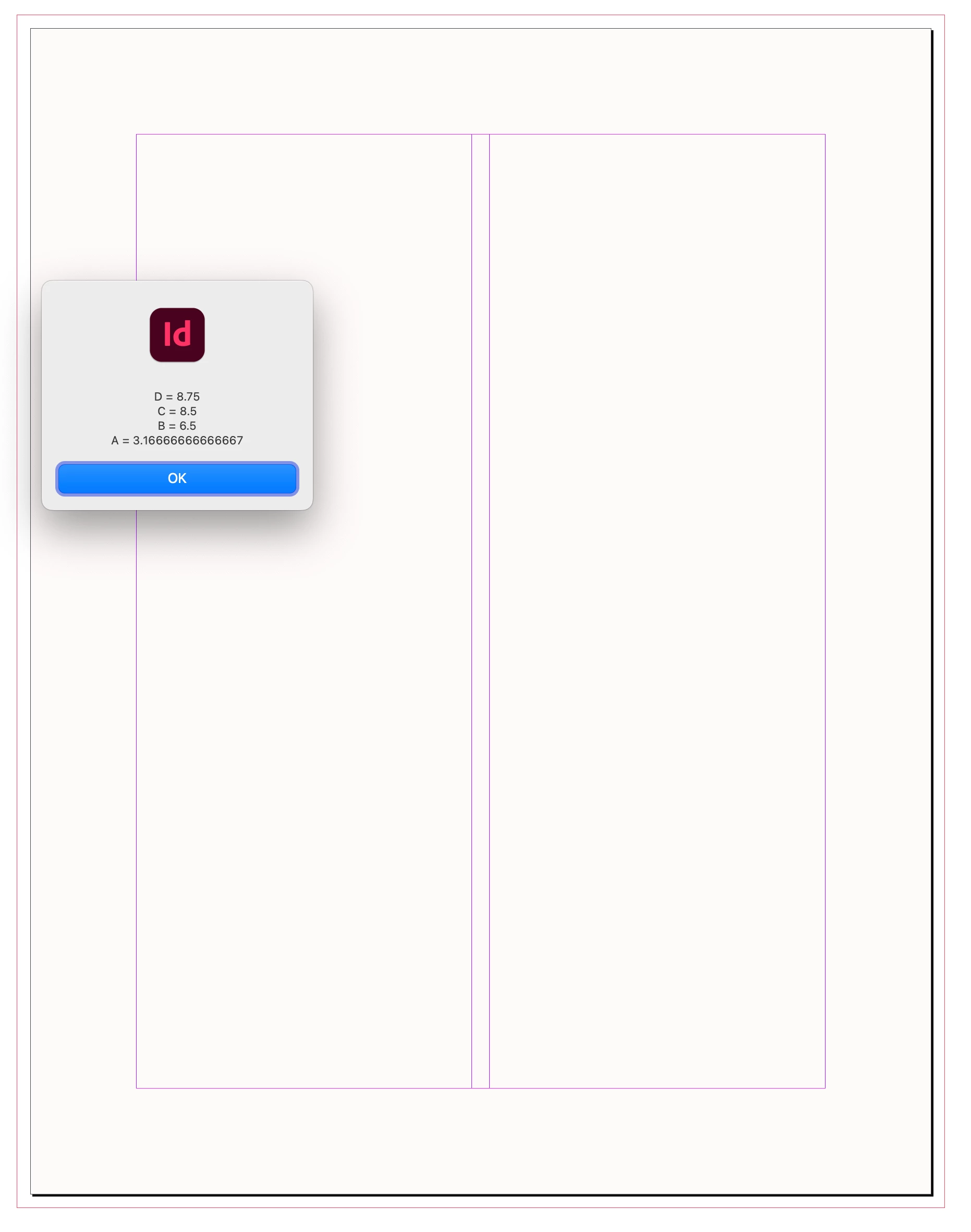
 

    Correct answer rob day
    var d = app.activeDocument;
    //d page 1
    var p = d.pages[0];
    //the page bounds array
    var pb = p.bounds
    //an array of column positions starting with 0
    var mcc = p.marginPreferences.columnsPositions;
    //the document’s left and right bleed settings
    var lb = d.documentPreferences.documentBleedInsideOrLeftOffset
    var rb = d.documentPreferences.documentBleedOutsideOrRightOffset


    //the page width plus left and right bleeds
    var D = (pb[3]-pb[1])+(lb+rb)
    //page width
    var C = pb[3]-pb[1]
    //distance from left to right margin guides
    var B = mcc[3]
    //the left column’s width
    var A = mcc[1]

    alert("\rD = " + D + "\rC = " + C + "\rB = " + B + "\rA = " + A)


    2 replies

    rob day
    Community Expert
    rob dayCommunity ExpertCorrect answer
    Community Expert
    March 27, 2026
    var d = app.activeDocument;
    //d page 1
    var p = d.pages[0];
    //the page bounds array
    var pb = p.bounds
    //an array of column positions starting with 0
    var mcc = p.marginPreferences.columnsPositions;
    //the document’s left and right bleed settings
    var lb = d.documentPreferences.documentBleedInsideOrLeftOffset
    var rb = d.documentPreferences.documentBleedOutsideOrRightOffset


    //the page width plus left and right bleeds
    var D = (pb[3]-pb[1])+(lb+rb)
    //page width
    var C = pb[3]-pb[1]
    //distance from left to right margin guides
    var B = mcc[3]
    //the left column’s width
    var A = mcc[1]

    alert("\rD = " + D + "\rC = " + C + "\rB = " + B + "\rA = " + A)


    dublove
    dubloveAuthor
    Legend
    March 27, 2026

    Hi ​@rob day 

    When the layout has only one column, the margin width behaves abnormally

    Also, is it possible to directly determine the number of columns?


    rob day
    Community Expert
    Community Expert
    March 27, 2026

    If you don’t know the number of columns use


    var B = mcc[mcc.length-1]


    rob day
    Community Expert
    Community Expert
    March 26, 2026

    Just to clarify, are you trying to get the page margin guide’s column count, or the selected text frame’s column count? They are not the same.


    var item = app.activeDocument.selection[0];
    var pp = item.parentPage;
    //the margin guides
    var mcc = pp.marginPreferences.columnCount
    //the selected textframe’s column count
    var scc = item.textFramePreferences.textColumnCount

    alert("\nPage margin's column count: "+ mcc + "\nSelection’s column count: " + scc)


    dublove
    dubloveAuthor
    Legend
    March 27, 2026

    Thank you.

    Both are needed.
    Is there a faster way to determine the column width and the type area width?

    Also, I’d like to know the English names for majors A, B, C, and D, and how to calculate them.


    Community Expert
    March 27, 2026

    @dublove read the following article it explains what you are asking

    https://www.adobe.com/uk/learn/indesign/web/set-print-bleed?learnIn=1&locale=en-GB

    -Manan