


Participant
September 2, 2026
Answered

How to centre text in a frame when using tabs to create a table?

  • September 2, 2026
  • 3 replies
  • 43 views

I have used the tabs panel on indesign to set regular sized tabs to create a middle aligned table. However, no matter what I do the first column is always aligned to the left even when the text box is set to be middle aligned. As soon as I press tab the first column always wants to be next to the text box. Does anyone know how to make the first column middle aligned?

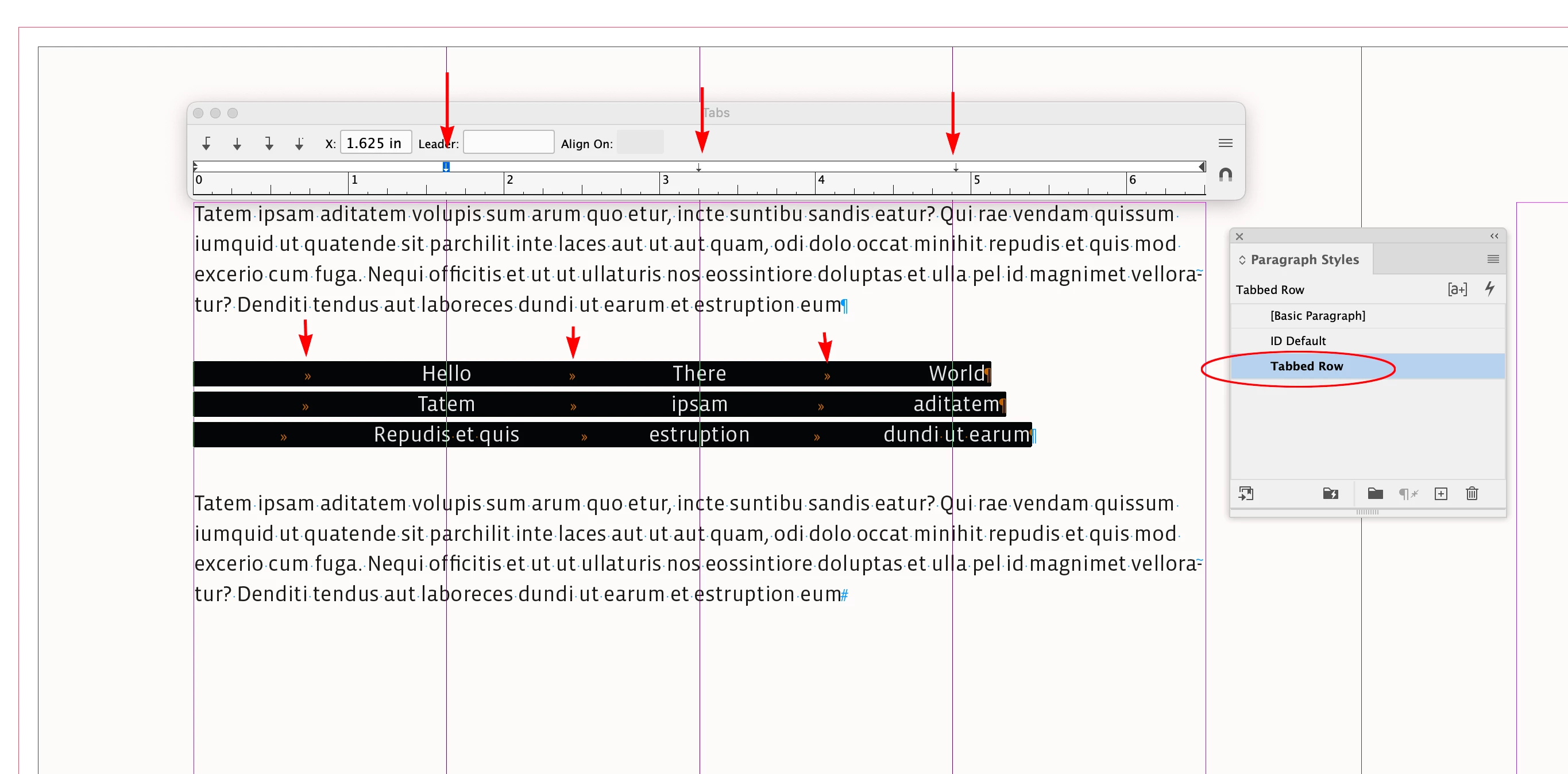
    Correct answer rob day

    Hi ​@abstract_Meadowd197 , Here is an example of ​@Gord@APL ’s centered tabs, which can be saved as a Paragraph Style:


    3 replies

    rob day
    Community Expert
    rob dayCommunity ExpertCorrect answer
    Community Expert
    September 2, 2026

    Hi ​@abstract_Meadowd197 , Here is an example of ​@Gord@APL ’s centered tabs, which can be saved as a Paragraph Style:


    BobLevine
    Community Expert
    Community Expert
    September 2, 2026

    @Gord@APL is correct, but why don’t you use a table?

    Gord@APL
    Inspiring
    September 2, 2026

    You’ll need to set a centre-aligned tab for each column, then start each line with a tab.