February 12, 2020
Answered

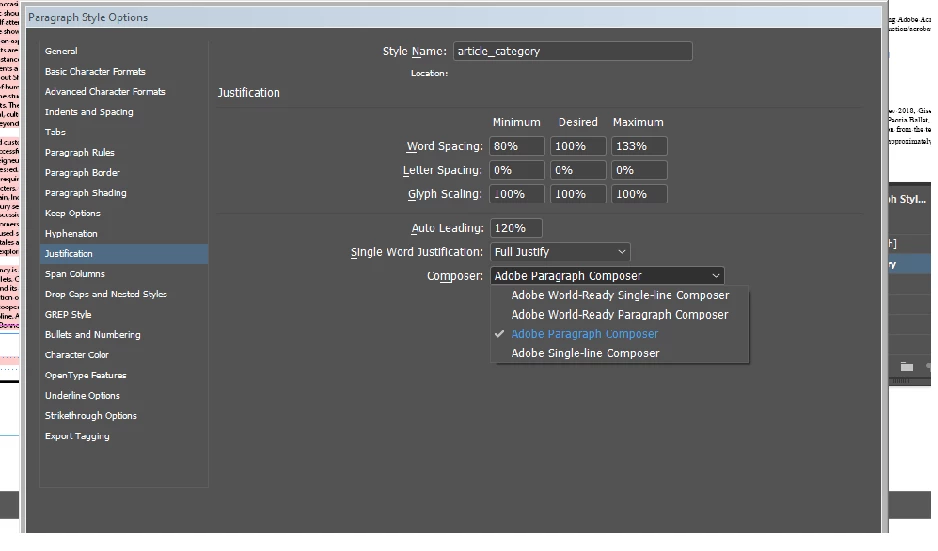
how to change indesign composer
  • February 12, 2020
  • 3 replies
  • 3059 views

I will change world ready single-line composer 

This topic has been closed for replies.
Correct answer Manan Joshi

Try the following


var myDoc = app.documents[0];
var para = myDoc.allParagraphStyles;
for (var i = 0; i < para.length; i++) 
{
	if(para[i].name != "[No Paragraph Style]")
		para[i].composer = "Adobe World-Ready Single-line Composer";
}


As a practice we should not also change the properties of Basic Paragraph Style, so the above code can be changed accordingly by adding the condition to the if statement. The reason your code was failing was that it would change the No Paragraph Style as well which is not permissible.


-Manan

3 replies

Community Expert
February 12, 2020

Hi raja,

look into the property composer of object Paragraph or ParagraphStyle.

Apply this string as value for Adobe World-Ready Single-line Composer:

"$ID/HL Single Optyca"

This will work for all language versions of InDesign that support the Adobe World-Ready composers.


Here the list of composer strings that are supported by InDesign CS6 and above:

/*

"$ID/HL Single J" > Adobe Japanese Single-line Composer
"$ID/HL Composer J" > Adobe Japanese Paragraph Composer

"$ID/HL Single" > Adobe Single-line Composer
"$ID/HL Composer" > Adobe Paragraph Composer

"$ID/HL Single Optyca" >  Adobe World-Ready Single-line Composer
"$ID/HL Composer Optyca"  > Adobe World-Ready Composer

*/


Regards,
Uwe Laubender

( ACP )


Community Expert
February 12, 2020

Try the following

app.documents[0].paragraphStyles.itemByName("article_category").composer = "Adobe World-Ready Single-line Composer"


-Manan

-Manan
February 12, 2020

var myDoc = app.documents[0];
var para = myDoc.allParagraphStyles;
for (var i = 0; i < para.length; i++) {
para[i].composer = "Adobe Single-line Composer";

}

is not working

Manan JoshiCommunity ExpertCorrect answer
Community Expert
February 12, 2020

Try the following


var myDoc = app.documents[0];
var para = myDoc.allParagraphStyles;
for (var i = 0; i < para.length; i++) 
{
	if(para[i].name != "[No Paragraph Style]")
		para[i].composer = "Adobe World-Ready Single-line Composer";
}


As a practice we should not also change the properties of Basic Paragraph Style, so the above code can be changed accordingly by adding the condition to the if statement. The reason your code was failing was that it would change the No Paragraph Style as well which is not permissible.


-Manan

-Manan
Willi Adelberger
Community Expert
Community Expert
February 12, 2020

It is done in the very same dialog you show us. I don't understand your problem?

Why do you need the World Composer? With which language do you work?

February 12, 2020

working indesign javscript. how change paragraph style >justification >composer