
Answered
How to change join (Mitre Join, Bevel Join or Round Join) in text using a script
Hello. I can't figure out how to change the JOIN in the text (Mitre Join, Bevel Join or Round Join). For example, I will attach a simple version of how I would like to change (my main script is very large).
var doc = app.activeDocument;
var textFrame = doc.textFrames.add();
textFrame.geometricBounds = [0, 0, 100, 200];
textFrame.contents = "Hello World!";

var text = textFrame.texts[0];
text.strokeWeight = 5;
text.strokeColor = doc.colors.item(0);
text.strokeJoinType = StrokeJoinType.MITER_END_JOIN;

// Альтернативні варіанти:
// text.strokeJoinType = StrokeJoinType.BEVEL_END_JOIN;  // Bevel Join
// text.strokeJoinType = StrokeJoinType.ROUND_END_JOIN;  // Round Join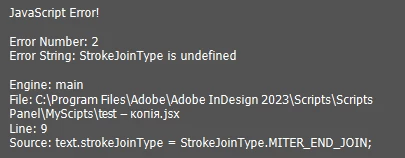
In general, the basic idea of my script is as follows: a window, a text input field, a stroke size and a drop-down list with Mitre Join, Bevel Join and Round Join. InDesign sets Mitre by default, but I need to switch between them.


 AdChoices