Inspiring
February 12, 2022
Answered

how to change position of new xml element as immediate sibling to current xml Element using JSscript
  • February 12, 2022
  • 2 replies
  • 832 views

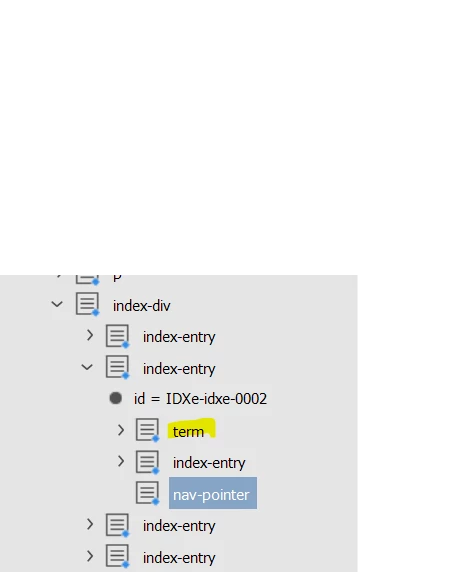
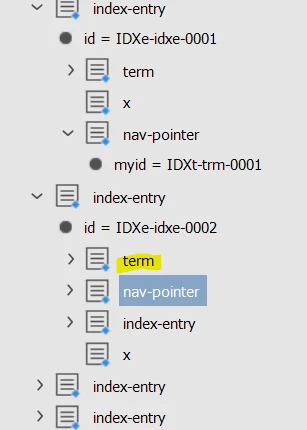
I am trying to change position of nav-pointer tag as immediate sibling of term element as like shown below,
This topic has been closed for replies.
Correct answer Sunil Yadav

Try this code:

moveTerm()
function moveTerm(){
    var myDoc = app.documents[0];
    var xPath = ['//term'];
    var root = myDoc.xmlElements[0];
    var node = null;
    try{
        var proc = app.xmlRuleProcessors.add(xPath);
        var match = proc.startProcessingRuleSet(root);
        while (match != undefined){
            node = match.element;
            match = proc.findNextMatch();
            if(node != null && node != undefined){
                if(node.parent.xmlElements.length > node.index+1){
                    var nextSibling = null;
                    for(var i = node.index+1; i < node.parent.xmlElements.length; i++){
                        if(node.parent.xmlElements[i].markupTag.name == "nan-pointer"){
                            nextSibling = node.parent.xmlElements[i];
                            break;
                            }
                        }
                    if(nextSibling != null){
                        nextSibling.move(LocationOptions.after, node);
                        }
                    }
                }
            }
        }
    catch(ex){}
    finally{
        proc.endProcessingRuleSet();
        proc.remove();
        }
    }

Best

Sunil

2 replies

Sunil Yadav
Sunil YadavCorrect answer
Legend
February 12, 2022

Try this code:

moveTerm()
function moveTerm(){
    var myDoc = app.documents[0];
    var xPath = ['//term'];
    var root = myDoc.xmlElements[0];
    var node = null;
    try{
        var proc = app.xmlRuleProcessors.add(xPath);
        var match = proc.startProcessingRuleSet(root);
        while (match != undefined){
            node = match.element;
            match = proc.findNextMatch();
            if(node != null && node != undefined){
                if(node.parent.xmlElements.length > node.index+1){
                    var nextSibling = null;
                    for(var i = node.index+1; i < node.parent.xmlElements.length; i++){
                        if(node.parent.xmlElements[i].markupTag.name == "nan-pointer"){
                            nextSibling = node.parent.xmlElements[i];
                            break;
                            }
                        }
                    if(nextSibling != null){
                        nextSibling.move(LocationOptions.after, node);
                        }
                    }
                }
            }
        }
    catch(ex){}
    finally{
        proc.endProcessingRuleSet();
        proc.remove();
        }
    }

Best

Sunil

Legend
February 13, 2022

I have never used xmlRuleProcessors, so it was very helpful.
Thank you.

Sunil Yadav
Legend
February 14, 2022

If you use xmlRuleProcessor, you will never have to be dependent on gluecode ever. Rule processor will find each & every node in sequential manner.

evaluateXPathExpression is also used for finding node (it won't be able find nodes in sequntial).

rob day
Community Expert
Community Expert
February 12, 2022

Hi @Karthik SG , i don‘t do much InDesign XML work, but I think you would use the XMLElement move method. I can’t see your root, but if index-entry was level 1 then:


//root
var xroot = app.activeDocument.xmlElements.item(0);
//root’s elements
var xml1 = xroot.xmlElements.item(0);
//xml1’s elements
var xml2 = xml1.xmlElements.item(0);
//the 1st element in xml2
var term = xml2.xmlElements.item(0)
//the 3rd element in xml2
var newpoint = xml2.xmlElements.item(2);

//move newpoint
newpoint.move(LocationOptions.after, term);


$.writeln(xml1.markupTag.name)
$.writeln(xml2.xmlElements.count(0))
$.writeln(xml2.xmlElements.item(2).markupTag.name)

move method

Legend
February 12, 2022

I tried using XPath.

If each element is a sibling, move.

var targetElementName = "nav-pointer";
var referenceElementName = "term";

// Target element with the reference element in the same hierarchy
var targetElementArray = app.activeDocument.xmlElements.firstItem().evaluateXPathExpression("//" + targetElementName + "[../" + referenceElementName + "]");

// Reference element with the target element in the same hierarchy
var referenceElementArray = app.activeDocument.xmlElements.firstItem().evaluateXPathExpression("//" + referenceElementName + "[../" + targetElementName + "]");

for(var i =0; i < referenceElementArray.length; i++){
    targetElementArray[i].move(LocationOptions.AFTER,referenceElementArray[i]);
}