
Participant
February 27, 2018
Question

How to change spacing between frames in existing grid of frames?

  • February 27, 2018
  • 2 replies
  • 3214 views

Hi, is there any way to edit the spacing between an existing grid of frames?

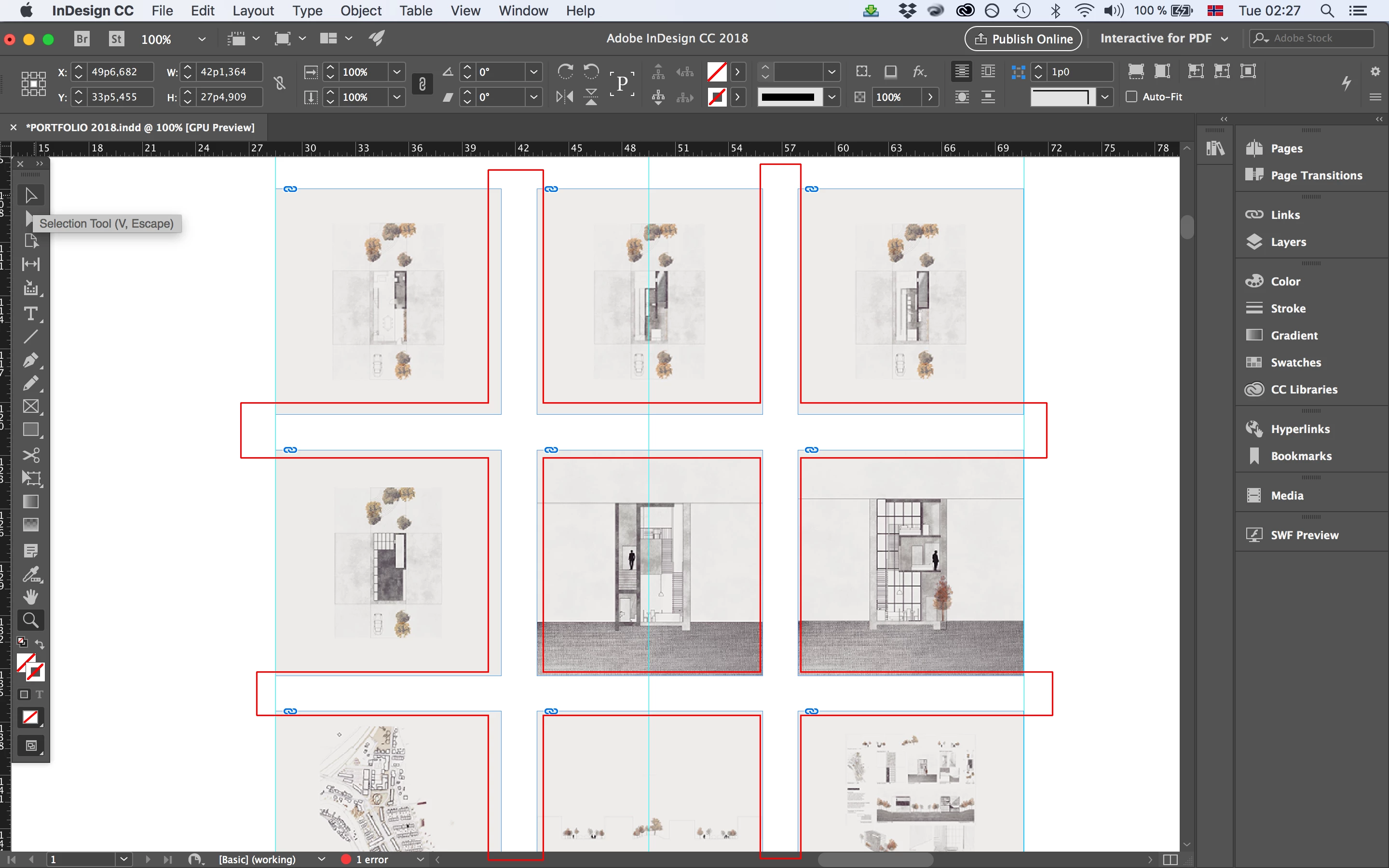
I am working on a document with a grid of frames where each of the frames are set to be like sided squares. I would like to edit the space between them while keeping the form of each frame as a like sided square. Therefore I cannot use the gap tool. Is there any way to edit the spacings in the grid after it has been created and filled with images? I would like to edit all of them at once naturally, not each spacing individually.

Attached is an example screenshot where the spacings are marked in case there is any confusion.
This topic has been closed for replies.

2 replies

vinny38
Legend
February 27, 2018

Hi there.

If I understand the question, this looks like a job for the (fairly unknown) Live Distribute INDD feature.

https://indesignsecrets.com/indesign-tip-using-live-distribute.php

Participant
February 27, 2018

Thank you very much Vinny, that´s it!

Community Expert
February 27, 2018

Hi,

should the images inside the frames change their position relative to the page?

Do you want to have still squares after changing the gaps?
How big is the gap now? How should it be?

Regards,
Uwe

Participant
February 27, 2018

Hi Uwe, thank you for your reply. The answer below is exactly what I was looking for.