
Known Participant
August 3, 2021
Answered

How to change text direction in Arabic & Hebrew languages fonts from right-to-left (RTL) in InDesign

  • August 3, 2021
  • 3 replies
  • 1548 views

good morning I' vedownloaded the myriad hebrewto do a hebrew version of my layout.

Unfortunally I 've notisted that the text goes from link to right unstead of from right to link, although I set the language as hebrew. How can I fix this problem? thaks in advance Giuliana


{Renamed by MOD}
Correct answer Julie26023356ci1y

Do you actually have text selected when assigning the direction, or entered new text after making the formatting adjustment?


I tried it on selected text and entering a new textbox.  Neither made a difference.

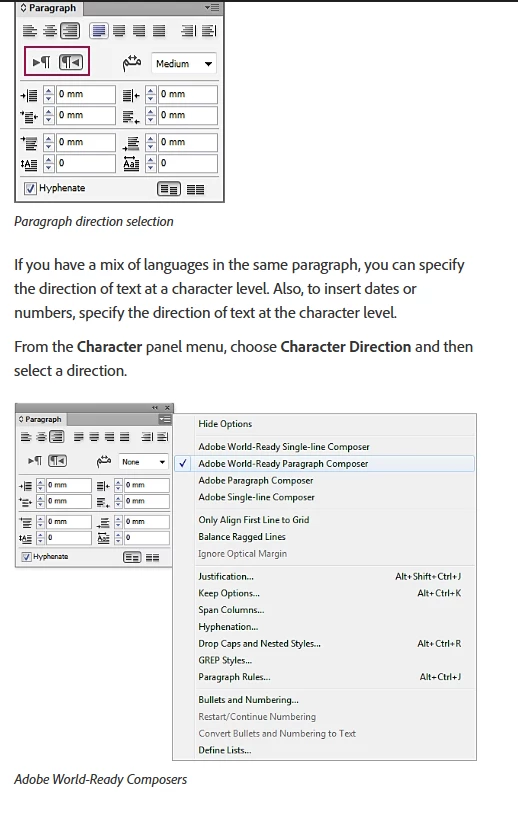
However, I figured it out!  Once I chose "Adobe World-Ready Paragraph composer" in the Paragraph panel options, everything worked! The directions on this page, https://helpx.adobe.com/indesign/using/arabic-hebrew.html, are confusing, because the text of the directions talk about the options in the Character panel, but then the picture below shows the needs to change it to "Adobe World-Ready Paragraph Composer" in the paragraphy panel, below the text.  So I must have read the text and skipped the picture.  Probably something that should be fixed in the directions.  🙂

Thanks for your help!


3 replies

Anshul_Saini
Community Manager
Community Manager
August 3, 2021

Hi there,


Sorry about this trouble. Thanks for confirming that you are using the Middle East and North African edition of InDesign. I would suggest you to try the steps shared in this help article (https://helpx.adobe.com/indesign/using/arabic-hebrew.html) and see if that helps to resolve the issue.


Let us know how it goes.

Regards,

Anshul Saini

Participant
December 16, 2024

Hi - 
I am experiencing the same issue as the person above.  I am using the  Middle East and North African edition of InDesign, and see the option to move the text from right to left in the character panel, but when I select that option the text still does not move.  I did review the Adobe help document that you referenced, and tried everything it suggested, but it still did not resolve the issue.  Can you help me?

Peter Spier
Community Expert
Community Expert
December 16, 2024

Do you actually have text selected when assigning the direction, or entered new text after making the formatting adjustment?

Known Participant
August 3, 2021

Thank Peter, as Adbe suggested  I switched temporarly my account adobe to hebrew languages and then I've installed my ID againg and I was sercheing for MENA font in the Adobe font, but MENA doesn't exist, there is only Myriad , Adobe and Noto as hebrew language.

Unfortunally doesn't still work, this set up didn' t fix any thing, the direction of the hebrew texts are still wrong way. 

There is any body can help me? Thanks

Giuliana

Peter Spier
Community Expert
Community Expert
August 3, 2021

To get the right to left language options you'll need to install the MENA (Middle East/North Africa) version of ID.

Should be available from the CC app.