
Known Participant
February 27, 2023
Answered

How to change text direction in the latest version?

  • February 27, 2023
  • 3 replies
  • 14674 views

I'm using Indesign 2023 and I'm trying to type Arabic. I turned on the Adobe World Ready option in the Paragraph panel, but the direction of the text is wrong. symbols end up in the opposite area instead of the correct area. 


I looked at YouTube videos and the place where they go does not exist in my version, where should I go for this? to make the text direction RTL for a certain paragraph? 


Thanks!
Correct answer Joel Cherney

Thanks Joel for the info. I can't see where to change the character direction in the character panel nor character style though. Using the latest CC on a Mac. 


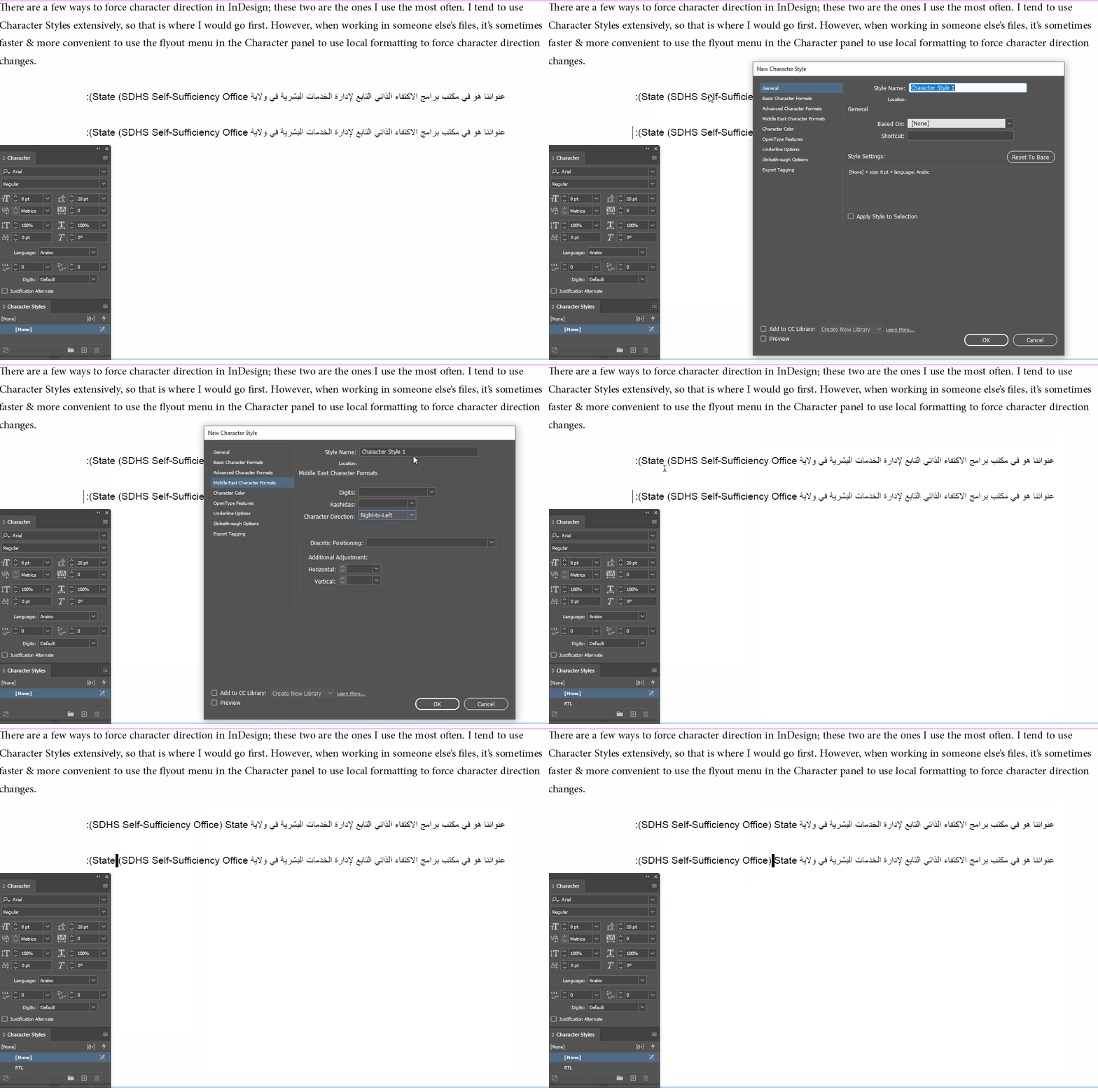
You said that you knew where to set a whole paragraph to run RTL, so I assume that you have a version of InDesign installed that has full RTL tools. If you're not using the right version of InDesign, these screen captures won't make much sense:


3 replies

Participant
October 17, 2023


Participant
October 28, 2024

this helps!!! big time! Thank uuuu

Robert at ID-Tasker
Legend
February 27, 2023

On Windows there is a trick with changing info in the Registry to get all the RTL functionality in EN version.


https://www.indiscripts.com/post/2009/10/switching-indesigns-ui-language-in-windows


Here is an option on Mac:


https://creativepro.com/change-ui-language-indesign-cs6-cc/


Known Participant
September 3, 2024

I have a similar problem but I would like to be able to set just one or two words in Persian within English text. My client sent me the manuscript for the book in Word and I can see that when I change the font in Indesign to a Persian font, the direction of the word is still left to right. I know how to set a whole paragraph reading right to left, but is there a script to assign just one or two words that will read right to left WITHIN English text? thanks!

Known Participant
September 3, 2024

Hmmm. I just changed the whole paragraph which includes both English and Persion to World-Ready Paragraph composer and seems to work for both languages. Fingers crossed it works throughout the book.

Joel Cherney
Community Expert
Community Expert
February 27, 2023

Well, I'd guess that you don't have the Arabic version installed, then. If you shut down Indesign and go to the Creative Cloud app, go to File -> Preferences -> Apps -> Default install language, I bet you'll see "English". But if you pull down the dropdown, you could change to "English اللغة العربية" and reinstall. It won't take long at all, and when you restart InDesign, I bet you'll see the tools you need to set Arabic language and right-to-left paragraph direction. 

HK5ED897Author
Known Participant
February 27, 2023

Will that change all of the program into Arabic? I just need it for this one project, I don't speak the language to use it full term. 

in Photoshop and Illustrator I have the option to change text direction with one click in the paragraph styles, I didn't install anything for that just a quick change in the preferences. Doesnt  InDesign has something similar in its preferences? 

thanks for you comment, I appreciate it!

Joel Cherney
Community Expert
Community Expert
February 27, 2023

Yeah, PS and Illustrator both have some minimal complex-text handling tools. InDesign's handling of RTL text is rather more complicated & more robust, for a variety of reasons that probably don't interest you, but the upshot is that the tools for handling Arabic are exposed only in "Middle East/North Africa" versions of the app. The version I was directing you to download was the Middle Eastern toolset with the English language interface. So you wouldn't have an Arabic UI after reinstalling. The tools are all there in your en_US app, but they're not in the UI.


However, if you don't wan't to go through that reinstallation, you can just save this in your Scripts folder. All of those RTL-handling tools that are in the ME editions are in the plain vanilla English tools, but they're not in the UI, and are only accessible via script. I grabbed it from an article by Thomas Phinney about doing RTL work in CS4, so it's been kicking around for a while...


//DESCRIPTION: Toggles R2L and L2R paragraph direction to selected text
main ();
function main ()
	{
	try
		{
		if (app.selection[0].paragraphDirection == ParagraphDirectionOptions.rightToLeftDirection)
			app.selection[0].paragraphDirection = ParagraphDirectionOptions.leftToRightDirection
		else
			app.selection[0].paragraphDirection = ParagraphDirectionOptions.rightToLeftDirection
		}
	catch (_){}
	}


However, this will only work for you if you don't need to assign language, or deal with numeral style or numeral direction. If you have to do more than just flip the paragraph direction, you'd be best served by just downloading the ME version with the English interface. But, all these things are accessible via scripting, if you'd rather go in that direction.