
Participant
September 4, 2021
Answered

How to change text frame box color

  • September 4, 2021
  • 2 replies
  • 1534 views

Hi.

Usually my default frame text box color is blue, but now it's yellow for some reason, which makes it really difficult to see against white, and I can not for the life of me figure out how to change it back.


This topic has been closed for replies.
Correct answer Bill Silbert

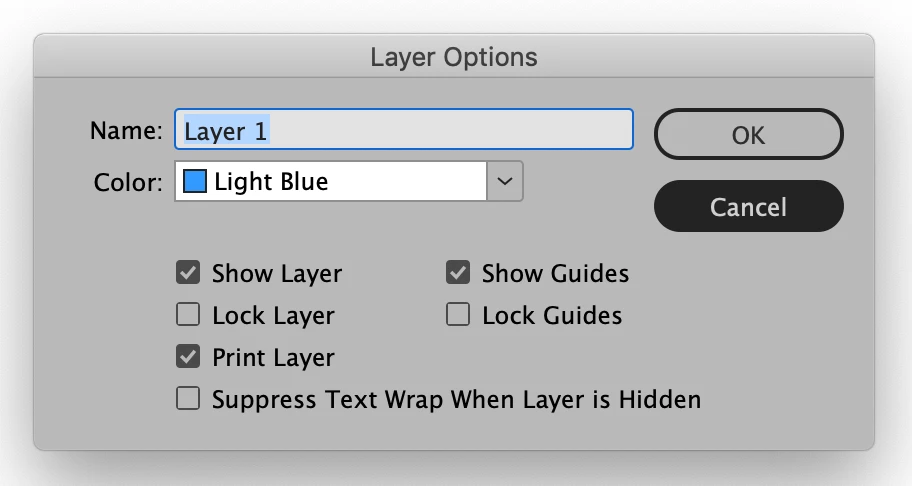
It sounds like what you are talking about is the color that frames have that depends on what layer they are on. If you double-click on the default layer you will get the Layer Options dialog box that has a pull-down menu for layer color. Choose that menu and pick a more pleaasing color to display your unstroked frames.

2 replies

Bill Silbert
Community Expert
Bill SilbertCommunity ExpertCorrect answer
Community Expert
September 4, 2021

It sounds like what you are talking about is the color that frames have that depends on what layer they are on. If you double-click on the default layer you will get the Layer Options dialog box that has a pull-down menu for layer color. Choose that menu and pick a more pleaasing color to display your unstroked frames.

Participant
September 4, 2021

yes that's it! thanks so much 🙂

Bill Silbert
Community Expert
Community Expert
September 4, 2021

Happy to help.

Participant
September 4, 2021

actually it's for the rectangle frame tool and not the frame text box.