
Inspiring
August 23, 2023
Question

How to change the default Object Style

  • August 23, 2023
  • 5 replies
  • 967 views

Hi everyone,

I Should change default Object Style and I found out these methods, but How should I behave in these cases where nothing is documented?

It's really difficult to have a good workflow when I encounter these commands which are not documented, so I have to try and try, also every time I encounter IPMUnknown interfaces I don't know how to behave, should they be left empty? do they have to be filled? I have no idea without some documentation.

I would need some tips from someone with a lot of experience to know how to behave in these situations, because I'm always reduced to asking the community slowing down my workflow considerably.


Anyway, back to changing the default object style, I've tried these methods:

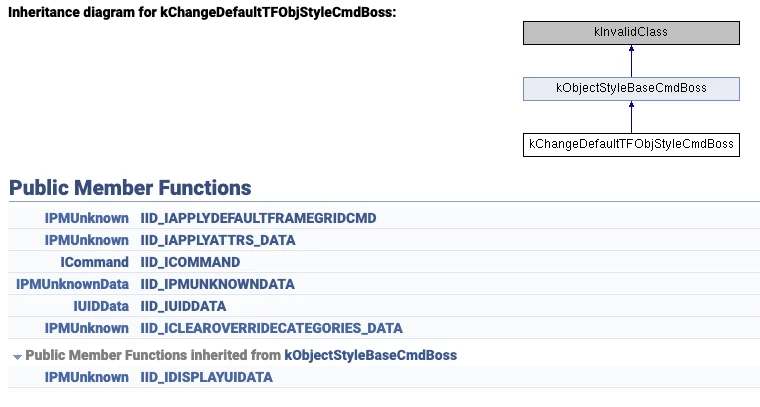
1) Using kChangeDefaultTFObjStyleCmdBoss
 

InterfacePtr<ICommand> changeDefaultTFObjStyleCmd(CmdUtils::CreateCommand(kChangeDefaultTFObjStyleCmdBoss));
if(!changeDefaultTFObjStyleCmd)
  break;
            
InterfacePtr<IUIDData> UIDData(changeDefaultTFObjStyleCmd, UseDefaultIID());
if(!UIDData)
  break;
UIDData->Set(DATABASE, UIDStyle);
            
if(CmdUtils::ProcessCommand(changeDefaultTFObjStyleCmd) != kSuccess) // Thread 1: EXC_BAD_ACCESS (code=1, address=0x0)
  break;


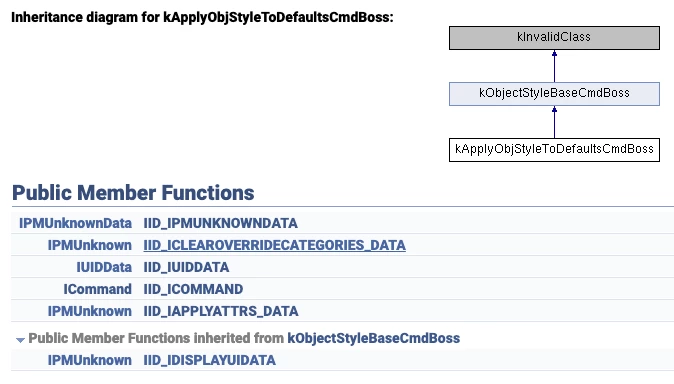
2) Using kApplyObjStyleToDefaultsCmdBoss
 

InterfacePtr<ICommand> applyObjStyleToDefaultsCmd(CmdUtils::CreateCommand(kApplyObjStyleToDefaultsCmdBoss));
if(!applyObjStyleToDefaultsCmd)
  break;

InterfacePtr<IUIDData> UIDData(applyObjStyleToDefaultsCmd, UseDefaultIID());
if(!UIDData)
  break;
UIDData->Set(DATABASE, UIDStyle);

if(CmdUtils::ProcessCommand(applyObjStyleToDefaultsCmd) != kSuccess) // Thread 1: EXC_BAD_ACCESS (code=1, address=0x0)
  break;


3) Using IStyleGroupManager::Set______()
 

InterfacePtr<IStyleGroupManager> styleGroupManager(DOCUMENT->GetDocWorkSpace(), IID_IOBJECTSTYLEGROUPMANAGER);
if(!styleGroupManager)
  break;

styleGroupManager->SetDefaultStyleUID(UIDStyle);
styleGroupManager->SetDefaultTextStyleUID(UIDStyle);
styleGroupManager->SetDefaultFrameGridStyleUID(UIDStyle);


But when I try to create new text frame apply [None] anyway, so I think that I sholud usekChangeDefaultTFObjStyleCmdBoss or kApplyObjStyleToDefaultsCmdBoss


Stefano

This topic has been closed for replies.

5 replies

Legend
August 25, 2023

Unfortunately this generated documentation is very incomplete. The debug build already shows some more information. E.g. many interface IDs are just to have a minimum comment, or to allow duplicate use of the same interface. The backing implementation ID is one way to tell more, and you can even look up its name. This information is available e.g. from IObjectModel, IClassInfo. Likely the debug build even has some deeply nested submenu to output all of them as text, I don't know because I use my own that also includes the data from the interfaces, as far I have covered them over the years.


Let's have a look at that kChangeDefaultTFObjStyleCmdBoss :

IID_IAPPLYATTRS_DATA : kBoolDataImpl, IID_IAPPLYDEFAULTFRAMEGRIDCMD : kFalseInitBoolDataImpl are IBoolData.  IID_IDISPLAYUIDATA is not so obvious, but another IBoolData. Not sure where I found out about that a decade ago. IID_ICLEAROVERRIDECATEGORIES_DATA : kObjStylesAttrCategoriesListImpl , so that would be an IID_IOBJSTYLESATTRCATEGORIESLIST => IObjStylesAttrCategoriesList.

Of course that IID_IPMUNKNOWNDATA points to another boss, now – the first time that I looked at this – that would be an kObjectStylesTargetBoss which I don't remember having come across. Pretty similar interfaces to an object style itself, but that's where I'd also burn a few hours to see what they all mean, especially in this context, how to prefill them etc.

Peter Spier
Community Expert
Community Expert
August 24, 2023

so @Stefano5C37 seems to have the same experience I do. I'd love to find out I'm wrong, but I've seen this over every version since object styles were introduced, over multiple installs on multiple machines, through new prefs and anything else you can think of.

Community Expert
August 24, 2023

Hi @Stefano5C37,

There isn't much we an do if we have undocumented IPMUnkown interfaces, we don't have the header files included for the interface hence we can't possibly use it. In your case did you trace the process by doing the process manually and then checking the commands InDesign fires and the interfaces it shows in the trace. I suppose you are thinking on the same lines as I see your post that asked to how do this manually.

-Manan

-Manan
Peter Kahrel
Community Expert
Community Expert
August 23, 2023

And then I remembered:

app.activeDocument.pageItemDefaults.appliedTextObjectStyle = (object style)

app.activeDocument.pageItemDefaults.appliedGraphicObjectStyle = (object style)
Peter Spier
Community Expert
Community Expert
August 24, 2023

@Peter Kahrel does this actually work for graphic frames? Since day one I've found manually setting a default style for graphic frames is irrelevant (at least for drawn frames). Regardless of what is set as the default, as soon as the frame is drawn it recverts to [None].

Robert at ID-Tasker
Legend
August 24, 2023

Someone on another thread shown a screenshot where you can set default ObjectStyle - will try to find it. 


Peter Kahrel
Community Expert
Community Expert
August 23, 2023

I discovered how to do this after a long search not so long ago, but I've forgotten it. I was looking for (and eventually found) the equivalent of 

app.documents[0].textDefaults.appliedParagraphStyle = ...

to set a new default paragraph style.


Something similar to set a default object and/or graphic style exists, and because it's nowhere near where you expect it, it's not easy to find.