A loop through the said array gives you access to every paragraph style in your document.
Below the loop will write the name of every paragraph style and the length of styleExportTagMaps array to the JavaScript console of the ExtendScript Toolkit app:
var paraStylesArray = app.documents[0].allParagraphStyles;
for( var n=0; n<paraStylesArray.length; n++ )
{
$.writeln( paraStylesArray[n].name +"\t"+ paraStylesArray[n].styleExportTagMaps.length );
};
That's for the start. If you see length 0, you have the default situation.
If you want to change something you have to add a new styleExportTagMap to the paragraph style.
The method for this is styleExportTagMaps.add() where you give an object as argument that contains the needed property-value pairs. For your change in PDF this should be:
{
exportType : "PDF" ,
exportTag : "H2"
}
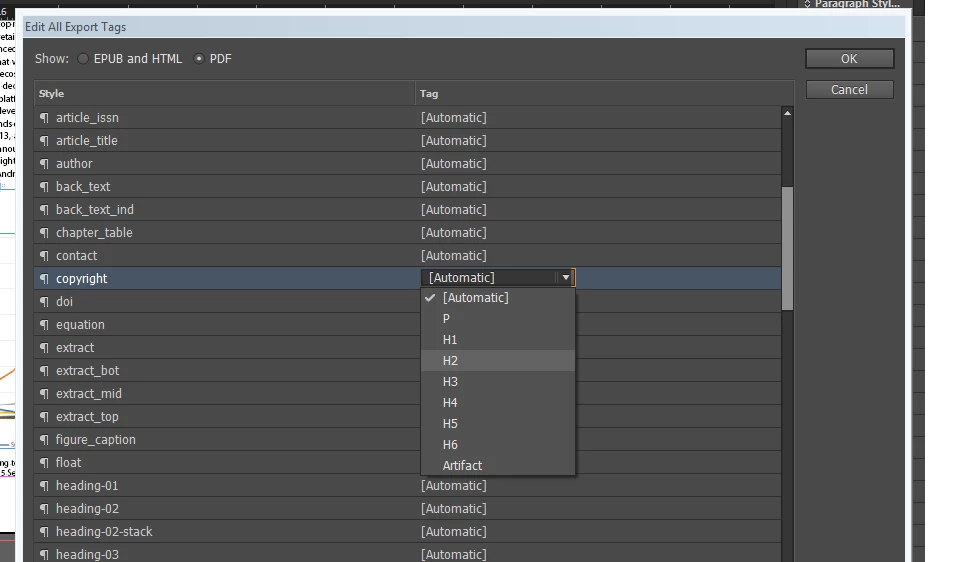
I would do some changes in the UI and read out the styleExportTagMaps array to see what's needed for what purpose.
loop the allParagraphStyles array of the document to get your paragraph style and look into property styleExportTagMaps of object paragraphStyle ( or characterStyle ). Details in DOM documentation compiled by Gregor Fellenz:
If all is set to default the length of styleExportTagMaps is 0. Then you have to add a new styleExportTagMap using method add() with properties. If I look into your screenshot the exportType seems to be "PDF", exportTag is "H2".
 AdChoices