
michaeld77148822
Participant
April 23, 2018
Answered

How to clean up welcome page?

  • April 23, 2018
  • 2 replies
  • 897 views

I am a newbie. Because of that I had a few false starts. I now am enjoying InDesign very much. So much better thatn Microsoft Word for creating photo albums. Anyway I have a few false starts still listed on my welcome page even though I have deleted the associated document/book. How do I get those bad links of that welcome page?

Thank you for your time and attention to this.

Michael Dietz

xxxxx@xxxx

email address deleted by moderator. this is a public forum.
This topic has been closed for replies.
Correct answer Barb Binder

Hi Michael:

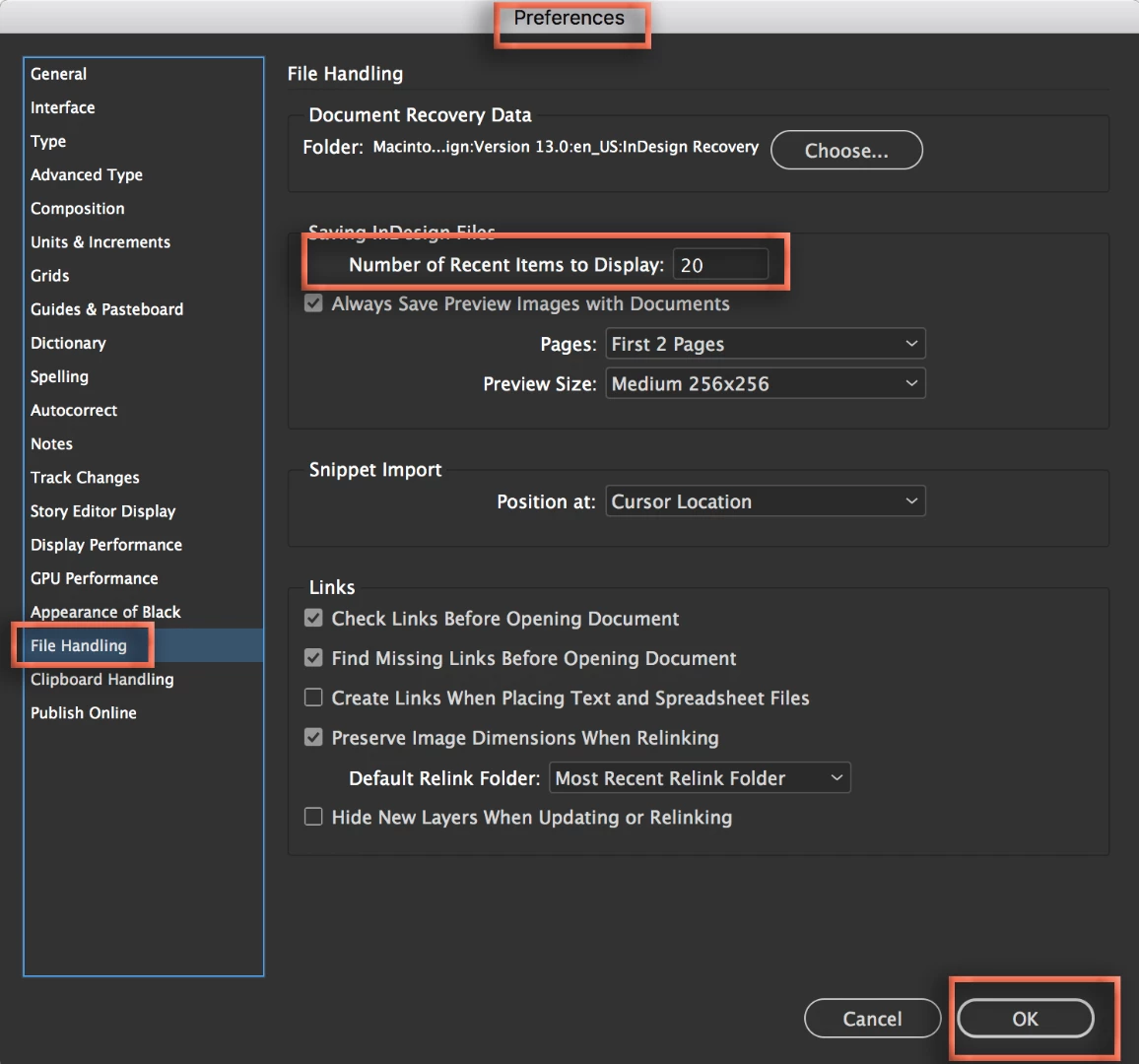
There isn't an option yet to remove individual items from the Welcome page, but you can remove all and start over, if you like. Set the Number of Recent Items to Display to 0 in Preferences > File Handling, close and restart InDesign and the list will be cleared. Come back and set the it to the desired number.

~Barb

2 replies

Inspiring
April 23, 2018

If you want to get all previews off your welcome page, check out this tip:

https://indesignsecrets.com/how-to-reset-recent-documents-list.php

Inspiring
April 23, 2018

Barb beat me to it. :-)

Barb Binder
Community Expert
Barb BinderCommunity ExpertCorrect answer
Community Expert
April 23, 2018

Hi Michael:

There isn't an option yet to remove individual items from the Welcome page, but you can remove all and start over, if you like. Set the Number of Recent Items to Display to 0 in Preferences > File Handling, close and restart InDesign and the list will be cleared. Come back and set the it to the desired number.

~Barb

~Barb at Rocky Mountain Training
michaeld77148822
Participant
April 23, 2018

Thank you Barb. I followed the instructions to click correct but cannot find any spot to click. I tried actions and nothing there. Where is the button?

Oh and incidentally your suggestion works very well. Thank you

Mike

jane-e
Community Expert
Community Expert
April 23, 2018

michaeld77148822  wrote

I followed the instructions to click correct but cannot find any spot to click.

I got it for you, MichaelD.