Known Participant
May 12, 2020 5:46 PM UTC
Answered

How to clear a color in a character style?

Is there a way to "clear" character color instead of reset all other character style settings?


I know it looks to be a silly question.

Thanks!

BozenkaCorrect answer
Participant
Oct 26, 2024 9:45 PM UTC

InDesign v15.0.1

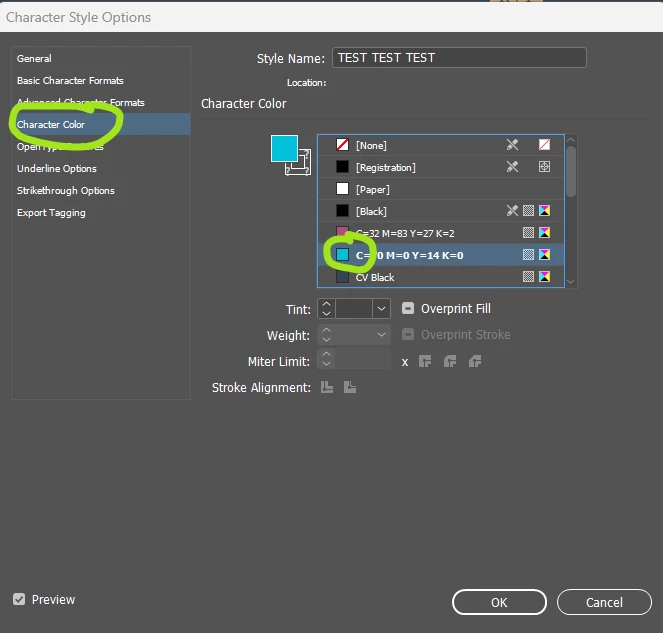
  1. Open the character style from the Character Styles palette.
  2. Click Character Color from the list on the left.
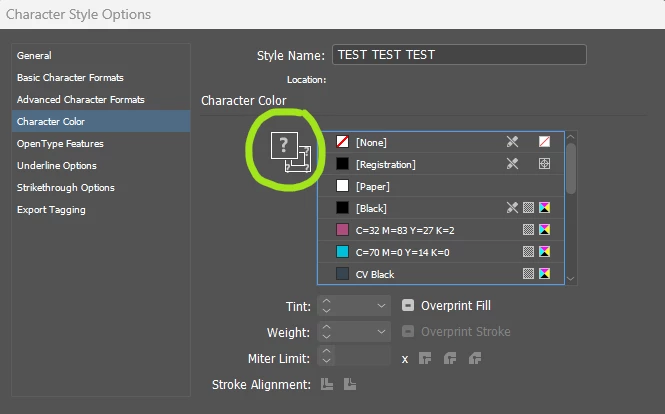
  3. Control/click (PC) Command/click (Mac) on the little swatch square in the character colour list:

Afterwards, it will look like this:


13 replies

Philip Byrne
Known Participant
Oct 29, 2025 9:33 AM UTC

This didn't appear to be working in InDesign 20.5 – the edit wouldn't save – but I think it may have been a corrupt style. Restarting my Mac Pro and recreating the style eventually worked but command-clicking the swatch still had unreliable results so I had to keep editing until it eventually stuck.

Translate
Willi Adelberger
Community Expert
Community Expert
Oct 29, 2025 1:06 PM UTC

If. the cmd-click-way does not work do that:

  1. Create a new character styles with the needed settings.
  2. Delete the old style and choose to replace it with the new style.
  3. Rename the new style with the final name.
Translate
BozenkaCorrect answer
Participant
Oct 26, 2024 9:45 PM UTC

InDesign v15.0.1

  1. Open the character style from the Character Styles palette.
  2. Click Character Color from the list on the left.
  3. Control/click (PC) Command/click (Mac) on the little swatch square in the character colour list:

Afterwards, it will look like this:


Translate
Participant
Oct 26, 2024 7:05 PM UTC

Everyone is giving the cmd + click solution, but its not working for me. I've tried every key combination I can think of, it only selects the color.

Translate
Dave Creamer of IDEAS
Community Expert
Community Expert
Oct 26, 2024 7:39 PM UTC

You need to Cmd-click (Mac) or Cntl-click (Win) on the swatch, not the "big T" symbol.


Translate
David Creamer: Community Expert (ACI and ACE 1995-2023)
Willi Adelberger
Community Expert
Community Expert
Jul 5, 2022 5:41 AM UTC

Click any color, hold down cmd/ctrl and click the same color again.

Translate
Diane Burns
Inspiring
May 12, 2020 11:36 PM UTC

Adding to David's reply, hold down Command/Ctrl and click on the color that is assigned to the text. Does basically the same thing, but one click. 🙂

Translate
Known Participant
May 14, 2020 11:50 AM UTC

Thanks, @diane_Burns but it's not the slution in this case. I have some paragraphs in different colors. These specific style can be applied in some of them. It shouldn't have a color. 🙂

Translate
David Popham
Participating Frequently
May 12, 2020 6:19 PM UTC

In Character Style Options > Character Color, Cmd/Ctrl + click on the [None] swatch until the fill color icon shows question marks in the corners.

Translate
Known Participant
May 14, 2020 11:51 AM UTC

Thanks, @David_Popham !


Translate