



dublove
Legend
October 19, 2026
Answered

How to convert a newly generated array of cells into a collection of cells?

Hellow everyone.

I want to generate new selections for some of the selected cells based on a certain condition.
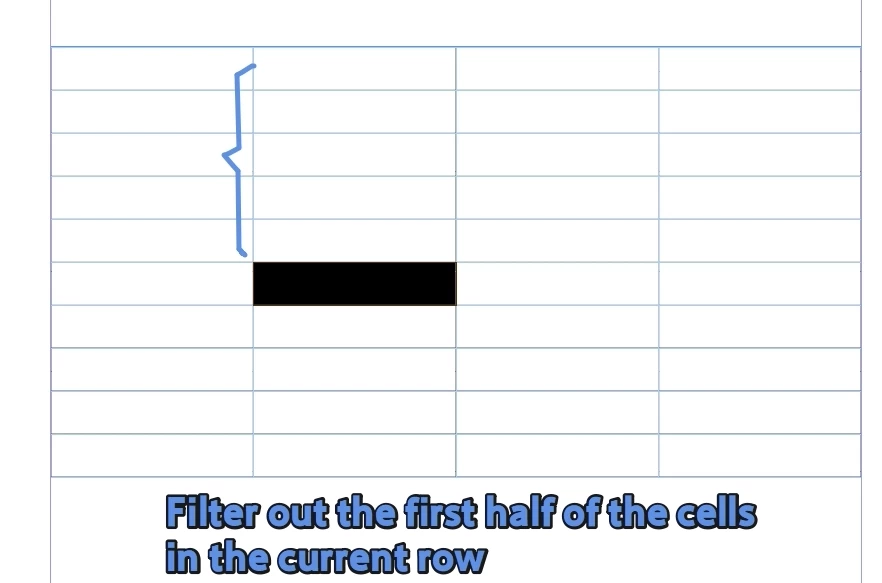
For example, I want to convert the first half of the current column into a new selection (although the actual conditions are more complex than this)
I found that following the following approach yields an array, not a collection of cells.

var item=app.selection[0]
//Please select a cell
var c = item.cells;
var cl = c.length;
var curHalfColumn=[];
var curColumn=c[0].parentColumn;

//Filter cells that meet the criteria
for(i=0;i<curColumn.cells.length/2;i++){
curHalfColumn.push(curColumn.cells[i])
}

 

    Peter Kahrel
    Peter KahrelCorrect answer
    Community Expert
    October 19, 2026

    You need to use itemByRange(), something along the lines of

    curColumn.cells.itemByRange(a, b)

    where a and b are the indices of the first and the last cell in the range.

    3 replies

    Peter Kahrel
    Community Expert
    Peter KahrelCommunity ExpertCorrect answer
    Community Expert
    October 19, 2026

    You need to use itemByRange(), something along the lines of

    curColumn.cells.itemByRange(a, b)

    where a and b are the indices of the first and the last cell in the range.

    Translate
    Community Expert
    October 19, 2026

    Try app.select(curHalfColumn) what happens? Does it not select?

    Translate
    -Manan
    dublove
    dubloveAuthor
    Legend
    October 19, 2026

    HI ​@Manan Joshi 

    app.select(curColumn); You can select the entire column.
    App. select (curHalfColumn) reports non-standard data.

    alert(curHalfColumn)

    The result of pushing is only an array, not a collection of cells

    Translate