Participating Frequently
July 16, 2019
Question

How to create a button to extend hide sections in InDesign

  • July 16, 2019
  • 4 replies
  • 1069 views

Hi, I've been trying to do a form with this function. Acrobat DC doesn't have the option, and I would like to know if on InDesign I can create an action button which gives the action to add or remove sections like the image attached.
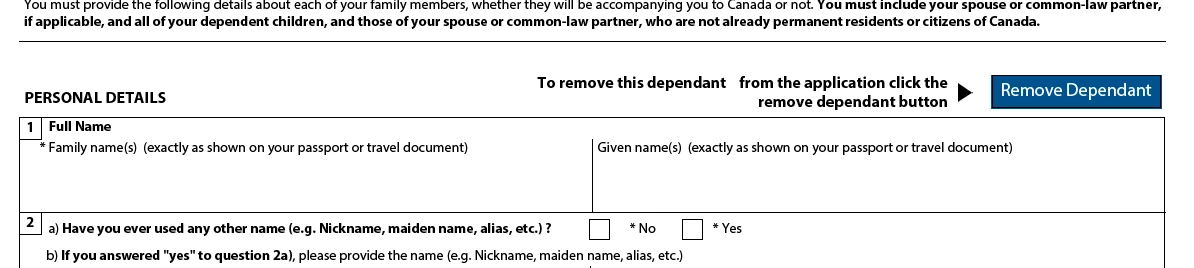
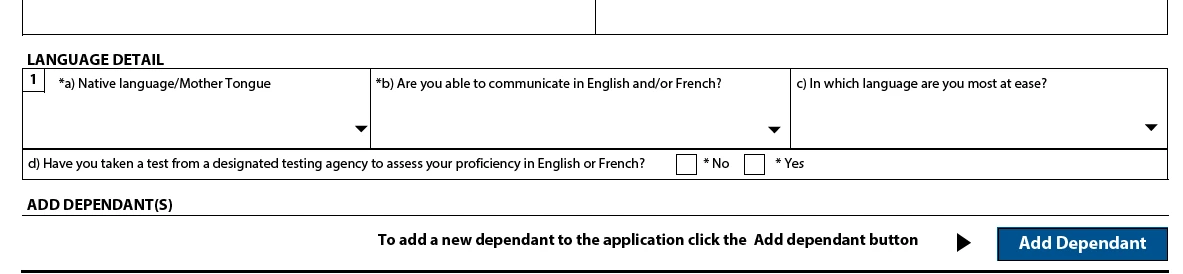
{Renamed by MOD}

    This topic has been closed for replies.

    4 replies

    Participating Frequently
    July 17, 2019

    Ok thank you for the recommendations, I'll keep searching.

    Community Expert
    July 17, 2019

    I would suggest an online html based form for dynamic and conditional based forms. Adobe Experience Manager Forms and Jotform are just 2 solutions. Without knowing all factors involved (i.e. the form is required to remain as PDF) these suggestions may not help you.

    Community Expert
    July 17, 2019

    The ability to show and hide elements with buttons is definitely achievable in Acrobat. But, if you want surrounding content to adjust position based on hidden content being shown or not shown, then you may need to consider other applications other than Acrobat to accomplish.

    Participating Frequently
    July 17, 2019

    What kind of application can help me with this?

    Peter Villevoye
    Community Expert
    Community Expert
    July 17, 2019

    This hiding/showing/adding/collapsing sections is possible in a PDF ! Content has to be pushed up and pulled down, even across page breaks. I've seen some very rare examples of it, and they were all built with lots of embedded custom JavaScripts – no way you can reliably (or at all) build this with InDesign.

    Participating Frequently
    July 17, 2019

    Ok thank you for let me know.

    Community Expert
    July 17, 2019

    Hi elenaa76219510 ,

    why do you think that Acrobat DC cannot do this?

    If in doubt best ask here:

    PDF Forms

    Or maybe it's scriptable with Acrobat's JavaScript then ask here:

    JavaScript

    FWIW: If Acrobat cannot do it InDesign cannot do it as well.

    Regards,
    Uwe