Inspiring
September 15, 2026
Question

How to create a table of contents that has pages numbered with Roman numerals and regular numbers

  • September 15, 2026
  • 8 replies
  • 29 views

Can someone point me to a tutorial on How to create a table of contents that has pages numbered with Roman numerals and regular numbers such as:

Preface .....…         ..... i
Acknowledgements ....ii
Author....…          .......iii

Frank Blank ..........1
John Doe..............5
Jim Swim.............10
Joe Schmo..........13

Thanks,

Joe

    8 replies

    Dave Creamer of IDEAS
    Community Expert
    Community Expert
    September 15, 2026

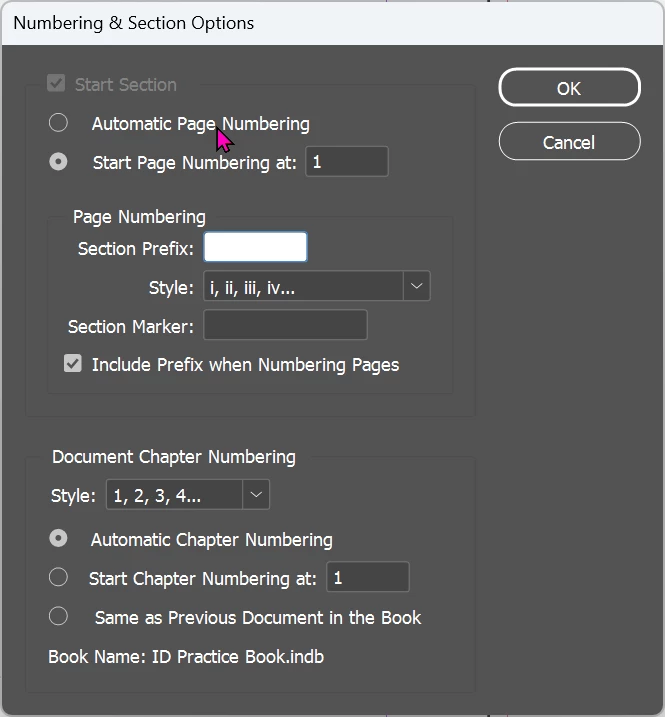
    Assuming you sectioned your pages with the proper format using the Numbering & Section panel, the TOC will pick up the format. 


    David Creamer: Community Expert (ACI and ACE 1995-2023)
    Randy Hagan
    Community Expert
    Community Expert
    September 15, 2026
    Dave Creamer of IDEAS
    Community Expert
    Community Expert
    September 15, 2026

    @Randy Hagan I believe that is just for how the page numbers appear in the Pages panel. I don’t think it will affect the TOC. Please correct me if I’m wrong...

    David Creamer: Community Expert (ACI and ACE 1995-2023)
    Randy Hagan
    Community Expert
    Community Expert
    September 15, 2026

    Actually it entirely will.


    If it affects the page numbers in the document, it will correspond to the 
    ToC. Though I will say, I should emphasize that the OP always wants to run a new ToC after making those changes and replace the previous one than try to use InDesign’s options to “replace existing Table of Contents” for this, among other reasons.


    Randy