Inspiring
June 7, 2023
Answered

How to Debug Indesign Release Version

  • June 7, 2023
  • 2 replies
  • 621 views

Hello,

Could someone tell me what I have to pay attention when I want to debug the release version?

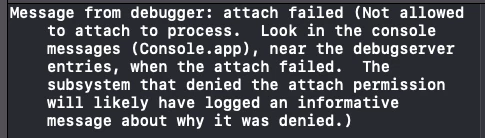
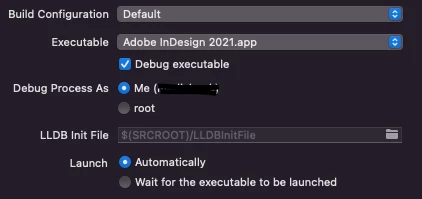
Because the only thing I did was simply activate this checkbox, but unfortunately the only time I was able to debug with the release version was with an iMac (Intel) using indesign 2019 and I only succeeded with that version with all the others no, because it gave me the same error that it gives me now on mac Studio.
I doubt that the problem is the pc I use, I'm probably ignoring something that's doesn't allow the correct functioning, but I don't know what.

I leave these two screenshots for you to understand better the possible problem.

Thank you in advance for the help.
If it can help i leave the configuration of my computers : 

Device : MacStudio (M1 Max)

OS : MacOS (12.3.1)

Xcode : Xcode (version : 13.2.1)

InDesign 2021 It couldn't attach to process

InDesign 2022 It couldn't attach to process

InDesign 2023 It couldn't attach to process


Device : iMac (2012 intel)

OS : MacOS (10.15.7)

Xcode : Xcode (version : 12.2)

InDesign 2019 works, (only with this version I can debug a release version of insedign)

InDesign 2020 It couldn't attach to process

InDesign 2021 It couldn't attach to process

InDesign 2022 It couldn't attach to process


Stefano
This topic has been closed for replies.
Correct answer Stefano5C37

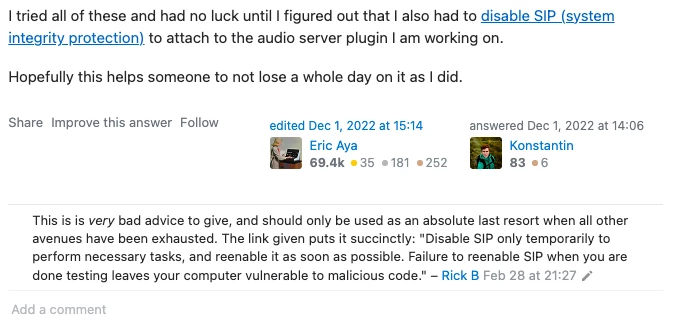
I've found the solution here but this method is NOT raccomanded.

Disabling the sip everything works correctly, but it is NOT a recommended practice at all.

If you disable SIP, it opens up the possibility of making changes to the operating system, including accessing and modifying sensitive system files. However, there are various negative aspects to consider:

  1. Compromised security: Disabling SIP makes the operating system more vulnerable to malware attacks and unauthorized modifications. Since SIP provides significant protection, disabling it can expose the system to greater risks.
  2. System instability: Making changes to the operating system can result in system instability. Even a small incorrect modification can cause booting issues, frequent errors, or even system crashes.
  3. Operating system updates: Some macOS system updates require SIP to be enabled in order to be installed correctly. If SIP is disabled, you may need to temporarily re-enable it to apply security updates.
  4. Untrusted applications: By disabling SIP, you open up the possibility of installing and using untrusted or potentially harmful applications that could compromise the system or personal data

So pay close attention to disable the SIP.

 - Stefano

2 replies

Stefano5C37AuthorCorrect answer
Inspiring
June 8, 2023

I've found the solution here but this method is NOT raccomanded.

Disabling the sip everything works correctly, but it is NOT a recommended practice at all.

If you disable SIP, it opens up the possibility of making changes to the operating system, including accessing and modifying sensitive system files. However, there are various negative aspects to consider:

  1. Compromised security: Disabling SIP makes the operating system more vulnerable to malware attacks and unauthorized modifications. Since SIP provides significant protection, disabling it can expose the system to greater risks.
  2. System instability: Making changes to the operating system can result in system instability. Even a small incorrect modification can cause booting issues, frequent errors, or even system crashes.
  3. Operating system updates: Some macOS system updates require SIP to be enabled in order to be installed correctly. If SIP is disabled, you may need to temporarily re-enable it to apply security updates.
  4. Untrusted applications: By disabling SIP, you open up the possibility of installing and using untrusted or potentially harmful applications that could compromise the system or personal data

So pay close attention to disable the SIP.

 - Stefano

Community Expert
June 8, 2023

This seems more like an XCode bug, I have also faced this but never went deep into its investigation. Check the following link

https://developer.apple.com/forums/thread/120282

-Manan

-Manan
Inspiring
June 8, 2023

If I try to remove the debug executable check box, the process is correctly launched, but obviously I can't debug by inserting breakpoints, but at least the process is launched and linked to xcode