
Participant
April 4, 2017
Question

How to delete missing adobe pdf presets?

  • April 4, 2017
  • 2 replies
  • 829 views

Hi all,

I have recently updated my firms adobe PDF pre-sets and would like to be able to remove the now superseded presets options from both ID & Illustrator menus.

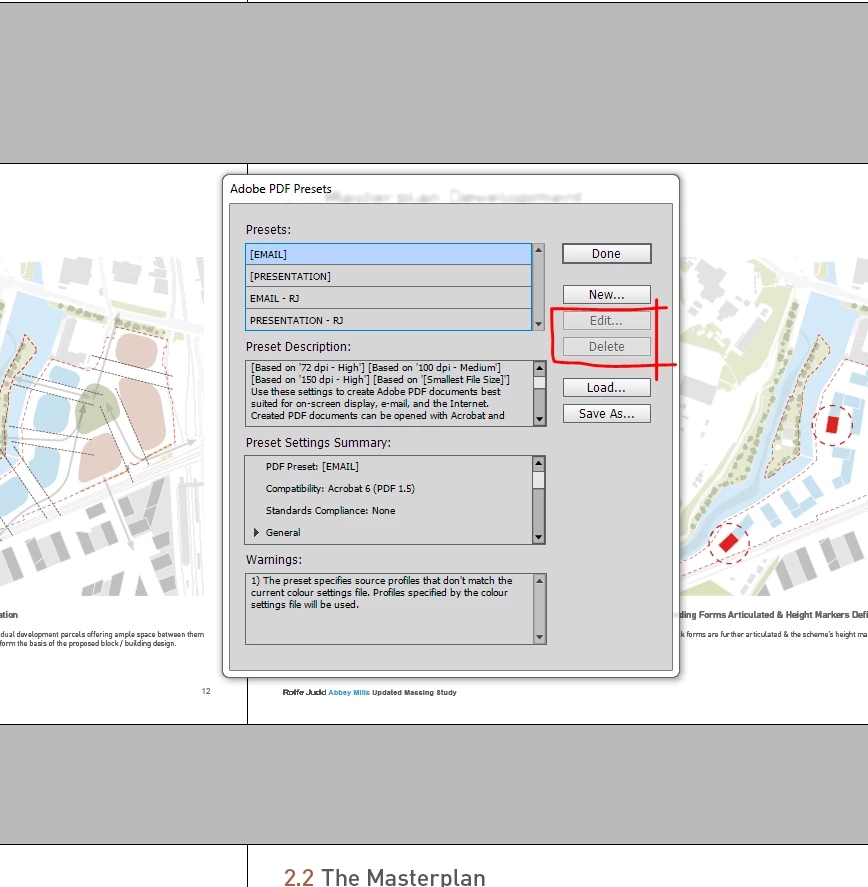
Using Adobe Distiller I can see that the old files no longer exist on my machine. I have deleted all the irrelevant joboption files from "Users\UserName\AppData\Roaming\Adobe\Adobe PDF\Settings" but I am still unable to edit or delete the SS options ( bracketed files ) from the menu shown below.

Any advice welcome.

Many thanks.
This topic has been closed for replies.

2 replies

Willi Adelberger
Community Expert
Community Expert
April 6, 2017

If entries here are in brackets those indicate they are application inherent and cannot be deleted. They are found somewhere deep inside the application files, I would not recommend to delete them as they might be used for standard procedures.

BTW. Why do you need the Distiller anyway? If a program can export or save as or if a program like MS Office has the PDF Maker, use that. Avoid Postscript.

Especially in InDesign, never use Print for PDF creation. Never use EPS or any other form of PostScript.

Jon5465Author
Participant
April 6, 2017

If entries here are in brackets those indicate they are application inherent and cannot be deleted. They are found somewhere deep inside the application files, I would not recommend to delete them as they might be used for standard procedures.

These joboption files were created by my predecessor and therefore cannot be application inherent.

To answer your query, I used distiller as it was the only means of accessing the phantom bracketed joboption files ( Presentation & Email ) as I couldn't find them saved anywhere on the system.

Fourteen
Inspiring
April 6, 2017

Sounds like they could be at a system level rather than a user level, which would mean they're not editable. Check if they are in the following location:

C: > ProgramData > Adobe > Adobe PDF > Settings

That is where all the defaults (with brackets) are found.

Jon5465Author
Participant
April 6, 2017

I have admin privileges and can confirm it has nothing to do with 'user' level access unfortunately.

Also, the folder C: > ProgramData > Adobe > Adobe PDF > Settings is empty with all joboptions files now being accessed from C: > Users > User Name > Appdata > Roaming > Adobe > Adobe PDF > Settings across the firms entire network.