
How to desaturate proportionally? (Yes, that's weird.)
Greetings from Vancouver 🙂
Happy new year, incidentally....
I have a screenshot from ColorThink wherein I have the 'worst' Pantones from a delta-e 2000 point of view. On the left is the sRGB rendition of the Pantone's LAB colours and on the right their SWOP rendition. I use it to show that math only goes so far... and that our eyes are more sensitive to changes of hues in lightly saturated colours.
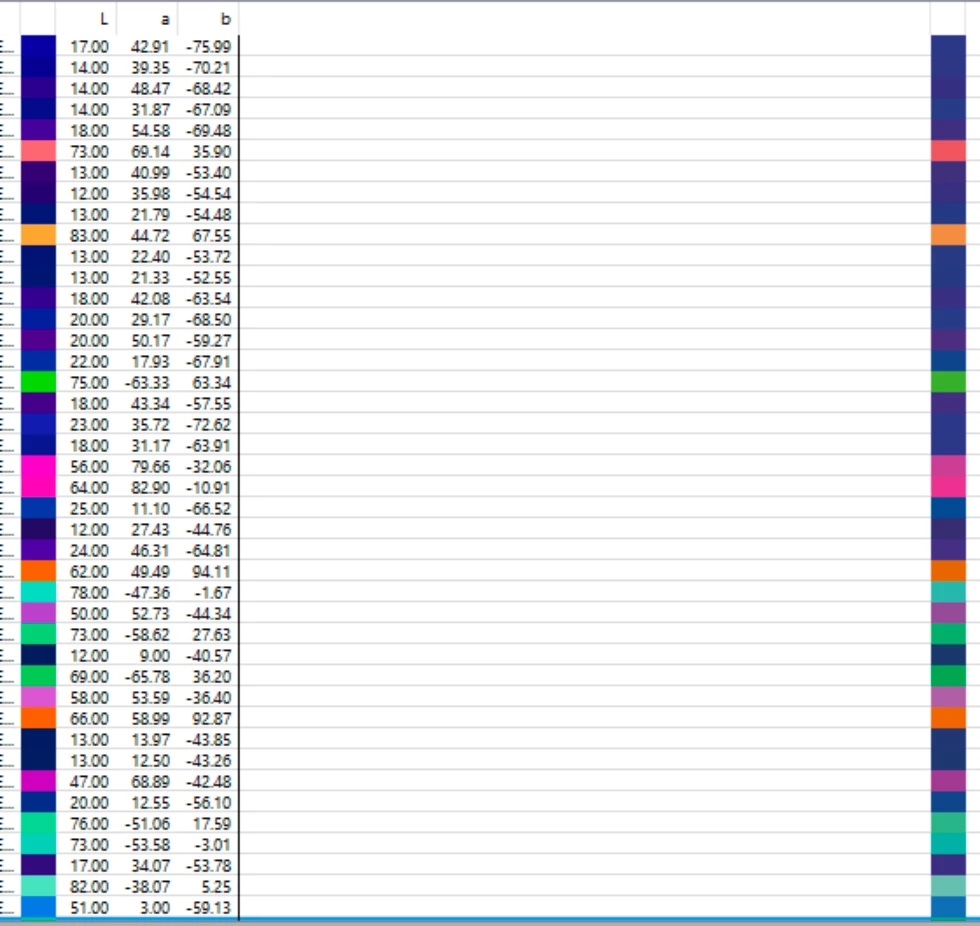
And as you can see *onscreen*, the left is more saturated than the right. I need this to be maintained in print, in InDesign.
Now, I need this difference to be maintained as I import this into InDesign and it doesn't. I haven't found a way to massage, convert, import this screenshot into indesign that would maintain the saturation difference from left to right as seen in the image above.
How do I desaturate the image proportionally so that the left side is dragged down to swop and the right side desaturated proportionally to the left side even further down? The point is to have a print that shows the same kind of differences between the left and right that you see above.
Thank you for your help, and health and prosperity to you and yours in this new year!
Antoine
PS: attached are screenshots of what I see in InDesign 2021 on my mac.
 AdChoices