


Silly-V
Legend
October 8, 2024
Answered

How to Detect "Phantom XML" Items in InDesign's XML Structure

  • October 8, 2024
  • 2 replies
  • 1385 views

Hello!
There is an issue I am experiencing where when a page is deleted that used to have structure somehow has one piece of the structure thinking there's still a document element attached to it.

Does anyone have advice on how to detect these items? I think maybe they all have "XMLStory" as the page-element parent at the top of it all, just thinking.
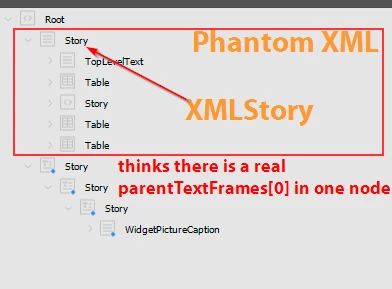
I would like to create a method that can be fed an XML element, and it needs to find its XML parents all the way to the top, and return true if the parent of the xmlContent is an instance of XMLStory.
Apparently the ones which do not have a representation in the pages are called "XMLStory", which under it has some kind of all valid elements even if they are not on the document pages.
I found some issue which may be a bug, where indeed I was getting a false positive with the parentTextFrame technique for one item and sure enough, when I visited it in the XML Structure panel, it had a "Go to Item" menu option available.
However, clicking this option just made InDesign unresponsive for a second, before in the XML Structure it underlined the nodes (this is what it does when it 'selects' an item on the page normally related to an XML node), but nothing effectively happens in the document.
So the problem as I would like to call it is "phantom XML".


I wish to ignore all these non-existing-item XML nodes, does anyone have an idea on how to accomplish this?


<Title renamed by MOD>


This topic has been closed for replies.
Correct answer Silly-V

In my case and anything I foresee in the future for it, I saw how the items that are not associated with an 'on-page' item can have a parent of XmlStory, and although I have not used parentPage as of yet, I was able to eliminate going down the branch that had the 'phantom' items by sensing if the xmlContent's parent was an XmlStory. I noticed that the Root was parented by XmlStory, so I made my collection method to ignore items which such a parent type of their xmlContent when it's one-level down.
Maybe this isn't quite correct, but for me just in the cases where I delete a page - it works.

2 replies

m1b
Community Expert
Community Expert
October 8, 2024

Hi @Silly-V!

> "Does anyone have advice on how to detect these [phantom XML] items?"

Did you get an answer to this? eg. Is there a function to detect a phantom?

- Mark

Robert at ID-Tasker
Legend
October 8, 2024
quote

Hi @Silly-V!

> "Does anyone have advice on how to detect these [phantom XML] items?"

Did you get an answer to this? eg. Is there a function to detect a phantom?

- Mark


By @m1b


Easy. 


In case of the XMLStory - check if it has any textContainers.


In case of other objects - if they have parentPage. 


Robert at ID-Tasker
Legend
October 8, 2024

Or simply if it's XMLStory: 


XmlStory

XML text content that has not yet been placed in the layout.


Robert at ID-Tasker
Legend
October 8, 2024

Can you share your INDD document?


Silly-V
Silly-VAuthor
Legend
October 8, 2024

Yes, the file is attached here.

Robert at ID-Tasker
Legend
October 8, 2024

This is a preview of your XML as a flat database:

Unfortunately, even after IDMLing - InDesign crashes when trying to access those elements - double click on any cell in my tool.


This is a Text structure of your document:

I've double clicked on the last row on the list - it's your phantom Story.

When I switch to InDesign - blinking cursor is in the center - marked with a red Rectangle.


This is Objects structure of your document:


What is strange - when I double click onn the Story in the XML structure and then load info about Selection - this is what I get - but those objects are fantoms as well:


After deleting manually this phantom Story - this is a new XML structure:


Object Structure is pretty much the same:


And the Text structure - no more phantom Story at the end: