dublove
Legend
August 21, 2025
Answered

How to determine which text box is currently selected: the first, middle, or last one?

  • August 21, 2025
  • 1 reply
  • 492 views

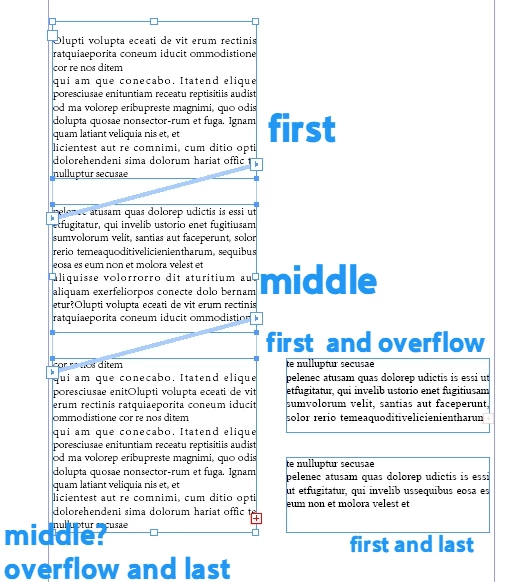
Ignore the overflow for now.
I divided all textFram of the Story into 3 categories:
A: The first text box.
B: The middle text box.
C: The last text box.

How can I determine which category (A, B, or C) the currently selected text box belongs to?


Correct answer Laubender

HI @dublove ,

all your text frames ( other page items as well ) have a unique ID value.

So you could determine all the text frames' id values of a given story and compare the id value of the one of your selection to a specific one of the text frames of a story:


var selectedTextFrame = app.selection[0] ;
var idOfSelectedTextFrame = selectedTextFrame.id ;

var parentStory = selectedTextFrame.parentStory ;

var allTextContainersArray = parentStory.textContainers ;

for( var n=0; n < allTextContainersArray.length; n++ )
{
	if( allTextContainersArray[n].id == idOfSelectedTextFrame )
	{
		alert( "Selected frame found. Frame "+ (n+1) + " in the story is selected." );
		break;
	}
};


Or you could directly compare the text frames of the story to the one that is selected.

If you do this with the array of textContainers you first have to resolve the textContainer you like to compare with getElements() like below :


var selectedTextFrame = app.selection[0] ;

var parentStory = selectedTextFrame.parentStory ;

var allTextContainersArray = parentStory.textContainers ;

for( var n=0; n < allTextContainersArray.length; n++ )
{
	if( allTextContainersArray[n].getElements()[0] == selectedTextFrame )
	{
		alert( "Frame "+ (n+1) + " in the story is selected." );
		break;
	}
};


Regards,
Uwe Laubender
( Adobe Community Expert )

 

1 reply

rob day
Community Expert
Community Expert
August 21, 2025

This get the 3 text frames of story 1. The 3rd text frame’s overflows returns true


//A collection of the document’s stories
var s = app.activeDocument.stories;

//the parentTextFrames of the first story’s text—3 in this case
var fs = s[0].texts[0].parentTextFrames
$.writeln(fs.length)


for (var i = 0; i < fs.length; i++){
    if (i == 0) {
        $.writeln("This is the first text frame, overflows are " + fs[0].overflows)
    } else if (i == 1){
        $.writeln("This is the second text frame, overflows are " + fs[1].overflows)
    } else if (i == 2){
        $.writeln("This is the third text frame, overflows are " + fs[2].overflows)
    }
};   

/*
returns:
3
This is the first text frame, overflows are false
This is the second text frame, overflows are false
This is the third text frame, overflows are true
 */


dublove
dubloveAuthor
Legend
August 22, 2025

Hi rob day.
It's not like this.

I need to determine whether the currently selected textFrame is the first, middle, or last one.


Sometimes there may be only one textFrame.

Community Expert
August 23, 2025

Something like the following would work

var sel = app.selection[0]
if (sel.constructor.name != "TextFrame") {
	alert("Selection is not a textframe")
	exit()
}
if(sel.nextTextFrame == null && sel.previousTextFrame == null)
    alert("You selected the one and only frame")
if(sel.nextTextFrame != null && sel.previousTextFrame == null)
	alert("You selected the first frame")
if(sel.nextTextFrame != null && sel.previousTextFrame != null)
	alert("You selected the frame in the middle")
if(sel.nextTextFrame == null && sel.previousTextFrame != null)
    alert("You selected the last frame")

-Manan

-Manan