Known Participant
March 1, 2023
Question

How to do equal spacing of objects easily
  • March 1, 2023
  • 1 reply
  • 4244 views

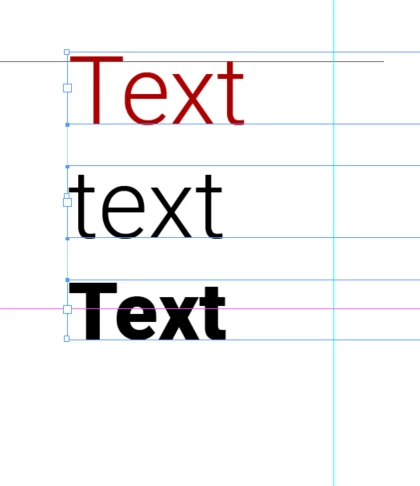
Is there any way I can just select these and press a button that gives them equal spacing?

 

This topic has been closed for replies.

1 reply

John Mensinger
Community Expert
Community Expert
March 1, 2023

Choose Window > Object & Layout > Align to show the Align panel.

Choose Show Options from the Align panel menu to see the distribute buttons.


https://helpx.adobe.com/indesign/using/aligning-distributing-objects.html#:~:text=You%20use%20the%20Align%20panel,margins%2C%20page%2C%20or%20spread.

Eric Dumas
Community Expert
Community Expert
March 1, 2023

In the screenshot you shared, the text frames will be evenly spaced out, not exactly the text itself (in case you need to be really precise).

You would need to outline your text (breaking in into a piece of graphic) to use exact measurements, but you could not edit the text anymore.

Known Participant
March 1, 2023

Thanks, I probably dont want to break it up that could be a bad idea if it ever needs to be changed

Aligning different pieces of frames of texts is always annoying in indesign especially if there is changes. Do you have any suggestions for this? I have started using groups that has helped i think