Known Participant
February 8, 2025
Answered

How to do paragraph space

  • February 8, 2025
  • 2 replies
  • 430 views

Hi please how to do I do a simple paragraph space in an InDesign document? In Word, you press the enter button but this does not make a space in the InDesign template I am working in when I press enter. I have tried changing the space before and after values in the paragraph settings. But even then when I type enter after a paragraph, the cursor just disappears altogether and anything I type doesn't show up on the page. 

Correct answer Dave Creamer of IDEAS

I strongly suggest you use paragraph styles. Make sure you are not used the numeric keypad Enter key.

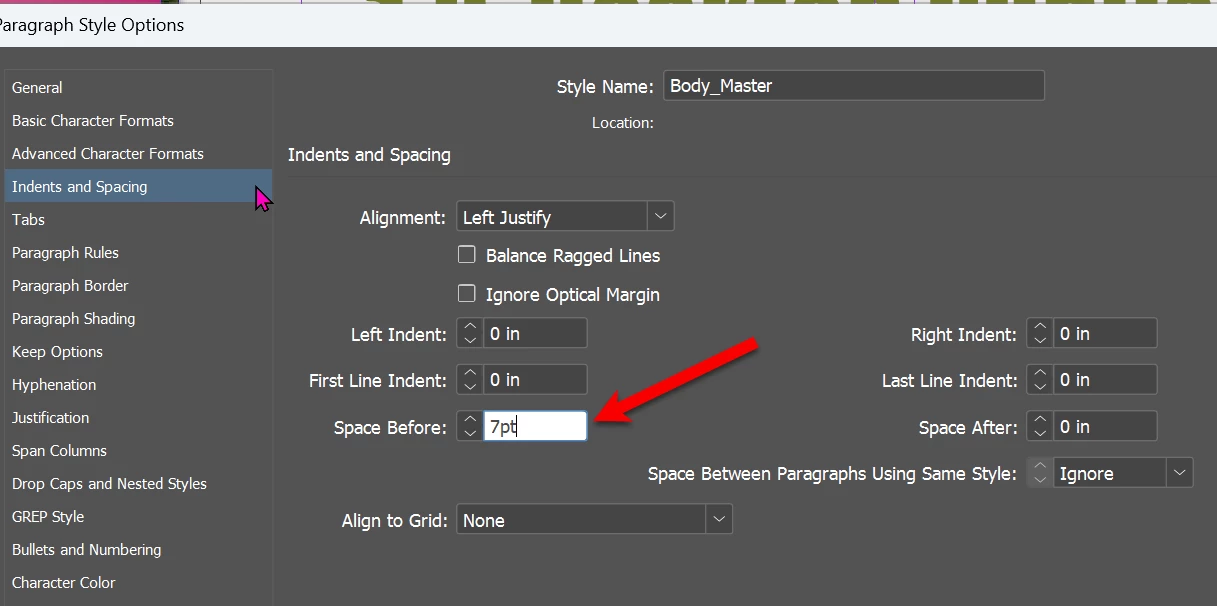
Simply apply [paragraph] spacing as shown below:

I always use space above for my body text so I can "collapse up" the lines for bullet/number lists.


2 replies

Willi Adelberger
Community Expert
Community Expert
February 8, 2025

Are you aware that enter and return key have not the same function in InDesign?

Return creates a new paragraph.

Enter creates a new paragraph in the next frame.

If you do not see any text after clicking enter it might be, that you did a frame break and no next frame is available.

Dave Creamer of IDEAS
Community Expert
Community Expert
February 8, 2025

Just to clarify, Macs label the keys differently: Return and [numeric keypad] Enter; Windows labels both Enter, but they still have different functions. 


David Creamer: Community Expert (ACI and ACE 1995-2023)
Dave Creamer of IDEAS
Community Expert
Dave Creamer of IDEASCommunity ExpertCorrect answer
Community Expert
February 8, 2025

I strongly suggest you use paragraph styles. Make sure you are not used the numeric keypad Enter key.

Simply apply [paragraph] spacing as shown below:

I always use space above for my body text so I can "collapse up" the lines for bullet/number lists.


David Creamer: Community Expert (ACI and ACE 1995-2023)
ali_4619Author
Known Participant
February 8, 2025

Wonderful! Thank you so much. I was using the numeric keypad! I will use your space above tip too. Thank you very much.


Dave Creamer of IDEAS
Community Expert
Community Expert
February 8, 2025

The numeric enter key is a column break, so your text was trying to jump to another column. If there isn't another column to jump to, it goes into the overset netherworld (you will notice a little red square in the lower right of the corner of the text box; more obvious with the Selection too). The text is never lost, you just can't see it.


David Creamer: Community Expert (ACI and ACE 1995-2023)