April 9, 2017
Answered

How to drag and drop text in InDesign within same frame ???

  • April 9, 2017
  • 2 replies
  • 6632 views

~Thanks

    This topic has been closed for replies.
    Correct answer amaarora

    Hi,

    You need to first select the text you want to be dragged. Then drag (your cursor would now have a small "T" below the black arrow) and drop it at the desired location in same or different frames.

    This is by default disabled in InDesign and works only in the story editor by default. To make it work in layout view you need enable it. Go to type->preferences and then check on the below shown preference.
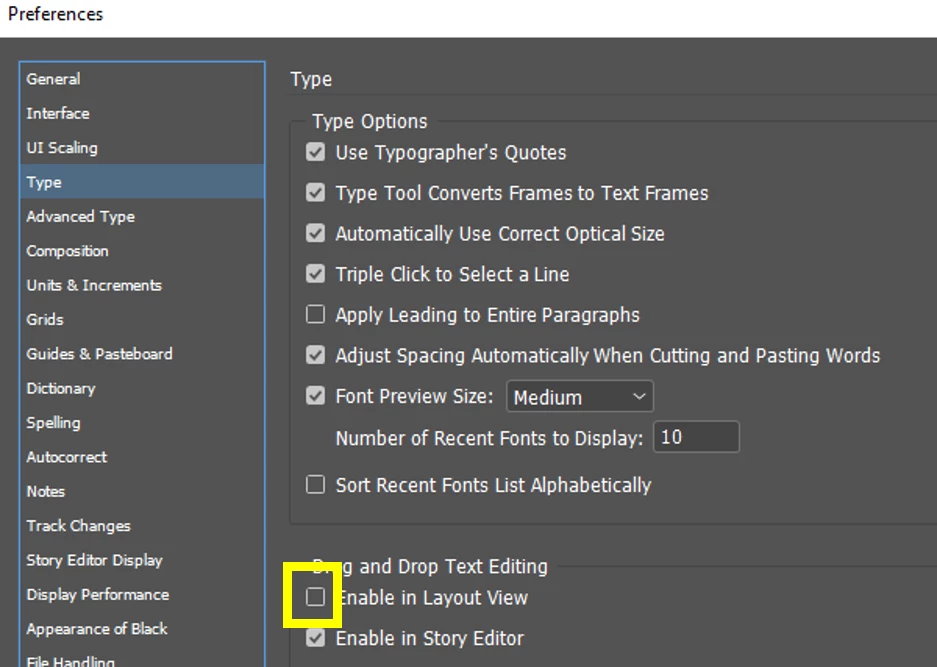
    This would drop the text with original formatting. pressing "shift" key along will make the dragged text adopt properties of the new location. Also try dropping the text with the "alt" key modifier.

    -Aman

    2 replies

    Participant
    August 5, 2020

    OMG!  I have been using InDesign for over 10 years and did not know I could enable drag and drop. It has been so frustating to only cut and paste to move text. What a game changer!!

    amaarora
    amaaroraCorrect answer
    Inspiring
    April 9, 2017

    Hi,

    You need to first select the text you want to be dragged. Then drag (your cursor would now have a small "T" below the black arrow) and drop it at the desired location in same or different frames.

    This is by default disabled in InDesign and works only in the story editor by default. To make it work in layout view you need enable it. Go to type->preferences and then check on the below shown preference.

    This would drop the text with original formatting. pressing "shift" key along will make the dragged text adopt properties of the new location. Also try dropping the text with the "alt" key modifier.

    -Aman

    April 9, 2017

    Thanks