

dublove
Legend
October 3, 2025
Question

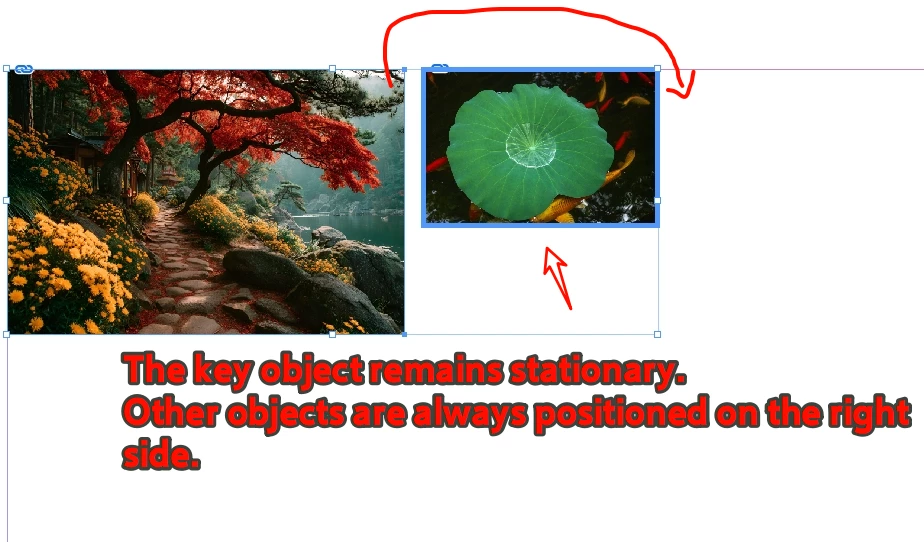
How to ensure the key object remains stationary (at the first of sel)?

  • October 3, 2025
  • 2 replies
  • 201 views

Ensure the key object is always the first element in “sel”.
Other objects should always be positioned to the right.


I intend to set sel[j].geometricBounds so that the keyObject remains stationary while the others are arranged to its right.

The code below doesn't seem to be working.
var sel = app.documents[0].selection;
var key = app.selectionKeyObject;
var sb = key.visibleBounds;
sel.sort(function (a, b) {
var a = key.visibleBounds;
var b = b.visibleBounds;
if (a[1] > b[1]) {
return 1;
} else if (a[1] < b[1]) {
return -1;
}
});


2 replies

dublove
dubloveAuthor
Legend
April 7, 2026

Hi ​@rob day

I have selected multiple objects.
Previously, the object farthest to the left was always the first one, but now I’ve added a condition:
If there is no key object, sort by the leftmost object.
If there is a key object, set `sel[0]` to that key object; the others don’t matter.

The original code seems to have been written by ​@m1b  , and I don’t know how to modify it:

    var d = app.activeDocument;
var item = d.selection[0];
var items = d.selection;
var sel=items;
var key=0;
for (i = 0; i < sel.length; i++) {
if (sel[i] == app.selectionKeyObject) {
key = sel[i];
}
// Key object exists
if(key!=0){


}

// No key object
if (items.length > 1&&key==0) {
sel.sort(function (a, b) {
var aBounds = a.visibleBounds;
var bBounds = b.visibleBounds;
// Compare left boundaries; if left boundaries match, compare top boundaries (0.5 is the allowed error margin)
if (aBounds[1] < bBounds[1] + 0.5) {
return -1;
} else if (aBounds[1] > bBounds[1] + 0.5) {
return 1;
} else {
return aBounds[0] - bBounds[0];
}
});
}


dublove
dubloveAuthor
Legend
October 3, 2025

It turns out you need to use move.

The ideal approach, of course, is to keep keyobj stationary while aligning the elements before and after it.
This seems difficult.