Known Participant
Jul 13, 2017 3:59 AM UTC
Answered

How to export workspace settings

How do I export Workspace settings in Mac InDesign 2017.1 so I can make them the same on laptop/desktop?

    MatejKrizCorrect answer
    Inspiring
    Apr 29, 2024 11:50 AM UTC

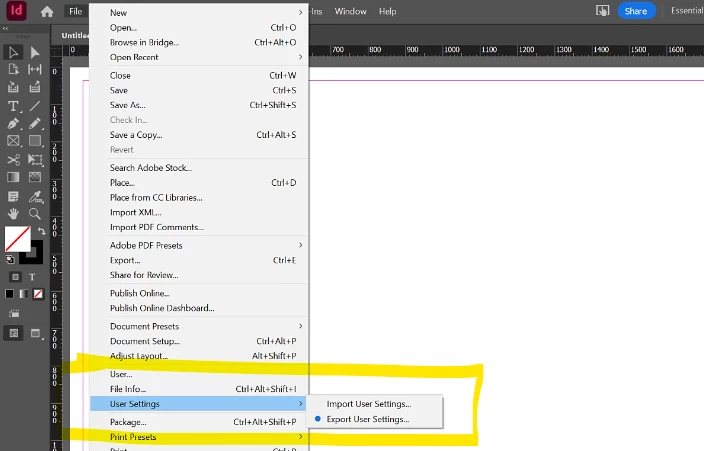
    In 2024/04: Go to File> User Settings > Export User Settings.

    "Export and Import User Settings" a new InDesign feature (already in version 19.4) that was introduced a few days ago.

    You can now export or import these user settings: Preferences, Workspaces, Menu Sets, Keyboard Shortcuts, Glyph Sets


    More info (source): https://helpx.adobe.com/in/indesign/using/export-import-user-settings-indesign.html


    19 replies

    MatejKrizCorrect answer
    Inspiring
    Apr 29, 2024 11:50 AM UTC

    In 2024/04: Go to File> User Settings > Export User Settings.

    "Export and Import User Settings" a new InDesign feature (already in version 19.4) that was introduced a few days ago.

    You can now export or import these user settings: Preferences, Workspaces, Menu Sets, Keyboard Shortcuts, Glyph Sets


    More info (source): https://helpx.adobe.com/in/indesign/using/export-import-user-settings-indesign.html


    Translate
    Participant
    Jun 25, 2025 9:24 AM UTC

    Great! Thank you 🙂

    Translate
    Known Participant
    Jul 13, 2017 8:33 AM UTC

    Excellent! Thank you.  I was looking in the right place almost...

    Translate
    amaarora
    Inspiring
    Jul 13, 2017 6:53 AM UTC

    Hi,

    You need to migrate your preferences.

    1. Go to: ~/Library/Preferences/Adobe/Adobe InDesign

    2. Navigate to Version X.0/en_us/Workspaces and you'll find your workspace files

    Copy and place the workspace files in the exact same location on the new Macintosh and launch InDesign -- you should see them in the menu.

    Let us know if the issue was resolved.

    -Aman

    Translate
    Inspiring
    Feb 19, 2018 11:35 AM UTC

    Could anyone tell me how to do this on a PC running windows 10?

    Translate
    BobLevine
    Community Expert
    Community Expert
    Feb 19, 2018 12:11 PM UTC

    You can find them here:

    drive:\Users\username\AppData\Roaming\Adobe\InDesign\Version 13.0\language\Workspaces

    Translate